
Best Metricool Alternatives for Agencies and Marketers
If you’re managing social media for multiple clients and Metricool’s per-brand pricing is pushing you into the next billing tier every time you add an account, you’re not alone. The best starting point for most agency and creative teams is Photofy — a template-driven social marketing platform with white-label support, built-in scheduling, and a content asset library that keeps brand consistency tight across every client account. For teams with heavier API requirements, flat per-account schedulers and enterprise analytics platforms round out the shortlist.
Here’s how the categories break down by priority:
- Creative-first agencies and franchises: Photofy (white-label, template library, scheduling, multi-account)
- API-first / automation teams: Platforms with public REST APIs and batch posting support (e.g., Agorapulse, Statusbrew)
- Flat per-account schedulers: Buffer, Later, Loomly, SocialBee, Sked Social (predictable billing regardless of account count)
- Enterprise analytics / social listening: Sprout Social, Meltwater, DashThis (deeper reporting, higher per-seat cost)
- Lightweight free-tier options: Planable, ContentStudio, Sendible (generous trials or free tiers for small teams)
Quick action guidance: If billing predictability is your first concern, start with a flat per-account scheduler and run a trial period. If API access and custom reporting are the priority, verify REST endpoint availability and rate limits before committing. If your team’s bottleneck is content creation and brand consistency, Photofy is the most direct path.
Table of Contents
- How do the best Metricool alternatives compare at a glance?
- Detailed profiles: which Metricool alternative fits your workflow?
- 1. Photofy — best for creative-first agencies and franchises
- 2. Planable — best for content approval workflows
- 3. Hootsuite — best for established teams needing broad network coverage
- 4. Buffer — best for flat-rate simplicity
- 5. Later — best for visual-first Instagram and TikTok scheduling
- 6. Loomly — best for content calendar management with approvals
- 7. Sprout Social — best for enterprise analytics and social listening
- 8. Agorapulse — best for agency client management with a public API
- 9. SocialBee — best for content recycling and category-based scheduling
- 10. ContentStudio — best for content discovery and multi-channel publishing
- 11. Statusbrew — best for team collaboration and unified inbox
- 12. Sendible — best for agencies managing many client accounts
- 13. Sked Social — best for Instagram-first agencies
- 14. Meltwater — best for social listening and media intelligence
- 15. DashThis — best for automated marketing reporting
- How do you pick the right Metricool alternative for your team?
- Moving off Metricool: a practical migration checklist
- How we evaluated these alternatives
- How does customer support quality compare across these platforms?
- What security and data privacy features should you look for?
- Key Takeaways
- Why Photofy stands out for many Metricool switchers
- Photofy gives your agency a creative-first alternative to Metricool
- Sources, vendor docs, and API documentation
How do the best Metricool alternatives compare at a glance?
The table below maps each platform category to the decision dimensions that matter most to agencies and social media managers. Use it to identify which category fits your workflow, then jump to the detailed profiles.
| Category | Best for / use case | Pricing structure | Free plan or trial | Supported networks | Scheduling & calendar | Collaboration & approvals | Analytics depth | API / automation | White-label / agency | Team seats |
|---|---|---|---|---|---|---|---|---|---|---|
| Creative-first platforms | Brand consistency, template-driven content, franchises | Per-user or flat tier | Free tier + paid plans | Instagram, Facebook, LinkedIn, TikTok, Pinterest | Visual calendar, queue, bulk scheduling | Brand presets, team roles | Campaign-level reporting | API / integrations available | Yes (white-label for enterprise) | Role-based |
| Flat per-account schedulers | Agencies with many client profiles, cost predictability | Flat per-account or per-plan | Free tier (limited) | Instagram, Facebook, X, LinkedIn, Pinterest, TikTok | Queue, bulk upload, calendar | Basic approvals, client sharing | Mid-tier reporting, CSV export | Zapier + some REST APIs | Limited or add-on | Per-plan seat limits |
| API-first platforms | Developer teams, automation, embedded publishing | Per-user or per-profile | Trial period | Instagram, Facebook, X, LinkedIn, TikTok, YouTube, Threads | Advanced queue, bulk posting | Multi-level approvals, client portals | Deep reporting, custom exports | Public REST API, webhooks | Agency dashboards | Unlimited or tiered |
| Enterprise analytics platforms | Competitor tracking, ads reporting, social listening | Per-seat (enterprise pricing) | Demo / custom trial | All major + niche networks | Scheduling included | Full approval workflows | Advanced: competitor, ads, web | REST API + Looker Studio connectors | Full white-label | Unlimited (enterprise) |
| Content calendar + approvals | Content teams, editorial workflows, client sign-off | Per-user or per-workspace | Free trial (14–30 days) | Instagram, Facebook, LinkedIn, X, TikTok | Visual calendar, drag-and-drop | Client approval links, comments | Basic to mid-tier | Zapier, some native APIs | Limited | Per-workspace |
| Lightweight / free-tier options | Solo creators, small teams, budget-conscious users | Freemium or low flat rate | Free tier | Instagram, Facebook, LinkedIn, X | Basic scheduling | Basic collaboration | Basic analytics | Zapier-only or limited | No | 1–3 users |
How to read this table: “Analytics depth” refers to the range of reporting available — basic means post-level metrics only; mid-tier adds historical data and CSV export; advanced includes competitor benchmarking, paid ads data, and web analytics connectors. “API / automation” distinguishes platforms with public REST APIs (suitable for developer integrations) from those offering only Zapier or Make connectors.
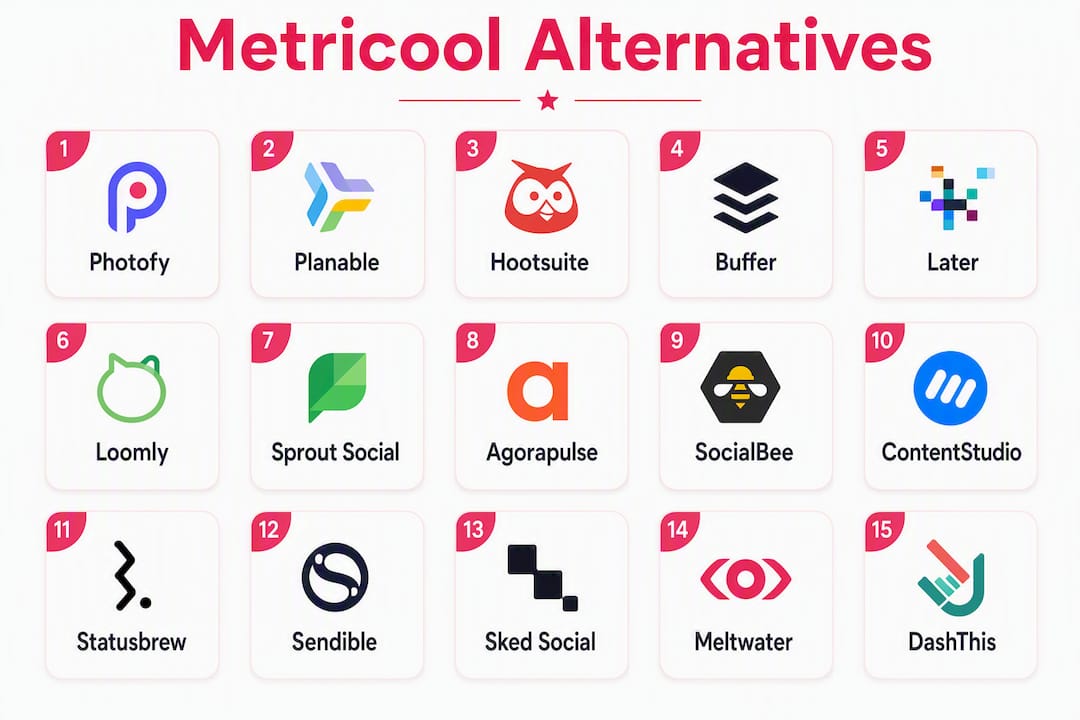
Jump to detailed profiles: Photofy | Planable | Hootsuite | Buffer | Later | Loomly | Sprout Social | Agorapulse | SocialBee | ContentStudio | Statusbrew | Sendible | Sked Social | Meltwater | DashThis
Detailed profiles: which Metricool alternative fits your workflow?
The profiles below cover the fifteen platforms most frequently surfaced in market comparisons of Metricool alternatives. Each profile includes a pricing snapshot (checked June 2026), API availability, and a clear “best for” callout. Pricing changes frequently — always verify on the vendor’s current pricing page before committing.

1. Photofy — best for creative-first agencies and franchises
Photofy is a social marketing platform built around template-driven content creation, multi-account scheduling, and white-label brand management. Where most Metricool alternatives focus on publishing workflows or analytics, Photofy addresses the upstream problem: getting on-brand creative assets produced and distributed consistently across a large network of accounts.
Standout features for Metricool switchers:
- Pre-designed and custom templates with a stock asset library and video stitching
- Visual content calendar with scheduling across Instagram, Facebook, LinkedIn, TikTok, and Pinterest
- White-label content management for enterprise clients and franchise networks
- Team roles and permissions for multi-user brand management
- Available on iOS, Android, and desktop
Pricing shape: Freemium model with a free tier for personal use; paid monthly and annual subscriptions for small business plans; enterprise and franchise plans via direct inquiry. See current pricing for plan details.
API / automation: Integrations available; confirm specific REST endpoint availability and connector support during your trial.
Trial / free tier: Free tier available for personal use; paid plans include trial access.
Pros:
- White-label support is built in at the enterprise level, not an expensive add-on
- Template library reduces creative production time for teams managing many accounts
- Franchise and direct-selling use cases are purpose-built (see Keller Williams and F45 Training as real-world examples)
- Freemium entry point lowers the cost of evaluation
Cons:
- Analytics depth is campaign-level rather than competitor-benchmarking or paid-ads reporting
- Teams with heavy REST API requirements should verify endpoint availability before migrating
Best for: Agencies, franchises, and direct-selling brands that need consistent branded content across many accounts, with white-label support and a visual content calendar.
2. Planable — best for content approval workflows
Planable centers on the content review and approval loop. Its visual feed preview lets clients see exactly how a post will look before it goes live, and multi-level approval chains (from one-click to multi-step) make it practical for agencies that spend more time chasing sign-offs than scheduling.
Pricing shape: Free tier (50 total posts); paid plans per workspace, starting at $33/month (billed annually). Pricing checked June 2026.
API / automation: Zapier integration; no public REST API documented for external developers.
Pros: Clean approval UX; workspace-based billing suits small agencies; strong visual preview across networks.
Cons: Post cap on the free tier limits evaluation depth; analytics are minimal compared with Metricool.
Best for: Small agencies and content teams where client approval speed is the primary bottleneck.
3. Hootsuite — best for established teams needing broad network coverage
Hootsuite covers the widest range of social networks of any platform on this list, including Instagram, Facebook, X, LinkedIn, TikTok, YouTube, Pinterest, and Threads. Its team collaboration features and content library are mature, and its analytics include paid social reporting on higher tiers.
Pricing shape: Per-user, tiered. Professional plan starts at $99/month; Team at $249/month. No meaningful free tier since 2023. Pricing checked June 2026.
API / automation: Public REST API available; Zapier and native integrations with Salesforce, HubSpot, and Adobe.
Pros: Broadest network support; mature API; strong enterprise integrations.
Cons: Per-user pricing scales poorly for large teams; cost is high relative to flat-rate alternatives; the free tier was removed.
Best for: Mid-size to enterprise teams that need broad network coverage and are already embedded in Salesforce or HubSpot workflows.
4. Buffer — best for flat-rate simplicity
Buffer’s per-channel pricing model is one of the most predictable on the market. You pay per social profile, not per user, which keeps costs stable as your team grows. Its publishing queue and calendar are clean, and the analytics cover post-level and page-level metrics with CSV export on paid plans.
Pricing shape: Free tier (3 channels); Essentials at $6/month per channel; Team at $12/month per channel. Pricing checked June 2026.
API / automation: Public REST API available; Zapier integration.
Pros: Per-channel billing is transparent and predictable; strong free tier for evaluation; good API documentation.
Cons: Analytics are mid-tier at best; no white-label features; approval workflows are basic.
Best for: Freelancers and small agencies that want cost-predictable scheduling with a usable free tier and solid API access.
5. Later — best for visual-first Instagram and TikTok scheduling
Later built its reputation on Instagram scheduling and has expanded to TikTok, Pinterest, Facebook, LinkedIn, and X. Its visual drag-and-drop calendar is among the most intuitive for image-heavy content teams, and its link-in-bio tool (Linktree-style) adds a useful conversion layer.
Pricing shape: Free tier (1 social set, 30 posts/month); Starter at $25/month; Growth at $45/month; Advanced at $80/month. Pricing checked June 2026.

API / automation: Instagram API integration; Zapier available; REST API access on higher tiers.
Pros: Best-in-class visual calendar; strong Instagram and TikTok support; link-in-bio included.
Cons: Analytics depth drops on lower tiers; limited approval workflows; per-social-set billing adds up for agencies with many clients.
Best for: Visual content teams and e-commerce brands where Instagram and TikTok are the primary channels.
6. Loomly — best for content calendar management with approvals
Loomly combines a content calendar, post ideas engine, and multi-level approval workflow in a single interface. Its “Post Ideas” feature surfaces trending content and calendar events, which helps teams that struggle with content planning gaps.
Pricing shape: Base plan at $42/month (2 users, 10 accounts); Standard at $80/month; Advanced at $175/month; Premium at $369/month. Pricing checked June 2026.
API / automation: Zapier integration; REST API available on Advanced and Premium plans.
Pros: Post Ideas feature reduces planning time; clean approval UX; good account-to-user ratio on Base plan.
Cons: REST API is gated behind higher tiers; analytics are mid-tier; white-label is not available.
Best for: Content teams and small agencies that need structured editorial calendars with client approval workflows.
7. Sprout Social — best for enterprise analytics and social listening
Sprout Social sits at the analytics-heavy end of the market. Its reporting suite covers competitor benchmarking, paid social performance, and audience demographics at a depth that most flat-rate schedulers cannot match. The platform also includes a social listening module for brand monitoring and trend tracking.
Pricing shape: Per-seat, enterprise. Standard at $249/seat/month; Professional at $399/seat/month; Advanced at $499/seat/month. Pricing checked June 2026.
API / automation: Public REST API; Salesforce, HubSpot, Tableau, and Google Analytics integrations.
Pros: Deepest analytics on this list; social listening included; strong CRM integrations.
Cons: Per-seat pricing is among the highest here; analytics depth that justifies the cost requires the Professional tier or above; not cost-effective for small agencies.
Best for: Enterprise marketing teams and agencies where competitor benchmarking and paid social reporting are non-negotiable requirements.
Pro Tip: If your primary need is analytics depth but your publishing volume is modest, consider pairing a lower-cost flat-rate scheduler with Sprout Social’s reporting layer rather than paying for full seats on both functions.
8. Agorapulse — best for agency client management with a public API
Agorapulse is one of the stronger API-first options on this list. Its public REST API supports batch posting, post-status management, and historical data exports — the three capabilities that matter most when you’re migrating automated workflows off another platform. Its agency features include client reporting, a shared inbox, and a content calendar with approval workflows.
Pricing shape: Free tier (3 social profiles, 1 user); Standard at $69/month; Professional at $99/month; Advanced at $149/month; Custom enterprise pricing. Pricing checked June 2026.
API / automation: Public REST API with documented rate limits; Zapier, Make, and native integrations.
Pros: Public REST API with batch posting and CRUD on posts; agency reporting included; free tier for evaluation.
Cons: Per-user pricing scales up for larger teams; analytics are solid but not at Sprout Social’s depth.
Best for: Developer-driven agencies and teams automating content workflows who need a public REST API with full post management.
9. SocialBee — best for content recycling and category-based scheduling
SocialBee organizes your content library into categories and recycles evergreen posts automatically, which reduces the manual effort of refilling a publishing queue. User reviews on G2 highlight the category-based scheduling as a genuine time-saver for teams managing consistent content themes across multiple accounts.
Pricing shape: Bootstrap at $29/month (5 profiles); Accelerate at $49/month (10 profiles); Pro at $99/month (25 profiles). Pricing checked June 2026.
API / automation: Zapier integration; REST API available on higher tiers.
Pros: Content recycling reduces queue management overhead; per-profile pricing is predictable; strong content categorization.
Cons: REST API is not on the entry-level plan; approval workflows are basic; analytics are mid-tier.
Best for: Solo creators and small teams with a large evergreen content library who want automated recycling without manual queue management.
10. ContentStudio — best for content discovery and multi-channel publishing
ContentStudio combines content discovery (RSS feeds, trending topics, curated sources) with a publishing calendar and basic analytics. Its automation recipes let you auto-publish curated content from RSS sources to social profiles, which suits teams that blend original and curated content strategies.
Pricing shape: Starter at $25/month (1 workspace, 5 profiles); Pro at $49/month; Agency at $99/month. Pricing checked June 2026.
API / automation: Zapier integration; REST API available; automation recipes built in.
Pros: Content discovery built in; automation recipes for RSS-to-social workflows; competitive pricing.
Cons: Analytics are basic on lower tiers; white-label is limited; approval workflows are less mature than Loomly or Planable.
Best for: Content marketers who blend curated and original content and want automation recipes without custom API development.
11. Statusbrew — best for team collaboration and unified inbox
Statusbrew’s unified social inbox and team assignment features make it practical for agencies managing high-volume community management alongside publishing. Its API supports custom integrations, and its reporting includes engagement metrics and team performance data.
Pricing shape: Lite at $69/month (5 users, 5 profiles); Standard at $129/month; Premium at $229/month; Enterprise custom. Pricing checked June 2026.
API / automation: Public REST API; Zapier and native integrations.
Pros: Unified inbox with team assignment; strong collaboration features; public REST API.
Cons: Entry price is higher than flat-rate schedulers; analytics depth is mid-tier.
Best for: Agencies managing active community engagement alongside publishing, where a unified inbox and team assignment are as important as scheduling.
12. Sendible — best for agencies managing many client accounts
Sendible is built specifically for agencies, with client dashboards, white-label reporting, and a content calendar that supports many accounts from a single interface. Its pricing is per-user rather than per-profile, which makes it more predictable for agencies with a high account-to-user ratio.
Pricing shape: Creator at $29/month (1 user, 6 profiles); Traction at $89/month (4 users, 24 profiles); Scale at $199/month (7 users, 49 profiles); Advanced at $399/month. Pricing checked June 2026.
API / automation: Public REST API; Zapier integration; Canva integration built in.
Pros: White-label reporting included; per-user billing with generous profile allowances; Canva integration.
Cons: Analytics are mid-tier; REST API documentation is less comprehensive than Agorapulse’s.
Best for: Agencies managing many client accounts who need white-label reporting and a high profile-to-user ratio without per-profile billing.
13. Sked Social — best for Instagram-first agencies
Sked Social focuses on Instagram and Facebook, with strong visual scheduling, first-comment posting, and story scheduling. Its collaboration features include client approval links and team roles, and its analytics cover Instagram-specific metrics in more depth than most general schedulers.
Pricing shape: Fundamentals at $25/month (1 user, 4 profiles); Essentials at $75/month (3 users); Professional at $135/month (5 users). Pricing checked June 2026.
API / automation: Instagram API integration; Zapier available; REST API on higher tiers.
Pros: Deep Instagram feature set; first-comment and story scheduling; client approval links.
Cons: Network coverage is narrower than Hootsuite or Agorapulse; REST API gated behind higher tiers.
Best for: Instagram-first agencies and e-commerce brands where Instagram and Facebook are the dominant channels.
14. Meltwater — best for social listening and media intelligence
Meltwater operates at the enterprise end of the market, combining social listening, media monitoring, influencer tracking, and publishing in a single platform. Its analytics go well beyond post-level metrics into share-of-voice, sentiment analysis, and earned media value — capabilities that justify its price point only when those insights are core to your reporting.
Pricing shape: Enterprise custom pricing; no public per-seat rates listed. Pricing checked June 2026.
API / automation: REST API available; enterprise integrations with Salesforce, Tableau, and Power BI.
Pros: Social listening and media monitoring at scale; sentiment analysis; influencer database.
Cons: Custom enterprise pricing with no transparent tiers; overkill for teams that only need publishing and basic analytics.
Best for: Enterprise communications and PR teams that need social listening, media monitoring, and publishing in one platform.
15. DashThis — best for automated marketing reporting
DashThis is a reporting aggregator rather than a publishing platform. It pulls data from social media, Google Analytics, Google Ads, Facebook Ads, and other sources into customizable dashboards and automated client reports. If your primary frustration with Metricool is reporting flexibility rather than publishing, DashThis addresses that specific gap.
Pricing shape: Individual at $49/month (3 dashboards); Professional at $149/month (10 dashboards); Business at $289/month (25 dashboards); Standard at $449/month (50 dashboards). Pricing checked June 2026.
API / automation: REST API; Zapier; native connectors for Google Analytics, Google Ads, Facebook Ads, LinkedIn Ads, and more.
Pros: Automated client reporting with white-label dashboards; broad data source connectors; strong Looker Studio alternative.
Cons: No publishing features; requires a separate scheduling platform; per-dashboard billing adds up for large agencies.
Best for: Agencies that need automated, white-label client reporting across multiple data sources and are happy to keep publishing on a separate platform.
How do you pick the right Metricool alternative for your team?
The decision comes down to four variables: billing model, API access, analytics depth, and content workflow. Getting clear on your priority order before you start trials will save you weeks of evaluation time.
Selection checklist
Work through these in order before opening a single trial account:
- Billing model first. Per-brand billing (like Metricool’s) pushes costs up as you add client accounts. Flat per-account or per-plan billing stabilizes your monthly spend. Identify your current account count and project it 12 months forward — then price each shortlisted platform against that number.
- API access. If your team runs automated workflows (batch posting, custom reporting, n8n/Make/Zapier pipelines), you need a platform with a public REST API and documented rate limits. Zapier-only integrations are fine for simple triggers but won’t support batch posting or historical data exports.
- Supported networks. Confirm that every network your clients use is supported at the tier you’re evaluating. Some platforms drop TikTok, YouTube, or Google Business Profile on lower tiers.
- Reporting exports. Can you export historical data as CSV or JSON? Do Looker Studio or Google Sheets connectors exist? If client reporting is a deliverable, this is non-negotiable.
- Approval workflows. If client sign-off is part of your process, check whether approval links work without the client needing a paid seat.
- White-label needs. White-label reporting and dashboards are available on Sendible, DashThis, and Photofy’s enterprise tier. Confirm this is included in the plan you’re evaluating, not an add-on.
Questions to ask vendors during trials
- What are the API rate limits per endpoint, and are they documented publicly?
- Can I export all historical analytics data as CSV or JSON before canceling?
- Do you have a native Looker Studio connector or a Google Sheets integration?
- How are user seat admin controls managed — can I add and remove team members without contacting support?
- What is the support response time SLA for my plan tier?
Red flags to watch for
- Pricing that is not listed publicly (common with enterprise-only platforms)
- API access gated behind the most expensive tier
- Network support that varies by tier without clear documentation
- No CSV or JSON export of historical analytics data
Evaluation timeline and cost estimate
A realistic 30–60 day pilot looks like this: spend the first week exporting your Metricool data and setting up parallel accounts on 2–3 shortlisted platforms. Run publishing and analytics in parallel for 14 days. In week three, compare reporting outputs side by side. By day 45, you have enough data to make a confident decision. Budget for one month of paid access on each platform you’re seriously evaluating — most offer monthly billing with no long-term contract on entry plans.
Pro Tip: Before starting any trial, export your last 90 days of Metricool analytics as CSV. Most platforms cannot import historical data from a competitor, so this export is your baseline for comparing reporting continuity.
Moving off Metricool: a practical migration checklist
Migration risk is mostly about data loss and broken automations. Follow these steps in order to preserve reporting continuity and avoid gaps in your publishing schedule.
Step-by-step migration checklist
- Export all reports and historical metrics from Metricool. Download CSV exports for every account covering at least the last 90 days. Store these in a shared folder your whole team can access.
- Export queued and scheduled posts. Note any posts scheduled more than two weeks out. Most platforms do not import scheduled content from competitors, so you’ll need to recreate these manually or via bulk upload CSV.
- Export creative assets. Download all images, videos, and templates stored in Metricool. Organize them by client or account before uploading to the new platform.
- Map account IDs and network connections. List every social profile connected in Metricool, including the network, handle, and account ID. Use this list to verify connections in the new platform.
- Verify API endpoints and rate limits at the destination. Before migrating any automated workflows, confirm that the new platform’s REST API supports the same operations (batch posting, post-status reads, historical exports). Check the developer docs, not just the marketing page.
- Rewire automation pipelines. Update any Zapier, Make, or n8n workflows that currently point to Metricool’s API. Test each trigger and action before going live. For marketing automation workflows, a step-by-step checklist helps prevent missed connections.
- Preserve tagging and taxonomy. If you use campaign tags or content categories in Metricool reports, recreate the same taxonomy in the new platform before importing content. Consistent tagging is what makes historical comparisons meaningful.
- Run a parallel test for 7–14 days. Publish to at least two accounts through both platforms simultaneously. Compare post delivery times, analytics data, and any discrepancies in engagement metrics.
- Keep a rollback plan. Do not cancel your Metricool subscription until you have completed the parallel run and confirmed that all automations, reports, and scheduled content are working correctly in the new platform.
- Snapshot the last 30 days of analytics before canceling. Take a final export the day before you cancel. This is your permanent record of the pre-migration baseline.
API migration notes
For developer-heavy integrations, confirm support for batch posting, webhooks, and full CRUD on posts. An API that only supports publishing without post-status management or historical exports will create gaps in your reporting and complicate any rollback. Platforms with public REST API documentation (Agorapulse, Buffer, Hootsuite, Sendible) make this verification straightforward. For platforms where API docs are not publicly listed, request them directly from the vendor before signing a contract.
Pro Tip: When rewiring Zapier or Make workflows, use a staging environment or a test social profile for the first 48 hours. A misconfigured trigger that fires on a live client account is harder to explain than a delayed migration.
How we evaluated these alternatives
The shortlist and profiles above were assembled using a consistent set of criteria applied across all fifteen platforms. Here’s what went into each assessment:
- Features: Template and asset management, scheduling and calendar depth, collaboration and approval workflows, content recycling, and network coverage were all checked against current vendor documentation.
- Pricing shape: Pricing was verified on each vendor’s public pricing page in June 2026. Per-brand, per-user, and flat-tier models were noted separately because billing structure is the primary driver of cost predictability for agencies.
- API accessibility: Developer documentation was checked for public REST API availability, documented rate limits, webhook support, and batch posting capability. Platforms with Zapier-only integrations were flagged separately from those with full public APIs.
- Supported networks: Network coverage was verified at the plan tier most relevant to the target audience (typically the mid-tier paid plan). TikTok, YouTube, Google Business Profile, and Threads coverage was checked specifically, as these are the networks most likely to vary by tier.
- Reporting and export capability: CSV and JSON export availability, Looker Studio connector status, and historical data access were checked for each platform.
- White-label and agency features: White-label reporting, client dashboards, and agency-specific billing were noted where available.
- Support responsiveness: Support channel availability (live chat, email, phone) and documented SLA response times were checked on vendor support pages.
- Shipping velocity: Platform update cadence was assessed using changelog trackers as a lightweight indicator of product health and ongoing investment.
Limitations: Pricing changes frequently, and API rate limits can shift without notice. The breadth of alternatives in this category means new entrants appear regularly. Always verify pricing and API details on the vendor’s current documentation before making a final decision. The GetApp and CB Insights listings were used to cross-check free-tier availability and market positioning.
How does customer support quality compare across these platforms?
Support quality varies significantly by plan tier across all fifteen platforms, and it’s one of the factors most likely to affect your team during a migration or when an API integration breaks unexpectedly.
Live chat is available on paid plans for Agorapulse, Sendible, Loomly, and SocialBee. Hootsuite and Sprout Social offer live chat and phone support on higher tiers, but entry-level plans are typically limited to email and help center access. Buffer and Later rely primarily on email support and a self-service knowledge base, which is adequate for straightforward scheduling questions but slower for API or integration issues.
Response time SLAs are published by Agorapulse (under 30 minutes for live chat on paid plans, per their support page) and Sprout Social (priority support on Advanced plans). Most other platforms do not publish specific SLA commitments for standard paid tiers.
Onboarding support is a meaningful differentiator for agencies migrating from another platform. Sendible and Agorapulse both offer onboarding calls on mid-tier plans. Meltwater and Sprout Social include dedicated customer success managers at the enterprise level. For platforms without structured onboarding, budget extra time for self-guided setup.
One practical note: if your team relies on API integrations, check whether the platform has a dedicated developer support channel or community forum. Buffer’s developer documentation is publicly available and well-maintained. Agorapulse has an active developer community. Platforms that route all API questions through general support tickets tend to have slower resolution times for technical issues.
What security and data privacy features should you look for?
For agencies handling client social accounts, data security is not optional. Here’s what to verify before committing to any platform.
SOC 2 Type II compliance is the baseline standard for SaaS platforms handling business data. Hootsuite, Sprout Social, Agorapulse, and Sendible all publish SOC 2 Type II compliance documentation. Verify the current status on each vendor’s security or trust page, as certifications require annual renewal.
OAuth-based social account connections are standard across all platforms on this list. No reputable platform stores your social network passwords directly. Confirm that the platform uses official API connections (Meta, LinkedIn, TikTok, Google) rather than browser automation or unofficial scraping methods, which violate platform terms of service and create account risk.
Data residency and GDPR compliance matter if you or your clients have European audiences. Hootsuite, Sprout Social, and Agorapulse publish GDPR compliance documentation. For US-based agencies, confirm that data is stored on US servers or that the vendor’s data processing agreement covers your jurisdiction.
Two-factor authentication (2FA) should be available and enforceable at the team level. Most platforms on this list support 2FA; check whether it can be required for all team members, not just optional per user.
Data export and deletion rights are worth confirming before you sign up. Can you export all your data (posts, analytics, assets) at any time? Can you request deletion of your data upon cancellation? These rights are standard under GDPR and increasingly expected by US enterprise buyers.
Role-based access controls limit what each team member can see and do. For agencies, this means ensuring that a junior team member cannot accidentally publish to a client account or access billing information. Agorapulse, Sprout Social, Hootsuite, and Sendible all offer granular role-based permissions.
Key Takeaways
The right Metricool alternative depends on whether your priority is billing predictability, API depth, analytics power, or creative workflow — and most teams need to pick one primary driver before evaluating platforms.
| Point | Details |
|---|---|
| Billing model drives cost | Flat per-account or per-plan billing prevents cost spikes as you add client accounts. |
| API access varies by tier | Public REST APIs with documented rate limits are available on mid-to-upper tiers; Zapier-only integrations won’t support batch posting or historical exports. |
| Analytics depth costs more | True analytics parity with Metricool’s reporting typically requires enterprise-tier pricing from analytics-first platforms. |
| Migration needs a parallel run | Run publishing and analytics on both platforms simultaneously for 7–14 days before canceling Metricool. |
| Photofy fits creative-first teams | Photofy’s template library, white-label support, and multi-account scheduling make it the strongest starting point for agencies and franchises focused on brand consistency. |
Why Photofy stands out for many Metricool switchers
Most articles about Metricool alternatives treat this as a pure scheduling swap — find a platform with similar publishing features, move your accounts, done. That framing misses the real problem for a significant portion of the teams looking to switch.
The agencies and franchise networks that get the most value from a platform change are the ones where content creation is the bottleneck, not just scheduling. When your team spends more time building assets from scratch than it does managing a publishing queue, a template-driven platform with a built-in asset library changes the math entirely. That’s where Photofy’s positioning makes sense.
Photofy’s white-label capability is built into the enterprise tier as a core feature, not a premium add-on. For franchise networks and direct-selling brands managing dozens or hundreds of accounts, that distinction matters in practice. The Keller Williams and F45 Training integrations are real examples of that model working at scale, not hypothetical use cases.
The honest tradeoff: Photofy is not the answer if your primary need is competitor benchmarking, paid social analytics, or deep social listening. For those requirements, you’re looking at Sprout Social or Meltwater, and you should budget accordingly. Where Photofy fits best is the team that needs brand-consistent creative output across many accounts, with scheduling and a content calendar, and doesn’t want to pay enterprise analytics prices for capabilities they’ll use once a quarter.
If you’re pairing Photofy with a dedicated reporting layer, DashThis or a Looker Studio setup pulls data from your social networks directly and gives you the reporting depth without requiring you to pay for a full analytics platform seat for every team member.
Photofy gives your agency a creative-first alternative to Metricool
If your team’s real constraint is producing on-brand content at volume across many accounts, Photofy addresses that directly. Pre-designed templates, a stock asset library, video stitching, and graphic overlays reduce the time from brief to published post. White-label content management keeps every client’s brand consistent without manual oversight at every step. Scheduling and a visual content calendar are built in, so you’re not stitching together a separate publishing tool.

For agencies and franchise networks, Photofy’s enterprise tier includes the white-label and multi-account features that most platforms charge a premium for. The enterprise solutions page covers custom partnership options for larger organizations. For individuals and small teams, the personal plan offers a free tier to evaluate the template library and scheduling before committing to a paid subscription.
During your trial, test branding presets across at least three accounts, run a bulk scheduling upload, and check the analytics export format. That 14-day window is enough to confirm whether the creative workflow fits your team’s process. Start your evaluation at photofy.com.
Sources, vendor docs, and API documentation
Pricing and API details were verified on vendor documentation pages in June 2026. Verify current pricing and API rate limits directly with each vendor before making a purchasing decision, as both change without notice.
- Metricool alternatives — SaaSHub community list and category filters
- Metricool alternatives — GetApp free-tier and review summaries
- Metricool alternatives — CB Insights market positioning and category breakdown
- Metricool user reviews — Capterra
- Metricool user reviews — G2
- SocialBee user reviews — G2
- Why analytics in marketing drives better ROI
- Marketing automation checklist for SMBs
- Photofy pricing and plan details
- Photofy enterprise solutions
Pricing and API availability were last checked in June 2026. Always confirm current details on each vendor’s official pricing and developer documentation pages before signing up.