
OEM-Compliant Social Media: Brand Control and Accessibility
OEM-compliant social media means two things working together: every post a dealer or sales rep publishes stays inside your brand rules, and every post is accessible to people with disabilities. The most reliable way to get both is to build the rules into the tools your network uses, so compliance happens while content is created instead of in a review afterward. This guide shows you how to set that up for photo, video and PDF content.
TL;DR
- Brand compliance and accessibility compliance are separate checks. Strong programs handle both in the same publishing workflow.
- In the U.S., the person or business publishing a post is responsible for its accessibility, not the platform, according to ReciteMe’s ADA guide.
- WCAG 2.1 Level AA is the benchmark used in the DOJ’s Title II rule and referenced by courts and settlements for private businesses.
- The basics are alt text, captions, readable contrast, plain language and capitalized hashtags. Locked templates make them repeatable across dealers.
- Photofy gives distributed teams approved templates, asset management and white-label control in one platform.
Table of Contents
- What does “OEM compliant” mean for social media?
- Why accessibility belongs in your OEM content rules
- Who is responsible when a dealer posts?
- What does an accessible post look like?
- How do you build compliance into the workflow?
- What about posts that already exist?
- Does accessible content help performance too?
- Our perspective on OEM-compliant social
- How Photofy supports a compliant network
- A short checklist for your dealer network
- FAQ
- Sources
What does “OEM compliant” mean for social media?
When manufacturers and their dealers talk about compliant social content, they usually mean one of two things, and a good program covers both.
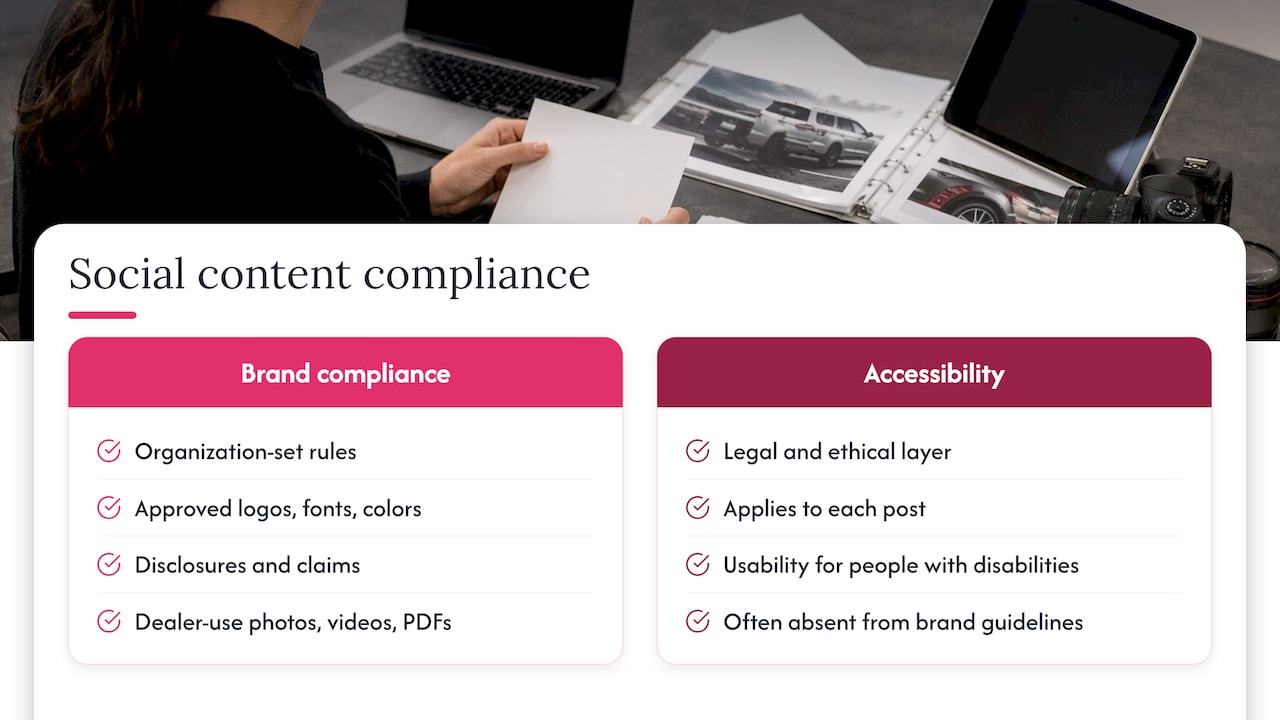
Brand compliance is the set of rules your organization sets for its network: approved logos, fonts, colors, required disclosures, claims that can and cannot be made, and which photos, videos and PDFs a dealer may use. Your own brand standards and any agreements with dealers define these rules, so they differ from one manufacturer to the next.
Accessibility compliance is a legal and ethical layer that applies to the post itself. It asks whether someone who is blind, Deaf, hard of hearing, or has a cognitive disability can take in what you published. This is where U.S. law comes in, and it is the part many brand guidelines leave out.
The two meet at the same point: the moment a local rep creates a post. If your sales team has to remember twenty rules while editing a photo on a phone, some will be missed. If the rules sit inside the template, the post starts out compliant.
Why accessibility belongs in your OEM content rules
Under Title III of the Americans with Disabilities Act, businesses open to the public are expected to provide equal access to their goods, services and communications. Accessibility Checker’s overview explains that social media content carries the same legal considerations as a website, even though third parties operate the platforms.
The American Bar Association notes that the DOJ has never set a uniform technical standard for private businesses, but court orders and settlements have cited the Web Content Accessibility Guidelines (WCAG). In practice, WCAG is the yardstick people reach for.
For public entities the standard is explicit. The DOJ’s April 2024 Title II rule requires state and local governments to meet WCAG 2.1 Level AA, and the rule does not bind private companies, as Curbcut’s analysis points out. The compliance deadlines were extended by one year: April 26, 2027 for entities serving 50,000 or more people, and April 26, 2028 for smaller ones.
Why does that matter if you sell vehicles or products rather than serve a city? Three reasons:
- Your standard is likely to be measured against the same benchmark. Settlements with private companies have required WCAG 2.1 A and AA. One proposed class settlement, Douglass v. Elecom USA, would have the company meet those levels, name an Accessibility Coordinator and complete an audit.
- Your dealers publish under your brand. A customer who cannot read a dealer’s promotional image sees your name on it.
- Government and municipal customers, fleet buyers and other institutions may expect the vendors they work with to document their accessibility practices. County guidance, for example, recommends that buyers request accessibility statements, VPATs or equivalent documentation from vendors.
This is general information, not legal advice. For your specific exposure, talk with an attorney who handles ADA matters.
Who is responsible when a dealer posts?
The publisher. Platforms such as Instagram, X and TikTok offer features like alt text and captions, but it is up to the content creator to use them. When a dealer posts on its own page, the dealer is the publisher. When your corporate team pushes content to a dealer’s page, or the dealer posts content you supplied, the content you built is what the dealer publishes.
That is why the best place to act is upstream. If the assets you distribute already have contrast that holds up, captions burned in or attached, and descriptive text ready to paste, a dealer only has to post. You take a compliance problem off hundreds of individual desks and put it in one library.
What does an accessible post look like?
The practices below come from government accessibility guidance, which is written for public agencies but works as a plain checklist for any brand.
Images and graphics
- Alt text. Keep it concise, describe what is relevant in the image, and do not repeat what the caption already says, per Section508.gov. For a vehicle photo, “Red three-row SUV parked in front of a dealership entrance” is useful. “Image of car” is not.
- Contrast. For text inside graphics, Section508.gov guidance calls for 4.5:1 for regular text and 3:1 for large text, excluding logos and brand names. That is guidance for federal creators, and it is a sound target for any template.
- Text in images. If a graphic carries an offer, the same details should appear in the caption so a screen reader user can get them.
Video and audio
- Provide closed caption files or open captions for video. For long-form or essential video and audio, link to a transcript that includes visual-only information.
- Closed captions can be switched on or off, and several platforms let you upload an SRT caption file, according to Section508.gov.
- Open captions, which are part of the video image, are a practical choice for short promotional clips because they travel with the file wherever a dealer posts it.
Words, hashtags and links
- Use plain language, active voice and short sentences, and avoid jargon and unexplained acronyms. This helps people with cognitive disabilities and non-native English speakers, as Section508.gov notes.
- Capitalize each word in a multiword hashtag, for example #DriveYourDay. Screen readers can then read the words separately.
- Put links in the caption with clear context about where they lead.
PDFs
Dealer teams often share spec sheets, offer flyers and brochures as PDFs. The principles carry over: real text rather than a flattened image of text, descriptive text for images, a logical reading order and sufficient contrast. If a PDF cannot be made accessible quickly, the Ohio Office of Disability Services suggests providing a link to an accessible version when a post is not accessible.
How do you build compliance into the workflow?
Guidance for content teams points the same way: embed accessibility standards in daily publishing workflows instead of relying only on onboarding guides. Here is a practical structure for an OEM or dealer network.
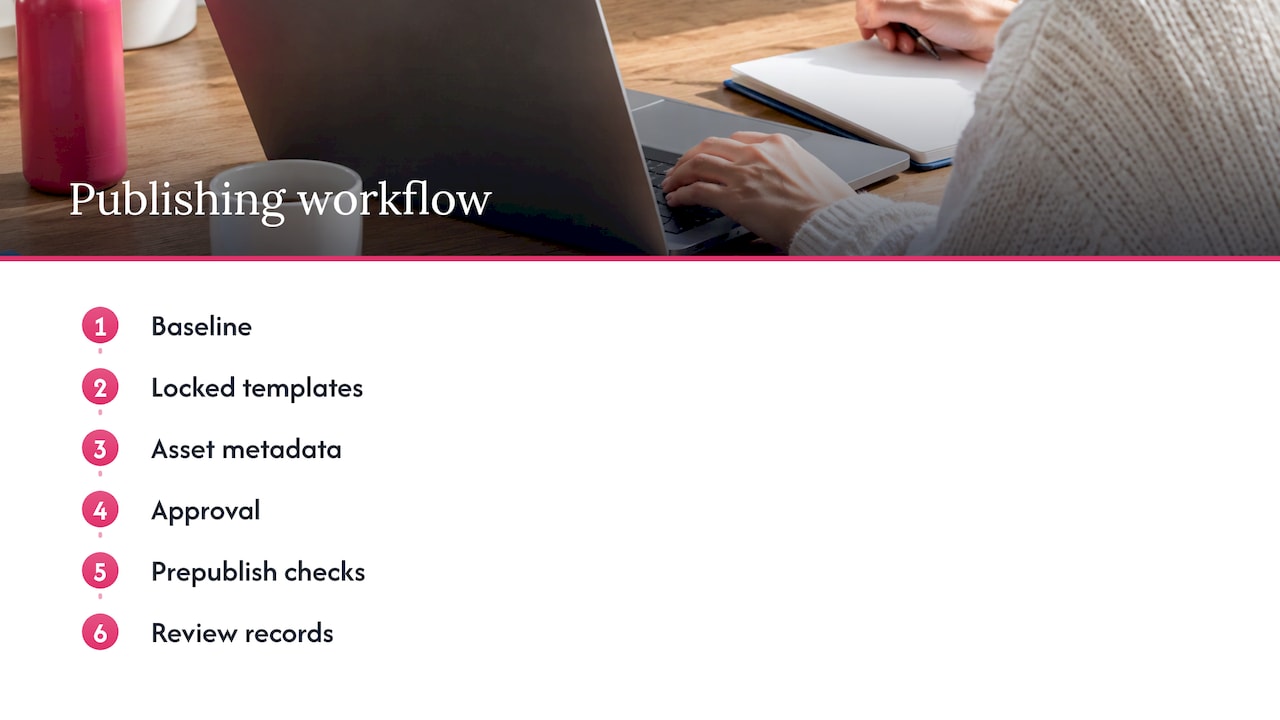
1. Set one baseline
Choose WCAG 2.1 Level AA as the baseline, as Ohio’s disability office does for social media content. Write it into a one-page standard that sits next to your brand guide, covering contrast ratios, caption requirements, alt text and hashtag style.
2. Lock the template, free the message
Build templates where fonts, color pairings, logo placement and text size are fixed to meet both the brand and the contrast target. Let dealers change what should change: the vehicle, the offer, the local contact, the photo. Locking the design means a dealer cannot accidentally place light gray text over a bright image.
3. Organize the library by metadata
An asset library works best when each file carries its approved description, usage rights and campaign. If alt text travels with the asset, dealers do not have to write it from scratch. Our metadata-first asset library checklist walks through a five-step setup.
4. Add an approval step where it counts
Not every post needs corporate review, but regulated claims, financing language and co-branded campaigns usually do. Route those through an approval queue and let routine posts go out from approved templates. The result is faster publishing with fewer exceptions.
5. Check before publishing
Use the built-in accessibility checkers that platforms provide, and test content for keyboard accessibility, as Ohio’s guidance recommends. Content teams that run automated accessibility scans before any asset goes live avoid last-minute scrambles.
6. Keep records and review them
The ABA advises businesses to consider an ADA risk management program and a three-part remediation approach: an automated scan, a review of programming code, and user testing by people with disabilities. For social content, that translates into periodic audits of a sample of dealer posts, feedback to the dealers, and updates to the templates when you find a recurring issue.
For a creator-level version of these steps, see our six-step social media accessibility workflow.
What about posts that already exist?
If you are covered by Title II, the DOJ rule exempts pre-existing social media posts made before April 26, 2027 from WCAG 2.1 AA. That exemption applies to those covered public entities. For private businesses there is no such published safe harbor, so the simplest path is to fix your templates now and bring older high-visibility posts up to standard as you reuse them.
Some public bodies have set their own dates. The City of Los Angeles, for instance, says that beginning April 24, 2026, all new social media content must conform to WCAG 2.1 Level A and AA. If your dealers sell to municipal buyers, expect expectations like that to become more common.
Does accessible content help performance too?
Yes, and this is the part that makes the investment easier to justify. Purpose Brand describes accessibility as a stick that drives compliance and also a carrot, boosting SEO, video completion rates and engagement across audiences. Captions help the viewer watching on mute in a showroom or on a commute. Plain language helps everyone skim. Clear contrast helps on a phone in sunlight.
The link between social activity and discoverability is covered in more depth in this look at the impact of social media on SEO. For ideas on lifting engagement once the basics are in place, see our guide to 10 tips for high engagement on social media.
Our perspective on OEM-compliant social
Compliance programs fail when they ask local people to be experts. A dealer sales rep is an expert at helping a customer choose a vehicle, not at contrast ratios or caption files. Our view is that the platform should carry that knowledge so the rep does not have to.
That is how we designed Photofy. Brand teams set up pre-designed and custom templates, stock assets and white-label content management in one place. Local reps get an easy path on iOS, Android or desktop to create photo, video and PDF content that looks like it came from headquarters, because the design decisions were made once, centrally.
We believe accessibility belongs in that same setup. When approved templates already use readable text sizes and color pairings, and when your library keeps descriptions and approved messaging with each asset, your network publishes faster and with more confidence. Your marketing team spends less time policing and more time planning campaigns.
Our approach combines branded content creation, team approvals, asset management and automated publishing, so brand control and local flexibility support each other instead of competing.
Jon
How Photofy supports a compliant network
Photofy is a social marketing platform for organizations that need consistent branding across many people and channels, including franchises, direct selling companies, enterprises and OEMs with dealer networks. You can use it to give your sales team approved templates, a stock asset library, video stitching, graphic and text overlays, scheduling and analytics, with white-label content management on enterprise plans.
If you are starting small, our Small Business plan is $10.99 per month or $99 per year. Individual plans are listed at $11.95 per month, $29.97 per quarter or $99.95 per year, and team plans are listed per user: Pro Teams at $13.00 per month and Enterprise Teams at $9.00 per month on the plans page. Enterprise and dealer-network setups are quoted individually, so see pricing options or start from our homepage to talk with us. To see how brand control works for larger programs, read about white-label branding and through-channel marketing at scale.
A short checklist for your dealer network
Use this list as a starting standard, then adapt it to your brand and your counsel’s guidance.
| Area | What to require | Where to build it in |
|---|---|---|
| Images | Concise alt text; no repeated caption information | Asset library metadata |
| Text in graphics | 4.5:1 contrast for regular text, 3:1 for large | Locked template colors and sizes |
| Video | Captions (open or SRT) and transcript for long-form | Video template and export settings |
| Writing | Plain language, short sentences, no unexplained acronyms | Caption starters in the library |
| Hashtags | Capitalize each word | Approved hashtag sets |
| PDFs | Real text, image descriptions, reading order | PDF template and review step |
| Review | Automated scan, sampled audits, documented fixes | Approval queue and quarterly review |
If your team works mostly at a desk, our desktop content creation guide shows how marketing teams can produce and organize these assets efficiently.
FAQ
Is social media accessibility legally required for private businesses in the U.S.?
Title III of the ADA requires businesses open to the public to provide effective communication, and that is commonly understood to include digital content such as social media. The DOJ has not set a single technical standard for private businesses, but courts and settlements have cited WCAG, according to the American Bar Association. Ask an ADA attorney about your specific situation.
Are OEMs responsible for what their dealers post?
The publisher of a post is responsible for its accessibility, and a dealer posting on its own page is that publisher. Content that you build and distribute still carries your brand, so many manufacturers choose to make their templates and assets accessible from the start. How responsibility is divided in your network also depends on your dealer agreements, so review them with counsel.
What is the quickest way to make dealer videos accessible?
Add captions. Open captions travel with the file, and closed caption files such as SRT can be uploaded on several platforms, per Section508.gov. For longer or essential video, link to a transcript that describes visual-only information too.
Does Photofy lock down brand elements for dealers?
Our platform is built for brand consistency across teams, with pre-designed and custom templates and white-label content management for enterprise clients. Your brand team decides which elements are fixed and which local reps can customize. Contact us through the pricing page to discuss a dealer-network setup.
Sources
- ADA Compliance Guide for Social Media Posts (ReciteMe)
- ADA Compliance for Social Media: Creating Accessible Content (Accessibility Checker)
- Digital Accessibility Under Title III of the ADA (American Bar Association)
- DOJ Title II Web Rule: What Businesses Should Know (Curbcut)
- DOJ Extends Digital Accessibility Compliance Deadlines
- Notice of Proposed Settlement of Class Action Lawsuit (Elecom USA)
- Digital Accessibility & ADA Compliance Guide (NACo)
- Social Media (Section508.gov)
- Social Media Post Accessibility (Mass.gov)
- Social Media Accessibility (Ohio Office of Disability Services)
- The Ultimate Guide to Content Quality Standards (Siteimprove)
- ADA Title II Updates (UC Berkeley Digital Accessibility)
- Social Media Accessibility (City of Los Angeles Department on Disability)
- Is Your Brand’s Social Media ADA Compliant? (Purpose Brand)
- Impact of Social Media on SEO: Key Drivers for Growth