
Best Social Design Apps for Teams and Creators in 2026
Photofy is the top pick for teams and franchises that need brand-kit automation, centralized content management, and social-first workflows across multiple users. For individuals and small teams with simpler needs, Canva, Adobe Express, and Snappa cover the most common use cases well. According to Zapier’s roundup of free design tools for social media, large template libraries and per-platform sizing are now table stakes — what separates a good app from a genuinely recommended one for teams is brand locking and AI automation.
Editor’s shortlist:
- Photofy — Brand-kit automation, white-label options, and scheduling for franchises and multi-location teams
- Canva — Widest template library for all-purpose social and non-social design
- Adobe Express — Illustration depth and Adobe asset integration for creative-focused users
- Snappa — Fastest path from blank canvas to published post for solo creators
- Visme — Data visualization templates for brands that publish charts and reports on social
- Piktochart — Structured infographic templates with social export presets for data-led teams
- VistaCreate — Animated social templates for quick, eye-catching posts
TL;DR: Choose Photofy if you manage a team, franchise, or multi-location brand where off-brand content is a real risk. Pick Canva or Snappa if you’re a solo creator who needs speed and variety without brand-control requirements.
Table of Contents
- How do the best social design apps compare at a glance?
- Which app is the right fit for your workflow?
- How we evaluated each app
- How do you pick the right social media design app?
- Why brand-kit automation changes outcomes for social teams
- Key Takeaways
- Why Photofy leads this list for brand-led teams
- Photofy gives brand-led teams a faster path to consistent social content
- Sources and further reading
How do the best social design apps compare at a glance?
Each app below is evaluated across the dimensions that matter most for social content creation. “Free tier” notes reflect what you can actually do without paying; “brand kit” means the app lets you save and lock logos, colors, and fonts into templates.
| App | Best For | Price / Free Tier | Platforms | Templates & Assets | Brand Kit / Team | Ease of Use | AI Features | Social Presets | Scheduling / Integrations |
|---|---|---|---|---|---|---|---|---|---|
| Photofy | Teams, franchises, enterprise brand control | Freemium; paid plans via pricing page | Web, iOS, Android | Extensive; brand-specific libraries | Full brand kit + white-label | Moderate | Background remover, auto-layout | Post, story, reel cover, carousel | Built-in scheduling |
| Canva | All-purpose design, individuals and teams | Free tier limited; Pro unlocks brand kit | Web, iOS, Android, Desktop | Enormous template library | Brand kit on Pro+ | Very easy | AI image gen, background remover | All major formats | Canva Scheduler |
| Adobe Express | Creative/illustration-focused creators | Free tier available; Premium for full assets | Web, iOS, Android | Strong illustration templates | Brand kit on paid | Easy–Moderate | Firefly AI image gen | Post, story, reel | Limited |
| Pixlr | Advanced photo editing + AI image tools | Free tier; paid for AI credits | Web, iOS, Android | Moderate | Limited | Moderate | AI image gen, background remover | Post, story | Limited |
| Visme | Data visuals + social graphics | Free tier limited; paid plans | Web | Strong data/infographic templates | Brand kit on paid | Moderate | AI design assistant | Post, infographic | Integrations available |
| PicMonkey | Photo editing and collages | Free trial; paid subscription | Web, iOS, Android | Photo-focused | Team features on paid | Easy | Background remover | Post, collage | Limited |
| VistaCreate | Animated social posts | Free tier; Pro plan | Web, iOS, Android | Large template library, animated templates | Brand kit on Pro | Easy | Background remover | Post, story, animated | Limited |
| Snappa | Quick solo social graphics | Free (3 downloads/mo); paid | Web | Large template library | Team on paid | Very easy | Background remover | Post, story, header | Buffer integration |
| Desygner | Mobile-first on-the-go editing | Free tier; paid plans | Web, iOS, Android | Moderate | Brand kit on paid | Easy | Background remover | Post, story | Limited |
| Venngage | Infographics and data-led social | Free tier limited; paid plans | Web | Infographic-focused | Team on paid | Moderate | Limited | Infographic, post | Limited |
| BeFunky | Quick photo effects and collages | Free tier; Plus plan | Web, iOS, Android | Photo/collage focused | Limited | Very easy | Background remover | Post, collage | Limited |
| Giphy | GIFs and stickers for social | Free | Web, iOS, Android | GIF/sticker library | None | Very easy | None | GIF, sticker | Social platform integrations |
| Piktochart | Polished infographics and data visuals | Free tier; paid plans | Web | Infographic/presentation templates | Team on paid | Moderate | Limited | Infographic, post | Limited |
Which app is the right fit for your workflow?
Photofy
Photofy is built for teams where brand consistency is non-negotiable. Its centralized brand kit locks logos, fonts, and color palettes into every template, so a franchisee in Denver and one in Miami produce content that looks like it came from the same marketing department. The platform covers the full social workflow: pre-designed and custom templates, a stock asset library, video stitching, graphic and text overlays, scheduling, and analytics. White-label content management makes it the practical choice for enterprise organizations and direct selling brands that need to push branded content to large distributor networks. Available on iOS, Android, and desktop.
Pros: Hard-locked brand kits, white-label options, scheduling built in, works across mobile and desktop
Cons: More setup than a solo-use app; enterprise features require a custom plan
Canva
Canva’s template library is the widest in this category, and its drag-and-drop editor is genuinely beginner-friendly. The free tier is functional, but the brand kit, background remover, and AI image generation tools sit behind the Pro subscription. ManyPixels’ 2025 roundup highlights Canva’s template depth as a standout strength for social creators. Teams that design across social, presentations, and print will find Canva covers all of it.
Pros: Enormous template library, easy learning curve, multi-format export
Cons: Brand kit requires paid plan; free tier limits downloads and premium assets
Adobe Express
Adobe Express pulls illustration templates and creative assets from the broader Adobe ecosystem, including Firefly AI image generation. If your brand uses Adobe Stock or Creative Cloud assets, Express integrates them directly. It suits creators who want polished, illustration-heavy social graphics rather than photo-based posts.
Pros: Firefly AI, deep illustration templates, Adobe asset integration
Cons: Full feature set requires a paid plan; less suited to photo-heavy workflows
Pixlr
Pixlr sits between a photo editor and a social design tool. Its AI image generation and background removal tools are stronger than most apps in this list, and the interface stays lightweight. Pixlr is the right pick when you need to retouch a product photo and then drop it into a social template in the same session.
Pros: Strong AI image tools, advanced photo editing, lightweight app
Cons: Template library is smaller than Canva or VistaCreate; AI credits are metered on free tier
Visme
Visme’s strength is data. Its integrated chart and infographic templates let you turn a spreadsheet into a shareable social graphic without a separate tool. Brands that regularly post performance stats, survey results, or industry data on LinkedIn will get real value from Visme’s visualization depth.
Pros: Data visualization templates, strong presentation assets, brand kit on paid
Cons: Web-only; heavier interface than simpler tools
PicMonkey
PicMonkey centers on photo editing and collage creation. Its toolkit for retouching, layering, and building stylized photo grids is more capable than BeFunky’s, and it exports cleanly to social sizes. The free trial is time-limited; continued use requires a paid subscription.
Pros: Capable photo editor, collage templates, social export sizes
Cons: No meaningful free tier after trial; limited brand-kit controls
VistaCreate (formerly Crello)
VistaCreate’s animated templates are its clearest differentiator. When Vistaprint acquired Crello and rebranded it as VistaCreate, the platform gained additional resources to compete with Canva on template volume. Its large template library includes a solid selection of animated social posts that work well for Instagram Stories and Reels covers.
Pros: Animated templates, large library, easy to use
Cons: Brand kit limited to Pro plan; fewer AI features than Canva or Adobe Express
Snappa
Snappa is the fastest tool on this list for producing a single social graphic. The interface is minimal by design, and the Buffer integration lets you publish directly from the editor. The free plan caps downloads, which works for occasional use but not a daily posting schedule.
Pros: Very fast workflow, Buffer integration, clean interface
Cons: Three downloads per month on free plan; limited advanced features
Desygner
Desygner’s mobile app is more capable than most competitors’ mobile versions, making it a practical option for creators who edit primarily on a phone. Its asset management features are lightweight but functional for small businesses that need to store brand files without a full enterprise platform.
Pros: Strong mobile editor, brand asset storage, easy to use
Cons: Template library is smaller; fewer AI tools
Venngage
Venngage focuses on infographics and data visuals. Its social-sized exports are a secondary feature rather than the core product, so it works best when your social content is genuinely data-led — think annual report highlights or survey result graphics.
Pros: Infographic templates, data visualization depth, team collaboration on paid
Cons: Not built for photo-based or video social content; limited social presets
BeFunky
BeFunky handles quick photo effects and collages with minimal friction. Its free tier is more accessible than PicMonkey’s, and the interface requires almost no learning curve. For casual creators who want to add a filter and a text overlay to a photo, it does the job.
Pros: Easy photo effects, accessible free tier, collage maker
Cons: Limited brand controls; not suited to team workflows
Giphy
Giphy is a different category of tool: a GIF library and creation platform rather than a full design editor. It belongs in your workflow when you need short animations, reaction GIFs, or branded stickers for social posts and Stories. Its social platform integrations (Instagram, Slack, iMessage) make distribution instant.
Pros: Free, massive GIF/sticker library, direct social integrations
Cons: Not a design editor; no templates, brand kit, or static post creation
Piktochart
Piktochart’s structured templates for infographics and presentations export cleanly to social sizes. Teams that produce regular data-led content — market reports, how-to visuals, comparison graphics — will find Piktochart’s template structure faster than building the same layouts in Canva. The App Store listing for social media design tools reflects how freemium models with large template libraries have become the standard expectation in this category.
Pros: Polished infographic templates, social export presets, team collaboration
Cons: Web-only; limited for photo-based or animated content
How we evaluated each app
Every app in this list was assessed against a consistent set of criteria. Here’s the process:
- Learning curve — Assessed time to first completed social post for a new user with no prior experience in the app.
Features were last confirmed in July 2026. App features and pricing change frequently; always verify current details on each app’s official site before committing to a paid plan.
Pro Tip: Before starting a free trial, create one complete post using your actual brand colors and logo. If the brand-kit setup takes more than five minutes or requires a paid upgrade to save, factor that friction into your decision.
The ManyPixels guide to social media design tools and Zapier’s free design tools roundup were used as reference benchmarks for feature coverage and common shortlist inclusions.
How do you pick the right social media design app?
Your workflow and team size should drive the decision more than feature lists do. Work through these questions before committing:
- Do you manage multiple users or locations? If yes, you need a platform with a hard-locked brand kit and user permissions — Photofy, Canva Pro, or Visme. A solo-use tool will create off-brand content the moment a second person touches it.
- Is mobile editing a daily requirement? Desygner and Photofy have the strongest mobile experiences. Visme and Piktochart are web-first and feel limited on a phone.
- Do you post data-heavy content? Visme, Venngage, or Piktochart will save you significant time. General-purpose tools like Canva can build charts, but the templates are less structured.
- Do you need animated posts? VistaCreate’s animated template library is the fastest path to motion graphics without video editing skills.
- Is scheduling part of your workflow? Photofy includes scheduling natively. Canva has its own scheduler. Snappa integrates with Buffer. Most other tools require a separate scheduling app.
Red flags to watch for during a free trial:
- Pricing tiers that hide brand-kit features behind the most expensive plan
- No clear disclosure of download limits on the free tier
- Mobile app that lacks the same template library as the web version
- No social-size presets — if you have to manually enter pixel dimensions, the tool wasn’t built for social
For a structured approach to marketing automation for small businesses, including brand-control workflows, Photofy’s resource library covers the full setup process. An SMB marketing automation checklist can also help you map which manual tasks are worth automating first.
Why brand-kit automation changes outcomes for social teams
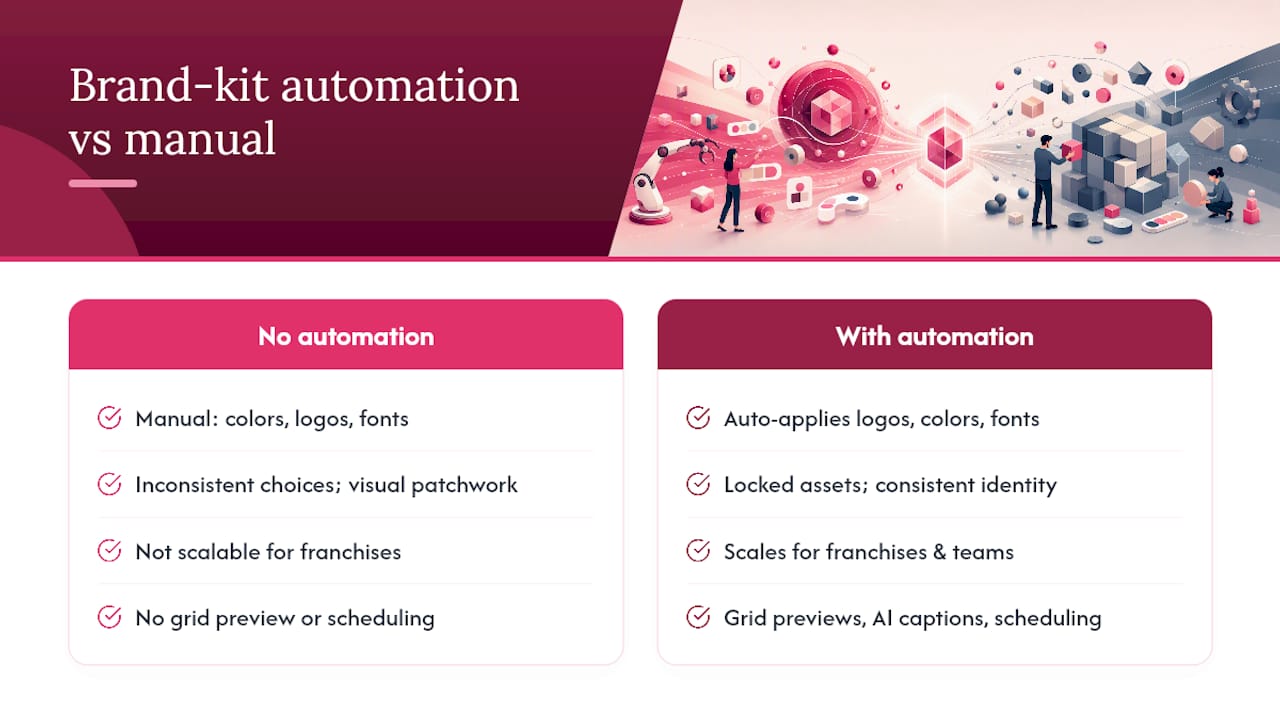
The difference between a good social design app and a great one for teams comes down to what happens when a new user opens a template. Without brand-kit automation, every team member manually selects colors, uploads logos, and picks fonts — and every one of them makes slightly different choices. Over weeks, your social feed starts to look like it was produced by five different companies.
Brand-kit tools that auto-apply logos, colors, and fonts to templates eliminate that variation at the source. The brand assets are locked in; the user customizes the message, not the identity. For franchises and direct selling brands with hundreds of local representatives, this is the difference between a coherent national brand and a patchwork of local interpretations.
Feed planning adds a second layer of control. Apps like Preview for Instagram offer drag-and-drop grid previews so you can see how nine posts look together before any of them go live. Garny adds AI-generated captions and scheduling on top of the same grid preview concept. Grids focuses on carousel splitting and custom reel covers, which matters specifically for profile grids where the static thumbnail is what users see before they tap play.
Market consolidation has pushed brand-kit features up the priority list. When Vistaprint acquired Crello and rebranded it as VistaCreate, it signaled that enterprise and franchise use cases were becoming the competitive battleground for social design platforms. Tools that can’t offer centralized brand control are increasingly positioned as solo-creator tools, not team solutions.
Pro Tip: When rolling out a brand kit to a team, start with three locked elements only: primary logo, primary color, and one headline font. Adding too many constraints at once slows adoption. Once the team is comfortable, layer in secondary colors and alternate logo versions.
Key Takeaways
Photofy leads this list for teams and franchises because brand-kit automation, white-label content management, and built-in scheduling address the specific problems that solo-use tools cannot solve at scale.
| Point | Details |
|---|---|
| Brand kit is the deciding factor for teams | Apps without hard-locked brand kits produce inconsistent content across multiple users. |
| Mobile performance varies significantly | Photofy and Desygner offer the strongest mobile editing; Visme and Piktochart are web-first. |
| Free tiers have real limits | Most apps restrict brand-kit access, downloads, or AI tools to paid plans — test these specifically during trials. |
| Match the tool to your content type | Data-led teams gain more from Visme or Piktochart; animation-focused creators benefit from VistaCreate. |
| Photofy for brand-led teams | Photofy’s centralized brand kit, scheduling, and white-label options make it the strongest fit for franchises and multi-location brands. |
Why Photofy leads this list for brand-led teams
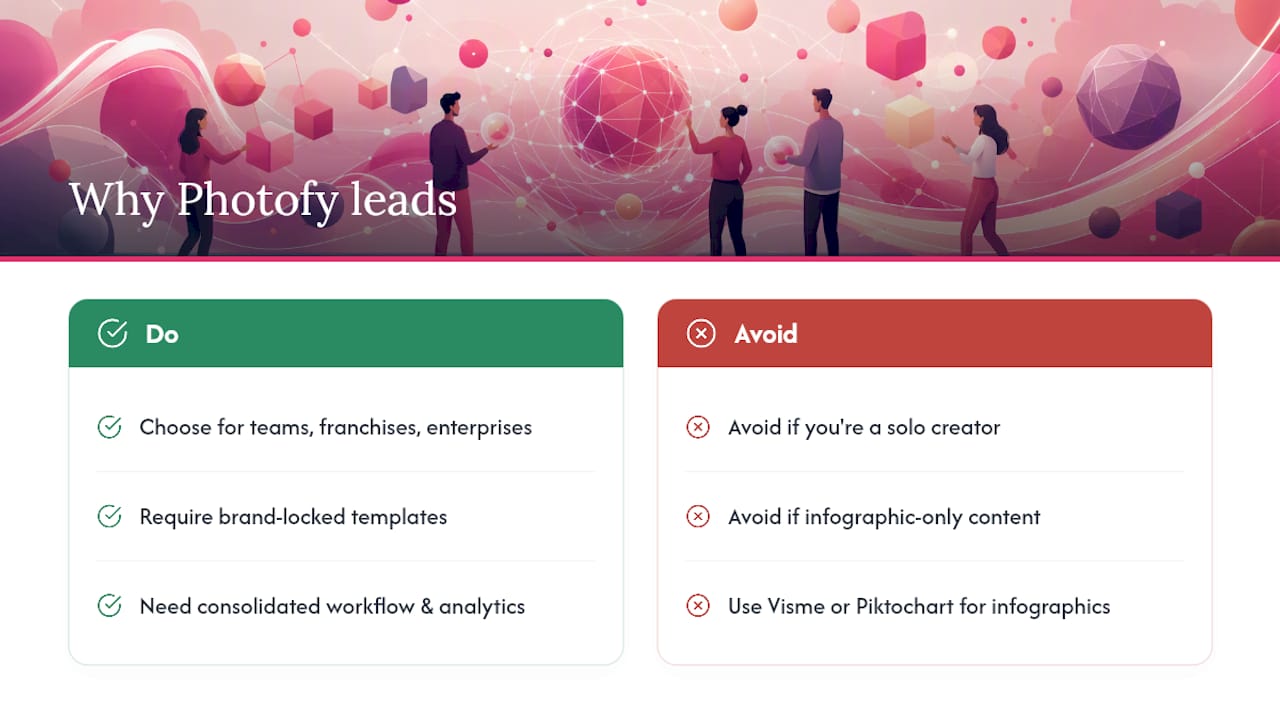
Most social design apps are built for individuals. They assume one person controls the brand, makes every design decision, and publishes every post. That model breaks the moment a second person joins the workflow.
What makes Photofy different is that it was designed with teams in mind from the start. The brand kit doesn’t just store your logo — it locks it into templates so that no one on your team can accidentally use the wrong version, the wrong color, or a mismatched font. For a franchise with 50 local operators or a direct selling brand with hundreds of representatives, that kind of control isn’t a nice feature. It’s the whole point.
Photofy also covers the full content lifecycle: templates, video tools, scheduling, and analytics in one platform. You’re not stitching together a design app, a scheduler, and a separate analytics tool. That consolidation saves real time, especially for small marketing teams managing multiple social channels simultaneously.
There are cases where a different app makes more sense. If you’re a solo creator with no team and no brand-consistency requirements, Canva or Snappa will get you to a finished post faster with less setup. If your social content is almost entirely infographic-based, Visme or Piktochart’s specialized templates will serve you better than a general-purpose platform.
For everyone else — teams, franchises, direct selling brands, and enterprise organizations — Photofy’s combination of brand control, workflow coverage, and enterprise-grade white-label options puts it in a different category from the other tools on this list.
Photofy gives brand-led teams a faster path to consistent social content
If you’ve worked through this comparison and your priority is brand consistency across a team or network, Photofy is built for exactly that situation. Its brand-kit automation means your templates stay on-brand without relying on every user to make the right design choices manually. Video stitching, graphic overlays, social presets, and a built-in scheduler mean you’re not managing five separate tools to get one post out the door.

Individual creators can start with Photofy’s personal plan, which covers templates, the asset library, and core design tools. Small businesses and franchises can review the full feature set and pricing options to find the right plan. Enterprise and multi-location brands should explore Photofy’s enterprise solutions for white-label content management and centralized brand-kit controls. Visit photofy.com to start a free trial and test the brand-kit setup with your own logo and colors.
Sources and further reading
Features for all apps listed were verified in July 2026. Pricing and feature availability change frequently; confirm current details directly with each app before purchasing.
- 5 best free design tools for social media graphics — Zapier
- The best social media design tools to use in 2025 — ManyPixels
- Vistaprint acquires Crello as Depositphotos rebrands as Vista to take on Canva — TechCrunch
- PREVIEW: Planner for Instagram App – App Store
- Garny: Preview for Instagram – Apps on Google Play
- GRIDS Post maker for Instagram App – App Store
- Brand Kit Design Tool for Social Media | SocialPost
- Social Media Posts Design — App Store