
White Label Social Media Platforms: Your Agency Guide
A turnkey white label social media platform with branded dashboards, scheduling, content libraries, and exportable reporting is the fastest way for agencies and resellers to launch a professional social management service under their own brand. The right platform handles the technical infrastructure while you focus on client relationships and margins.
Your next three steps: request a demo with a sample branded report, review the vendor’s SLA for uptime and support response times, and ask for a pilot period before committing to a full contract.
Who benefits most:
- Small and mid-size agencies adding social media management to their service menu
- Freelancers packaging social content as a recurring retainer offering
- Franchise networks and direct selling brands needing consistent branded content across dozens or hundreds of locations
Pro Tip: Before your first vendor call, pull together your brand assets (logo, color hex codes, domain) and a list of the social accounts you need to manage. Vendors who can configure a branded demo in under 48 hours are usually the ones with a mature onboarding process.
Table of Contents
- What does a white label social media platform actually include?
- How does white label onboarding actually work?
- How do pricing models work, and what margins can you expect?
- How do you choose the right white label partner?
- How Photofy supports agencies as a white label content platform
- What to remember when choosing a white label social media solution
- Useful resources for planning your white label social media service
- The margin math most agencies get wrong
- Photofy gives your agency a branded content platform, not just a tool
- Sources
What does a white label social media platform actually include?
The feature set agencies should require from any private label social media solution is well-established. DesignRush’s roundup of leading white label social media management services consistently highlights the same core capabilities: branded reporting, scheduling automation, approval workflows, and multi-location management.
Here is the checklist to use when evaluating any vendor:
Core platform capabilities:
- Branded dashboards with your logo, colors, and custom domain
- Client portals where customers can review and approve content before it publishes
- Scheduling and automation across major social networks
- Content libraries and pre-designed templates for fast, on-brand post creation
- Approval workflows with role-based permissions for team members and clients
- White label reporting exported as PDF or CSV, with your branding on every page
- Multi-account posting and multi-brand segregation for managing several clients cleanly, features commonly expected by agencies
- Analytics with performance data your clients can actually understand
Integrations and API access:
- Native connections to Facebook, Instagram, LinkedIn, X (Twitter), and TikTok
- Ad account linking for paid social reporting
- CRM and cloud storage integrations (Google Drive, Dropbox)
- Single sign-on (SSO) for enterprise clients managing large teams
Operational features:
- Multi-location support for franchise or distributed-team clients
- Usage limits and account management controls, often included in vendor packages
- Exportable audit logs for compliance and client transparency
Pro Tip: Test the “truly white label” behavior before signing. Log in as a simulated client and check every screen, email notification, and exported report for vendor logos or platform names. Also confirm the FROM address on automated emails uses your domain, not the vendor’s.
Photofy’s content calendar tools are built to support exactly this kind of consistent, branded content delivery across multiple accounts and locations.
How does white label onboarding actually work?
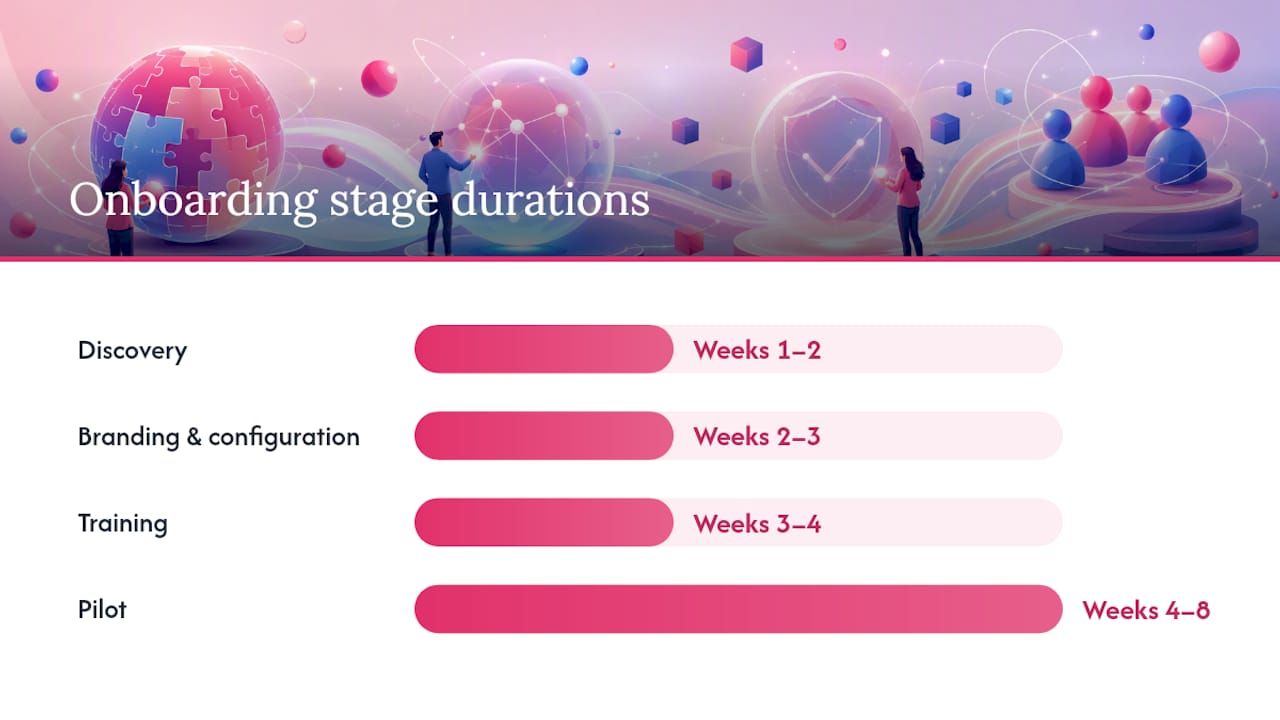
Most agencies underestimate the internal work involved in launching a white label social management service. The vendor handles the platform, but you own the brand configuration, client communication, and content strategy. Here is a realistic timeline:
- Discovery (Week 1–2): Define your service scope, client list, and branding requirements. Collect logo files, color codes, domain credentials, and any existing content assets.
- Branding and configuration (Week 2–3): The vendor applies your logo and colors, sets up your custom domain via CNAME or DNS record, configures report templates with your branding, and creates your admin account structure.
- Training (Week 3–4): Your team learns the admin dashboard, approval workflows, and reporting tools. Request at least two live training sessions and ask for recorded walkthroughs you can share with new hires later.
- Pilot (Week 4–8): Run two to five client accounts through the full workflow: content creation, scheduling, approval, publishing, and reporting. Measure scheduling accuracy, report delivery time, and client satisfaction.
- Scale: Once the pilot validates the workflow, onboard remaining clients using the process you refined.
What the vendor delivers vs. what you provide:
The vendor configures the platform, provides API documentation, and delivers SLA commitments. You provide brand assets, client access credentials, content approvals, and the client-facing communication strategy. Vendors who offer a dedicated onboarding manager for the first 30 days tend to cut configuration time significantly.
Deliverables to request from your vendor during onboarding:
- Written SLA covering uptime (look for 99.5% or higher) and support response times
- Admin training sessions (live, not just documentation)
- Sample branded report exports in PDF and CSV
- API documentation and rate limit details
- A test environment or sandbox account for your team to practice in
Pro Tip: Run a 30–60 day pilot before migrating all clients. Track three metrics: post scheduling accuracy (did posts go live at the right time?), report delivery reliability, and client approval turnaround time. If any of the three fails consistently, resolve it before scaling.
How do pricing models work, and what margins can you expect?
White label social media software pricing varies widely depending on the vendor model and the scale you need. Understanding the structure up front protects your margins.
Common pricing models:
- Per-client or per-profile pricing: You pay a fixed fee per managed account. Predictable, but margins compress as you add smaller clients.
- Seat-based pricing: Cost tied to the number of users (your team members or client logins). Works well for agencies with a small team managing many accounts.
- Tiered bundles: Entry, growth, and enterprise tiers with fixed account limits and feature sets. Most common for small to mid-size agencies.
- Subscription plus usage overages: A base monthly fee with additional charges for extra accounts, API calls, or storage. Watch the overage rates carefully.
- Revenue share or agency split: Less common, but some vendors take a percentage of what you charge clients. Margins are harder to predict.
Typical market pricing bands (generic ranges):
Sample margin calculation:
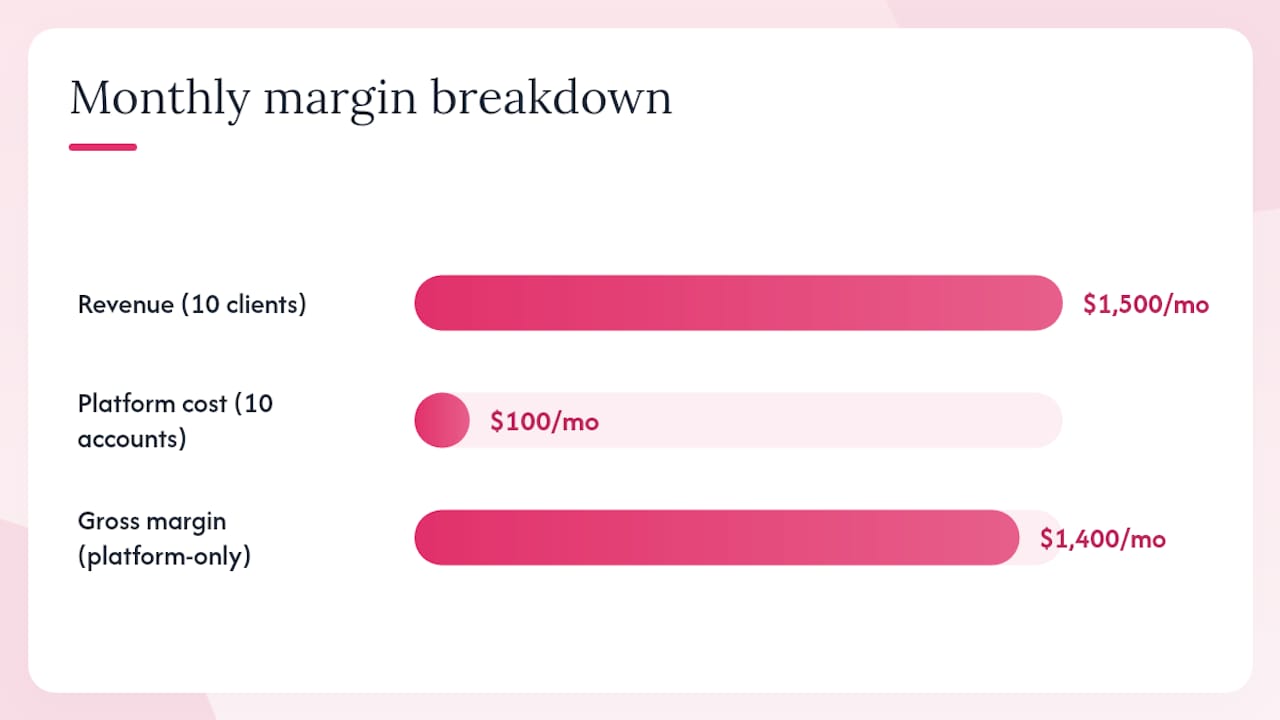
Suppose your vendor charges $200/month for 20 client accounts ($10 per account). You package social media management at $150/month per client. With 10 clients, your revenue is $1,500/month, your platform cost is $100/month (10 accounts at $10), and your gross margin on the platform cost alone is $1,400. Add your labor cost for content creation and reporting, and your net margin becomes clearer.
Billing logistics to clarify before signing:
- Who invoices the end client: you or the vendor?
- Are trial periods available, and do they require a credit card?
- What are the minimum contract lengths and cancellation terms?
- Are setup fees one-time or recurring?
How do you choose the right white label partner?
Evaluating white label social media tools comes down to four areas: product fit, operational fit, commercial fit, and support fit.
Questions to ask every vendor:
- Can I see a fully branded demo with my logo and domain before I sign?
- Do you own the data, or do I? What happens to client data if I cancel?
- What is your SLA uptime guarantee, and what is the remediation if you miss it?
- What are your API rate limits, and can they be increased?
- What support hours do you offer, and is there a dedicated account manager at my tier?
- Can I export all client data and reports at any time?
Red flags to watch for:
- Vendor logos or platform names visible in client-facing reports or dashboards
- No ability to use a custom domain or branded email FROM address
- Locked-in data with no export option at cancellation
- Pricing that changes significantly after the first contract term
- No live demo of branded assets before you commit
- Vague SLA language with no defined response time or uptime percentage
Decision framework by agency type:
| Agency Profile | Priority Features | Watch Out For |
|---|---|---|
| Small agency (under 20 clients) | Ease of setup, affordable entry tier, good templates | Overage fees that erode margins quickly |
| Multi-location franchise | Multi-brand segregation, location-level reporting, bulk scheduling | Platforms that lack true location-level permissions |
| Enterprise or large agency | API access, SSO, custom SLA, dedicated support | Vendors without enterprise-grade security or compliance documentation |
A note on legal and compliance: In the United States, your reseller agreement should clearly state data ownership, specify which party is the data processor under applicable privacy frameworks, and outline your obligations if a client requests data deletion. Review the vendor’s terms of service with your legal counsel before signing, particularly around data portability and termination rights. Agencies serving clients in regulated industries (healthcare, finance) need to confirm the platform’s compliance posture before onboarding those clients.
For a deeper look at how scheduling capabilities vary across platforms, the social media scheduling comparison guide is a useful reference when building your evaluation checklist.
How Photofy supports agencies as a white label content platform
Photofy is built for exactly the use case this article describes: branded content creation and management at scale, with white label configuration available for enterprise clients and franchise networks.
What Photofy delivers for agency and reseller partners:
- Pre-designed and custom templates that your clients can use without any design experience
- An extensive stock asset library for fast, on-brand content production
- Video stitching, graphic overlays, and text tools for multi-format social content
- Scheduling and analytics built into the platform, available on iOS, Android, and desktop
- White label configuration that removes Photofy branding and applies yours across the client experience
- Content calendar tools designed to keep client posting consistent week over week
Photofy’s enterprise solutions include white label configuration, partner support, and onboarding assistance for agencies and OEM partners. The Keller Williams implementation and the Wine and Design partnership are examples of how franchise and branded networks have used Photofy to maintain consistent visual identity across large distributed teams.
Trust signals to request when evaluating Photofy as your partner:
- A branded demo configured with your logo and colors
- Sample branded report exports in PDF format
- SLA documentation for your tier
- A pilot program to validate the workflow before full rollout
Pro Tip: When you request a Photofy demo, ask specifically to see the client-facing view with your branding applied. That single screen tells you more about the platform’s white label maturity than any feature list.
What to remember when choosing a white label social media solution
White label social media platforms give agencies a proven path to adding social management services without building infrastructure from scratch. The most effective approach combines a platform with genuine white label depth (custom domains, branded reports, no vendor logos) with a clear margin model and a piloted onboarding process.
| Point | Details |
|---|---|
| Verify true white label behavior | Check every client-facing screen, email, and report for vendor branding before signing. |
| Pilot before scaling | Run 2–5 accounts for 30–60 days to validate scheduling accuracy and report delivery. |
| Understand the pricing model | Calculate your per-account cost and markup before committing to a tier or contract length. |
| Clarify data ownership upfront | Confirm you can export all client data at any time, including at cancellation. |
| Photofy for branded content at scale | Photofy’s white label configuration, templates, and scheduling tools suit agencies, franchises, and enterprise networks. |
Useful resources for planning your white label social media service
The sources below are worth bookmarking as you evaluate vendors and plan your go-to-market.
| Resource | What It Covers |
|---|---|
| DesignRush: Best White Label Social Media Services | Vendor roundup with feature comparisons and agency selection criteria |
| BabyLoveGrowth: White Label Business Guide | Practical tactics for launching and scaling a white label offering |
| Agency SEO Tool Stack Guide | Partner resource on building an agency tool stack around a white label social platform |
The margin math most agencies get wrong
Most agency owners evaluating white label social media software focus almost entirely on the feature list. That is the wrong starting point. The feature list tells you what the platform can do; the margin math tells you whether the business model actually works for your agency.
The agencies that struggle with white label social management are usually the ones who priced their retainers before they understood their per-account platform cost, their content production time, and their reporting overhead. They end up with clients paying $99/month for a service that costs $85/month to deliver. That is not a business; that is a hobby with invoices.
The smarter approach is to work backward. That figure becomes your ceiling for vendor selection, not an afterthought.
The second thing most guides understate is the value of the pilot. A 30–60 day pilot is not just a technical test. It is your chance to discover how long content approval actually takes with real clients, whether your team can produce posts efficiently inside the platform’s template system, and whether the branded reports answer the questions your clients actually ask. Those answers change your pricing, your staffing model, and sometimes your vendor choice entirely. Commit to the pilot before you commit to the contract.
Photofy gives your agency a branded content platform, not just a tool
Your clients do not need to know what powers their social media content. They need to see their logo, their colors, and their posts going live on schedule. Photofy’s white label configuration makes that possible without requiring you to build anything from scratch.

Photofy combines pre-designed templates, a stock asset library, video and graphic tools, scheduling, and analytics in a single platform available on iOS, Android, and desktop. For agencies, franchises, and enterprise brands, the white label and enterprise configuration removes Photofy branding entirely and applies yours across every client-facing screen and report. The Wine and Design partnership shows what a fully branded implementation looks like in practice.
Request a branded demo at Photofy to see your logo on the dashboard before you make any commitment.
Sources
- 10 Best White Label Social Media Management Services
- BabyLoveGrowth – Get Google and ChatGPT Traffic on Autopilot