
Marketing Automation for Small Business: A Visual Content Playbook
Start with three automations: a welcome sequence, an abandoned-cart or inquiry recovery flow, and a review request series. These three alone cover your highest-leverage moments. Your immediate next step is to pick a platform that protects your brand assets and supports scheduled, templated social visuals, then block two hours to build your first workflow.
Here is what to prioritize:
- Welcome sequence: Triggers on signup; open rates average 50–60%, roughly three times a standard campaign.
- Abandoned-cart or inquiry recovery: A two-to-three message sequence that recovers 5–15% of lost carts or stalled inquiries.
- Review request flow: Sends after a completed service or delivery; builds social proof on autopilot.
As Salesforce frames it, your CRM is the brain and automation is the muscle. Photofy provides the branded visual layer that keeps every touchpoint looking consistent across all three flows.
Table of Contents
- Why does marketing automation matter for visual-content businesses?
- How do you build your first three automations in hours?
- How does CRM data power your automations?
- What should you look for in a platform for branded visual content?
- How does Photofy fit this checklist?
- What does a realistic setup timeline and budget look like?
- Which metrics should you track, and how often?
- What compliance and privacy rules apply to your automations?
- Key Takeaways
- What actually matters when you advise small businesses on automation
- Photofy gives you a faster path to branded automation
- Useful sources and further reading
Why does marketing automation matter for visual-content businesses?
Automation moves the needle for social-visual businesses in a specific way: it removes the gap between a high-intent customer moment and your response. When someone signs up, abandons a cart, or completes a service, a triggered message with a branded visual lands while the moment is still warm. Manual follow-up rarely matches that timing.
The practical wins for small businesses that rely on branded content are clear:
- Brand consistency: Every automated message uses the same approved templates, colors, and logo, so your brand looks polished whether you have one person or ten.
- Time savings: Repeatable tasks like welcome messages and review requests run without daily attention.
- Captured high-intent moments: Triggered messages reach customers at peak engagement, not days later.
- Predictable review acquisition: A post-service sequence generates a steady stream of new reviews each month.
- Revenue recovery: Abandoned-cart sequences reclaim revenue that would otherwise disappear.
Stat to know: Welcome emails average 50–60% open rates, and a well-timed abandoned-cart sequence recovers 5–15% of lost carts. Both automations can be live within a single afternoon.
Klaviyo’s automation guidance reinforces that email, SMS, and social must work together to keep your brand’s visual language consistent across every touchpoint.
How do you build your first three automations in hours?
Experts recommend starting with three focused automations rather than a sprawling campaign map. Here is how to build each one:
-
Welcome sequence
Trigger: New signup or contact creation. Cadence: Three emails over seven days. Goal: Introduce your brand, deliver a lead magnet or offer, and drive a first purchase or booking. Expected outcome: 50–60% open rate on message one. Build time: 60–90 minutes with a visual workflow builder and pre-made branded templates. -
Abandoned-cart or inquiry recovery flow
Trigger: Cart abandonment or a form submission with no follow-up booking. Cadence: Three messages at one hour, 24 hours, and 72 hours. Goal: Recover 5–15% of lost revenue or stalled inquiries. Build time: 60–90 minutes. Attach a branded visual to each message using templates you have already created in your social platform. -
Review request series
Trigger: Order fulfillment, service completion, or a status field update in your CRM. Cadence: Two messages, three and seven days post-service. Goal: Increase monthly review volume by a measurable count. Build time: 30–45 minutes.
Automation builders that combine visual workflow editors with pre-built triggers let small teams ship these flows in minutes rather than weeks. Reuse the branded visuals you create in Photofy directly inside each message to keep every touchpoint on-brand. For scaling later, use Zapier’s guidance on tagging content by performance to build a library of your best-performing visuals over time.
Pro Tip: Pick one primary KPI per automation and optimize that single metric before adding branches or conditions. Open rate for welcome, recovery rate for cart, and new reviews per month for the review flow. Complexity can wait.

How does CRM data power your automations?
Automation acts on CRM-stored interaction data to deliver timely, personalized experiences. Without a connected CRM, your triggers are guesswork. With one, every message is grounded in what a specific contact actually did.
Common triggers that matter for visual-social businesses:
- New signup or contact creation
- Purchase or booking confirmation
- Cart abandonment or form submission with no conversion
- Post-service completion (status field update)
- Social form submission or link click
- Inactivity after a set number of days
Two integration patterns work well for small businesses. The first is a native CRM-automation bundle, where your CRM and automation tool share a single database. The second is a light integration using webhooks or an API connector to sync your e-commerce platform, scheduling tool, or social platform with your automation tool.
Pro Tip: Keep a single contact source of truth. Sync only the fields your automations actually use — name, email, purchase date, and service status. Every extra field you sync adds maintenance friction with no return.
What should you look for in a platform for branded visual content?
Prioritize brand asset management, templated visual posts, a simple automation builder, scheduling, and analytics. Everything else is secondary until you have validated your first three automations.
| Feature | Why it matters for visual-social businesses |
|---|---|
| Brand kit and locked templates | Prevents off-brand posts across a team or franchise network |
| Asset library and video stitching | Centralizes approved images and video for reuse |
| Multi-channel triggers (email/SMS/social) | Coordinates touchpoints without separate tools |
| Native scheduling to social channels | Posts go out on time without manual intervention |
| Mobile app (iOS and Android) | Lets you post and manage on the go |
| Simple CRM or contact sync | Connects contact data to automation triggers |
| Transparent pricing and free tier | Lets you validate before committing to a paid plan |
| Visual automation builder | Reduces setup time from weeks to hours |
One contractual caution: avoid annual contracts until you have three months of data showing positive ROI. Monthly billing keeps you flexible while you learn what works.
How does Photofy fit this checklist?
Photofy covers the checklist items that matter most to visual-social businesses. The platform provides brand kits, locked templates, a stock asset library, video stitching, graphic and text overlays, scheduling, analytics, and white-label content management. It runs on iOS, Android, and desktop, so your team can create and post from anywhere.
Feature-to-checklist mapping:
- Brand-locked templates: Approved designs that keep every post on-brand, whether you have one marketer or a franchise network.
- Asset library: Centralized images and video clips ready to attach to any automation message.
- Video stitching and overlays: Build short-form video content without a separate editing tool.
- Scheduling to social channels: Queue posts directly from the platform.
- Analytics: Track engagement and content performance in one place.
- iOS, Android, and desktop: Full functionality across devices.
Real-world fit: a franchise network can push weekly branded posts to every location without each franchisee building their own assets. A real estate agent can auto-generate listing visuals from approved templates and attach them to a follow-up sequence. A local service business can pair a review request email with a branded thank-you graphic, all built once and reused indefinitely.
Pro Tip: Build your branded templates in Photofy first, then attach them to your automation messages. You will spend less time on design and more time on the triggers and copy that drive conversions.
What does a realistic setup timeline and budget look like?
You can have your first three automations live and tested within a week. Here is a practical breakdown:
- Hours 0–2: Choose your platform, connect your CRM or contact list, and upload your brand assets.
- Hours 2–8: Build the welcome sequence, abandoned-cart flow, and review request series using pre-built templates and a visual workflow editor.
- Days 2–5: Import your full contact list, run test sends, and confirm triggers fire correctly.
- First month: Monitor primary KPIs weekly. Adjust subject lines and send times based on open and click data.
- Quarter review: Assess cost versus attributed revenue and decide whether to expand to SMS or additional social channels.
Budget guidance: free tiers on many platforms are sufficient for starter automations. Paid SMB plans typically run $0–$79 per month depending on contact volume and feature depth. A practical rule of thumb is that your tool cost should not exceed 10% of the revenue you can attribute to your automations. If you have some technical capacity, a bring-your-own email delivery model, connecting an automation tool to a service like AWS SES, can meaningfully reduce per-email costs at higher send volumes.
Which metrics should you track, and how often?
Pick one primary KPI per automation and track it weekly, with a monthly ROI check.
- Welcome sequence: Open rate (benchmark: 50–60%), click-through rate, and conversion to first purchase.
- Abandoned-cart flow: Recovery rate (benchmark: 5–15%) and incremental revenue recovered.
- Review request series: Review conversion rate and new reviews added per month.
- Cross-cutting metrics: List growth rate, unsubscribe rate, and email deliverability score.
Your reporting rhythm should be: a weekly dashboard check for operational metrics, a monthly business-impact review comparing automation-attributed revenue to tool cost, and a quarterly segmentation and cost-versus-return analysis. Use UTM parameters on every link in your automated messages so your analytics platform can attribute traffic and conversions back to specific flows. Photofy’s attribution features can help you connect social-visual content performance to downstream conversions.
What compliance and privacy rules apply to your automations?
Marketing automation in the United States operates under several overlapping rules. The CAN-SPAM Act governs commercial email and requires a clear sender identity, a physical mailing address, and a working unsubscribe mechanism in every message. The Telephone Consumer Protection Act (TCPA) covers SMS marketing and requires prior express written consent before sending promotional texts. If you collect data from California residents, the California Consumer Privacy Act (CCPA) gives those contacts rights over their data, including the right to opt out of data sales.
Practically, this means three things for your automations. First, every email must include an unsubscribe link that works within ten business days. Second, your SMS opt-in must be explicit, documented, and separate from your email opt-in. Third, your privacy policy must accurately describe what data you collect and how you use it. Keep your contact list clean by removing hard bounces and honoring unsubscribes immediately. A suppression list that syncs across all your tools prevents a contact from receiving a message after they have opted out.
This article is general information, not legal advice. Confirm current requirements with a qualified attorney or the relevant regulatory body for your specific situation.
Key Takeaways
Marketing automation for small business delivers the most value when you start with three high-leverage automations, choose a platform built for branded visual content, and measure one KPI per flow before adding complexity.
| Point | Details |
|---|---|
| Start with three automations | Welcome sequence, abandoned-cart recovery, and review requests cover your highest-impact moments first. |
| Brand assets come first | Choose a platform with locked templates and an asset library before building any workflow. |
| One KPI per automation | Track open rate, recovery rate, or review conversion — one metric per flow until you have stable data. |
| Setup takes 2–8 hours | Your first three automations and branded templates can be live within a single workday. |
| Photofy as your visual layer | Photofy’s brand kits, templates, scheduling, and analytics map directly to the checklist for visual-social businesses. |
What actually matters when you advise small businesses on automation
Most small businesses do not have an automation problem. They have a maintenance problem. The tools are available, the triggers are easy to configure, and the templates are pre-built. What fails is the follow-through: a welcome sequence that was set up once and never reviewed, an abandoned-cart flow with a broken link, a review request that still references a promotion from two years ago.
My honest recommendation is to favor boring, well-maintained automations over ambitious, brittle ones. Defer lead scoring and predictive models until you have enough volume to make the data meaningful, typically several hundred contacts moving through a flow each month. Prioritize template reuse and asset governance instead. A franchise marketer who locks down approved visuals in Photofy and attaches them to three clean automations will outperform a solo operator running ten half-configured workflows with inconsistent branding every time.
The other trade-off worth naming: do not let platform complexity become a reason to delay. A simple visual workflow builder and a free tier are enough to validate your first automations. Scale the tool when the data tells you to, not before.
Photofy gives you a faster path to branded automation
Consistent branding across automated messages is harder than it sounds when your templates live in one tool, your assets in another, and your scheduler somewhere else. Photofy brings brand kits, a stock asset library, video stitching, scheduling, and analytics into one platform available on iOS, Android, and desktop, so your visual content is ready to attach to any automation trigger without hunting across tools.
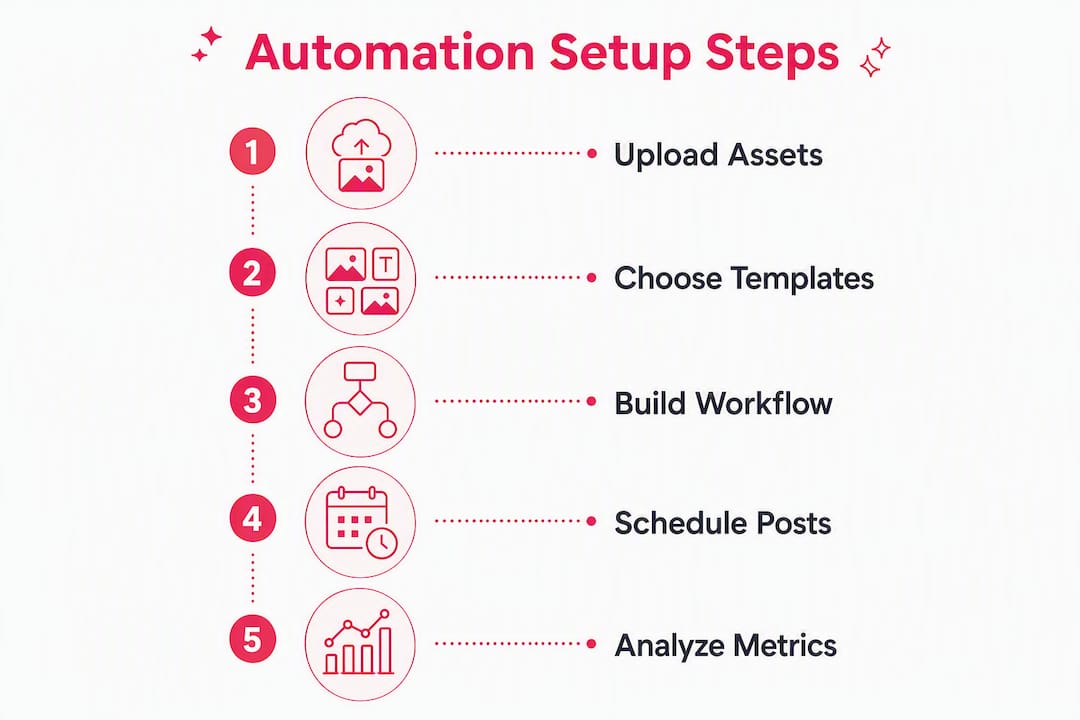
Getting started takes four steps: sign up and upload your brand assets, choose from pre-designed templates or build your own, schedule posts to your social channels, and connect your automation triggers to the branded visuals you have created. The free tier lets you test the workflow before committing to a paid plan.

Whether you are a solo marketer, a franchise coordinator, or a real estate professional managing a team, Photofy’s social marketing platform gives you the visual infrastructure your automations need to look professional from day one. Check the pricing page to find the plan that fits your contact volume and get your first three automations running this week.
Useful sources and further reading
The following sources informed this guide and are worth bookmarking as you build your automation setup:
- itsdeep — Marketing Automation for Small Businesses: Start Simple, Scale Smart: The clearest small-business-first framework available, with the three-automation rule, open-rate benchmarks, and free-tier platform comparisons.
- Salesforce — Marketing Automation for Small Business Guide: Authoritative framing of the CRM-as-brain model and how automation acts on contact data to trigger personalized experiences.
- Klaviyo — Marketing Automation Solutions: Practical guidance on omnichannel automation and keeping email, SMS, and social brand language consistent.
- Mailazy — Marketing Automation and BYO Delivery: Useful for teams with technical capacity who want to reduce per-email costs using a bring-your-own infrastructure model.
- Zapier — AI Content Creation Automation: Explains how to build a performance feedback loop that tags and archives content automatically, improving output quality over time.
When you consult these sources, use the setup timeline and measurement guidance above to stay focused. The goal is three working automations with clean branded visuals, not a perfect tech stack.