
Social Media: 5 FTC Ready Automation Workflows for Marketers
The best place to start is automating repeatable posting, content repurposing, basic engagement triage, and reporting, then using integrations and templates to scale your creative output while keeping the actual voice human. Below you will find prioritized automation ideas, five ready-to-run workflows, guidance on building a lean tool stack, and the FTC disclosure rules that keep automated influencer posts compliant. Some platforms help marketers handle the templates, scheduling, and approval side of this equation.
TL;DR:
- Automate scheduling of evergreen content and repurpose long-form media into multiple formats to save time and maintain consistent brand voice.
- Use AI to generate captions and hashtags, but ensure final edits and approvals stay human-driven to preserve tone and quality.
- Build workflows for routine tasks like gathering analytics, requesting user-generated content, and managing influencer disclosures with built-in compliance checks.
- Keep sensitive or tonal responses under human control, using automation primarily for routing and routine posting rather than engagement or emotional interactions.
- Use a lean, focused tool stack including templates, a scheduler, integrations, AI drafts, and analytics, tailored to your team size and content volume.
Table of Contents
- 1. Prioritized Social Media Automation Ideas You Can Start Today
- 2. Building a Tool Stack Without Overcomplicating Your Workflow
- 3. Five Ready-to-Run Automation Workflows You Can Build This Week
- 4. Keeping Automated Posts Honest and Compliant
- 5. When to Automate and When to Keep a Human in Charge
- How Photofy Fits Into Your Automation Plan
- Primary Sources and Reference Links
- Sources
- FAQ
1. Prioritized Social Media Automation Ideas You Can Start Today
Not every automation idea deserves the same amount of your attention. Some take fifteen minutes to set up and save hours every week. Others require more coordination but protect your brand at scale. Here are the ones worth building first, ranked roughly by effort versus payoff.
- Schedule evergreen content in themed queues. Group posts by category (tips, testimonials, product features) and let a scheduler cycle through them on a set cadence. Start here: build three to five content buckets in a spreadsheet, then load a two-week queue.
- Repurpose long-form content into multiple formats. Turn one blog post or video into a carousel, a short clip caption, and a quote graphic using AI for the copy and templates for the visuals. Start here: pick your best-performing post from last quarter and rebuild it three ways.
- Generate captions, hashtags, and calls to action with AI, then edit by hand. Automation drafts the first version; a person still approves the final wording. Start here: create a short brand-voice prompt so every AI draft sounds like you, not like a generic assistant.
- Auto-label and triage incoming comments and DMs. Route order questions to one folder, complaints to another, and compliments to a “share later” list. Start here: set up three tags before you automate anything else.
- Flag risky comments for human review instead of auto-responding. Automation should catch and route, not answer, anything involving complaints or sensitive topics. Start here: build a keyword list for words that always trigger a human reply.
- Send scheduled analytics reports to stakeholders. A weekly export beats a monthly scramble and keeps everyone looking at the same numbers. Start here: link our social media reporting guide for a ready-made template.
- Automate user-generated content requests and rights capture. When a customer tags your brand, trigger a request for permission to repost and store the reply. Start here: draft one polite, reusable permission message.
- Auto-publish from your blog or RSS feed with a templated caption. New post goes live, a formatted social version follows within the hour. Start here: match one caption template to your blog’s typical post length.
- Trigger review requests and monitor reputation mentions. Automation can ask for a review after a purchase and alert you when your brand is mentioned publicly. Start here: set the request to fire two days after delivery, not immediately.
- Run influencer campaigns through a pre-approval and disclosure flow. Every sponsored post gets checked for a disclosure overlay before it is scheduled. Start here: build a one-page checklist influencers sign off on before posting.
- Auto-translate or localize captions for wider reach, with a human check. Machine translation gets you close; a native speaker gets you right. Start here: test on a low-stakes post before rolling it out broadly.
- Run small A/B tests automatically and let data pick the winner. Schedule two caption variants, track which performs better, and pause the loser. Start here: test one variable at a time, like the opening line.
- Use low-code integration tools for one-off custom triggers. Platforms like n8n or IFTTT connect apps that do not talk to each other natively. Start here: automate the smallest annoying task first, like copying leads into a spreadsheet.
Pro Tip: Automate the task, not the judgment call. Anything requiring tone, empathy, or a real decision stays with a person.
2. Building a Tool Stack Without Overcomplicating Your Workflow
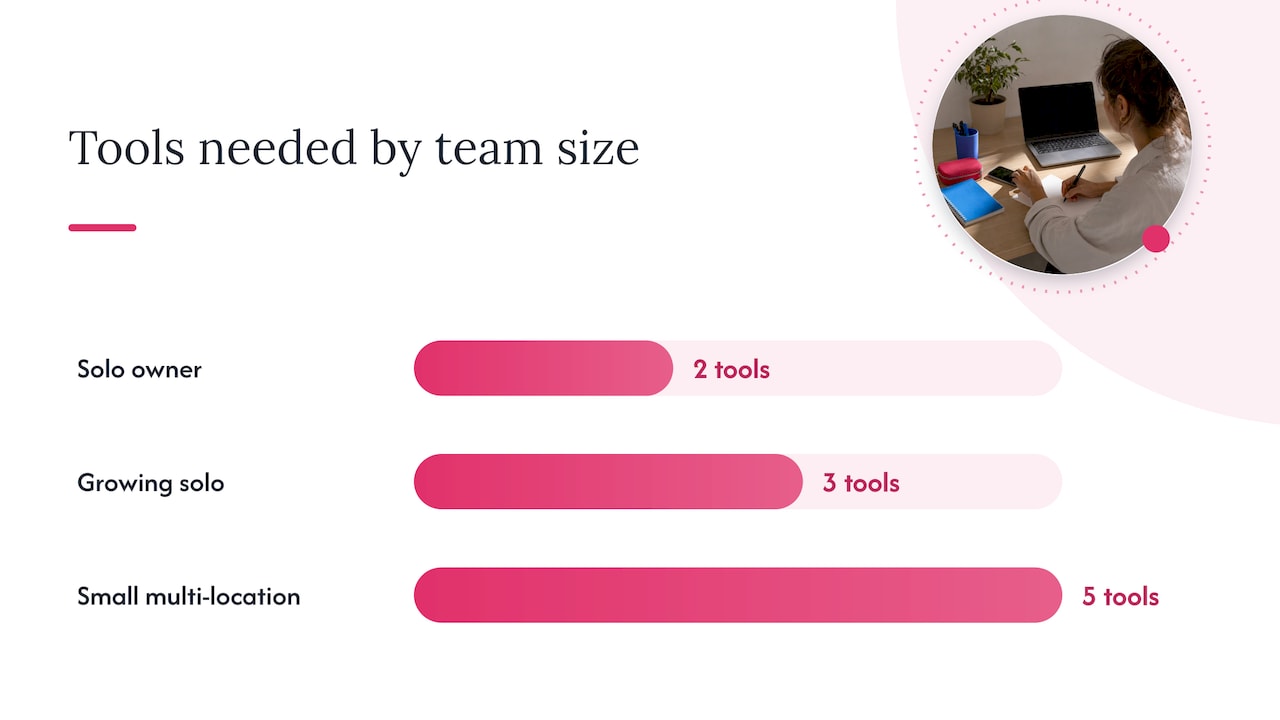
You do not need a dozen tools to run a solid automation setup. Most small teams need five categories covered, and the right stack depends on how many people touch your content and how many locations or brands you manage.
- Design and templates: where visuals get built and kept on-brand, such as Photofy’s template and asset library.
- Scheduler and publisher: the tool that queues and posts content across platforms on your chosen cadence.
- Integration layer: connects your calendar, forms, or CRM to your content tools without manual copying.
- AI assistant: drafts captions, hashtags, and variations for a human to review and approve.
- Analytics and listening: tracks performance and surfaces mentions or comments that need attention.
When evaluating a tool for any of these categories, weigh native platform support, whether it includes approval workflows, how well it integrates with the rest of your stack, its brand governance features, price per seat, and how much onboarding time it actually takes.
Two example stacks illustrate how this scales. A solo owner running one brand typically needs just a scheduler and a template tool, adding an integration platform only once repetitive manual steps start eating real time. A small team managing multiple locations needs the same core tools plus an approval layer and a shared asset library, since brand consistency becomes harder to enforce once more than one person is posting.
Software adoption for social management tools averages around 72%, with organizations typically seeing return on investment within about 11 months, according to G2’s research. That timeline is a reasonable benchmark if you are deciding whether the investment is worth it for your team.
3. Five Ready-to-Run Automation Workflows You Can Build This Week
These workflows are not theoretical. Each one names its trigger, the actions that follow, and a way to catch problems before they reach your audience.
- Weekly evergreen queue from a content calendar. Trigger: a new row is added to a shared calendar (Airtable or a spreadsheet). Actions: the row’s copy and image feed into a design template, then the finished post loads into your scheduler for the assigned date. Governance checklist: confirm brand colors and logo placement are locked in the template, not editable per post. Troubleshooting tip: if posts arrive with formatting errors, check that the calendar’s column names exactly match what the integration expects.
- Repurpose one blog or video into five post formats. Trigger: a new blog post is published. Actions: an AI assistant drafts a summary and a quote pull, then Templates in the platform turn those into a carousel, a quote graphic, a short caption, and a link post. Governance checklist: a person reviews the AI-drafted copy before anything schedules. Troubleshooting tip: keep one master template so formatting stays consistent across five outputs.
- New product or news alert with automatic UGC request. Trigger: a product launch or announcement is logged. Actions: a scheduled announcement post goes out, and a follow-up automation sends a request to early customers asking permission to repost their reactions. Governance checklist: store every permission response in one place, not scattered across DMs. Troubleshooting tip: wait at least 48 hours after launch before sending the UGC request so customers have something to react to.
- Scheduled analytics export with an auto-summary. Trigger: a set day and time each week. Actions: performance data pulls into a dashboard, and a short auto-generated summary (top post, engagement trend, follower change) emails to stakeholders. Governance checklist: confirm the summary highlights context, not just raw numbers, so it reads as useful rather than noise. Troubleshooting tip: our social media reporting guide has a template if you want a starting structure.
- Influencer sponsored post pre-approval with enforced disclosure. Trigger: an influencer submits a draft post for review. Actions: the draft routes to a brand reviewer, a disclosure overlay is added to the image or video, and the caption disclosure (“Ad” or “Sponsored”) is inserted before the post reaches the scheduler. Governance checklist: keep an audit log of every approval and the disclosure applied. Troubleshooting tip: never let disclosure be optional at the influencer’s discretion. Build it into the template so it cannot be skipped.
Pro Tip: Test every workflow on a low-visibility post first. A broken automation on your biggest account is a bad way to find a mistake.
4. Keeping Automated Posts Honest and Compliant
Automation makes it easy to move fast, which is exactly why disclosure has to be built into the process rather than left to memory. The FTC’s Consumer Reviews and Testimonials Rule requires clear, conspicuous disclosure of material connections, including paid relationships, free products, and employment ties, and it prohibits fake or misleading endorsements. FTC guidance for influencers also makes clear that a platform’s built-in label is not always enough. Disclosures need to sit where viewers will actually notice them, whether that is an overlay on an image, a repeated mention in a live stream, or a caption using plain language like “Ad” or “Sponsored.”
A short checklist keeps this from slipping through automated workflows:
- Bake a visible disclosure area into any template used for sponsored content.
- Repeat the disclosure in the caption, not only as an overlay.
- Require a human approval step before any sponsored post schedules.
- Store proof of disclosure and approval in one searchable log.
One workflow that satisfies this: an influencer submits a draft, a reviewer checks the disclosure overlay and caption wording, and only then does the post move into the scheduling queue.
5. When to Automate and When to Keep a Human in Charge
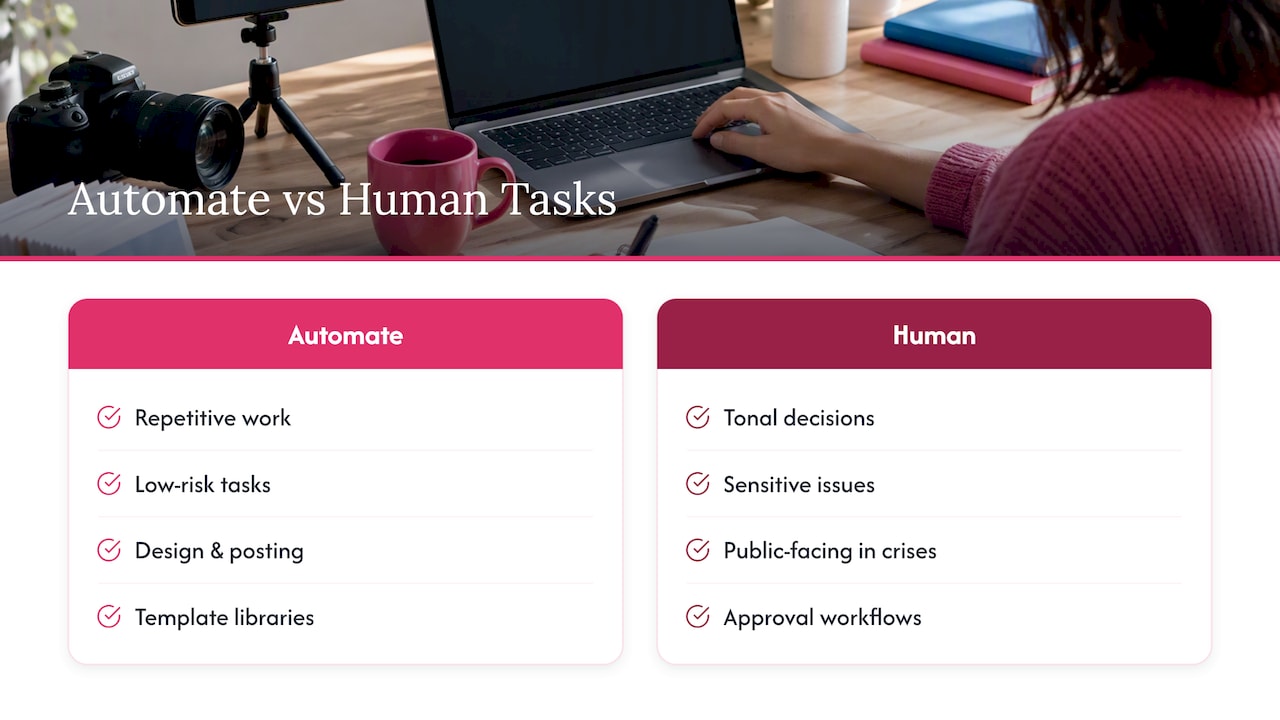
My rule of thumb: automate anything repetitive and low-risk, and keep a person on anything tonal, sensitive, or public-facing during a crisis. An auto-reply that fires on a customer complaint, for instance, can look tone-deaf fast, especially if the complaint involves a shipping delay or a safety concern. The fix isn’t removing automation. It is narrowing its job to routing and flagging, not responding.
Template libraries, approval workflows, and scheduling tools exist for exactly this split: automate the repetitive design and posting work, keep judgment calls with your team.
— Jon
How Photofy Fits Into Your Automation Plan
This platform handles the parts of this list that eat the most time: templates that keep every post on-brand, an asset library so nobody starts from a blank screen, scheduling that connects to your content calendar, and approval workflows for teams that need sign-off before anything goes live. Some franchises and multi-location brands can add white-labeling capabilities to help local reps create content while maintaining brand control.

- Try a template for your next repurposed post instead of building from scratch.
- Connect your content calendar to see how a queued workflow feels in practice.
- Check the Photofy pricing page to compare plans against your team’s size.
If you manage a distributed team or franchise network, the enterprise and franchise solutions page covers white-labeling and governance features built for that scale.
Primary Sources and Reference Links
- FTC Disclosures 101 for Social Media Influencers
- n8n social media workflow library
- Babylovegrowth: influencer marketing strategies
Sources
FAQ
Is Instagram automation illegal?
No, automating scheduling, reporting, or content creation on Instagram is not illegal. What matters legally is disclosure: if a post involves a paid relationship or free product, the FTC requires a clear, conspicuous disclosure regardless of whether a human or an automated tool published it.
What social media tasks should I automate first?
Start with scheduling evergreen content and generating analytics reports, since both are repetitive and low-risk. Comment triage and content repurposing are strong second steps once your posting cadence is stable.
How do I disclose sponsored posts that are automated?
Build the disclosure directly into the template as a visible overlay, then repeat it in the caption using plain language like “Ad” or “Sponsored.” The FTC’s influencer guidance notes that a platform’s built-in disclosure label alone may not be conspicuous enough.
Can automation hurt engagement or make my brand feel less authentic?
It can, if captions and replies sound generic or if a complaint gets an automated response instead of a human one. The fix is keeping automation on repetitive tasks like scheduling and reporting while routing anything tonal or sensitive to a person.
What tools do I need to build a basic automation stack?
A minimal stack covers five categories: a design and template tool, a scheduler, an integration layer, an AI assistant for drafts, and an analytics tool. Some platforms cover the template, asset library, scheduling, and approval side of that stack for teams that want brand consistency built in.