
90 Day Template Management for Marketing Teams, Governance First
The single most effective fix for template chaos is a canonical registry: one accountable owner per template, one approved version live at a time, and a publish/approve workflow that stops silent edits before they spread. Everything else in template management for teams builds on that foundation. Tools like Photofy make it easier to enforce with built-in template libraries, approval steps, and white-labeling for distributed marketing groups.
TL;DR:
- Maintaining a central registry with clear ownership and versioning rules prevents unauthorized edits and reduces operational risks like outdated templates or brand inconsistencies.
- Assigning specific roles such as owner, steward, and review committee ensures accountability and streamlines approval workflows, especially as the template library grows beyond 20 assets.
- Implementing a structured 90-day rollout plan that starts with inventory, classification, and pilot testing can establish effective governance in just three months.
- Regular monitoring of key performance indicators, including usage volume, approval rates, and deletion frequency, helps identify underused or problematic templates for timely updates or retirement.
- Using tools like Photofy, which align with this governance model, simplifies template control, approval, and brand consistency across small teams or large franchise networks.
Table of Contents
- Why Template Management for Teams Matters
- What Belongs in a Team-Ready Template System
- How Should Teams Organize Roles and Approvals?
- Workflows That Actually Hold Up in Practice
- A 90-Day Rollout Checklist for Template Governance
- How Do You Monitor Template Health?
- What Trips Teams Up Most Often on Template Rollouts
- Bring Governed Templates to Your Marketing Workflow
- Sources
- FAQ
Why Template Management for Teams Matters
Templates behave like infrastructure, not decoration. When a proposal template, social post design, or onboarding email gets copied, tweaked, and re-saved by five different people, you don’t have five versions of a template anymore. You have five undocumented liabilities. Template governance connects each template to a clear purpose, an accountable owner, and a visible version, so informal edits don’t quietly become the new default.
Unmanaged templates create real operational risk. A sales rep using an outdated pricing template can misquote a client. A regional office swapping out approved brand colors can trigger a compliance flag. Governance closes those gaps.
- Duplicate templates waste hours every week as teams rebuild what already exists
- Unauthorized edits erode brand consistency across channels
- Missing approval trails make audits and compliance reviews far slower
Teams that fix this see fewer rework cycles and faster content launches, because nobody is second-guessing which version is the real one.
What Belongs in a Team-Ready Template System
A working system needs a few non-negotiable pieces, and skipping any one of them is usually where template version control breaks down.
- A central registry listing template name, purpose, owner, current version, and permitted use cases. If a template isn’t in the registry, it doesn’t officially exist.
- Dual ownership. A business owner (brand, legal, or department lead) decides what the template should say. An operational owner (content ops or a platform admin) manages the technical publish and version history.
- Clear version rules. Drafts stay in a sandbox. Only a designated “publish” action moves a version into production, and every prior version stays retrievable.
- Field criticality tagging. Mark each field as critical, operational, or optional, with inline validation that blocks publishing when a critical field is empty or malformed, a practice documentation governance guides consistently recommend to cut ambiguity.
- A changelog with rollback steps. Every version bump needs a one-line reason and a documented path back to the prior state.
Pro Tip: Treat “draft” and “published” as different worlds. If someone can edit a live template directly, you don’t have version control. You have a suggestion box.
How Should Teams Organize Roles and Approvals?
Governance fails when it’s everyone’s job, which means it’s nobody’s job. Assign three roles: the owner (accountable for content accuracy and brand fit), the steward (handles day-to-day publishing and versioning), and a review committee for cross-functional templates.
You don’t need a committee for three templates. You need one once your library crosses roughly 20 templates or a single template touches legal, brand, and sales simultaneously. A small group of three to five people with clear decision rules scales well at that size.
Every change request should carry the same payload, regardless of who submits it:
- The specific problem with the current template
- The proposed change and who requested it
- The downstream impact (which teams, channels, or automations touch this template)
- A rollback plan if the change causes issues
Set service-level expectations up front. A minor copy fix might get a 48-hour review; a structural change touching multiple business units deserves a full week and sign-off from every affected owner.
Workflows That Actually Hold Up in Practice
The pattern that works, regardless of what tools you’re on, looks like this: authors draft in a sandbox, a steward reviews and publishes to the approved source, then that approved version propagates outward.
- Platforms with managed templates let an admin publish a master version and push supported changes to every connected instance, with usage dashboards showing which templates are actually being used and where.
- For teams working across multiple portals or brand accounts, tools like NetSpinnr’s Template Manager sync objects into reusable templates and deploy them across portals while automatically rewriting internal references, avoiding broken links after a copy.
- Engineering-adjacent teams managing infrastructure or code templates often lean on GitOps-style folder versioning, storing templates as YAML in Git so every change is tracked and reversible.
- Localization needs its own gate. Translation and fallback rules prevent a template update in one language from drifting out of sync with its other-language counterparts.
For marketing teams specifically, this is where a platform like Photofy fits: pre-built template libraries with brand-locked elements, approval steps before content ships, and white-labeling so franchise or enterprise networks stay on-brand without micromanaging every post.
A 90-Day Rollout Checklist for Template Governance
You don’t need a year-long initiative to get template management for teams under control. Ninety days is enough if you sequence it correctly.
- Week 1: Inventory every template in active use. Kill duplicates. Assign an owner to each survivor.
- Week 2: Classify every field as critical, operational, or optional. Set validation rules and publish the first batch of canonical, approved templates.
- Weeks 3 to 4: Pilot the change-request workflow on your two or three highest-volume templates. Fix the process before scaling it.
- Month 2: Automate provisioning where your tools allow it, and stand up a basic usage dashboard so you can see what’s actually getting used.
- Month 3: Run your first quarterly health check. Adjust thresholds based on what the first 90 days actually revealed.
Pro Tip: Don’t try to govern every template on day one. Start with the five templates your team touches most often. Momentum from a quick, visible win buys you patience for the harder rollouts later.
How Do You Monitor Template Health?
A template that nobody uses is either broken or unnecessary, and you won’t know which without tracking a few numbers. Governance frameworks recommend combining usage volume with structural signals, like how often users delete or skip sections, to flag mismatches early.
| KPI | What it signals | Suggested action threshold |
|---|---|---|
| Uses per period | Adoption and relevance | Fewer than 3 uses/month triggers review |
| First-pass approval rate | Template clarity | Below 50% suggests confusing fields |
| Section deletion rate | Structural mismatch | High deletion rates suggest redesign |
| Time-to-first-use | Onboarding friction | Over 2 weeks suggests poor discoverability |
Run this check quarterly, not annually. Templates that fail two consecutive quarters on the same metric should be redesigned or retired, not left live out of habit.
What Trips Teams Up Most Often on Template Rollouts
The pitfalls repeat across nearly every distributed team: no assigned owner, template libraries that balloon past what anyone can maintain, and mandatory fields that vary depending on who built the template. Each one alone is manageable. Together, they compound fast.
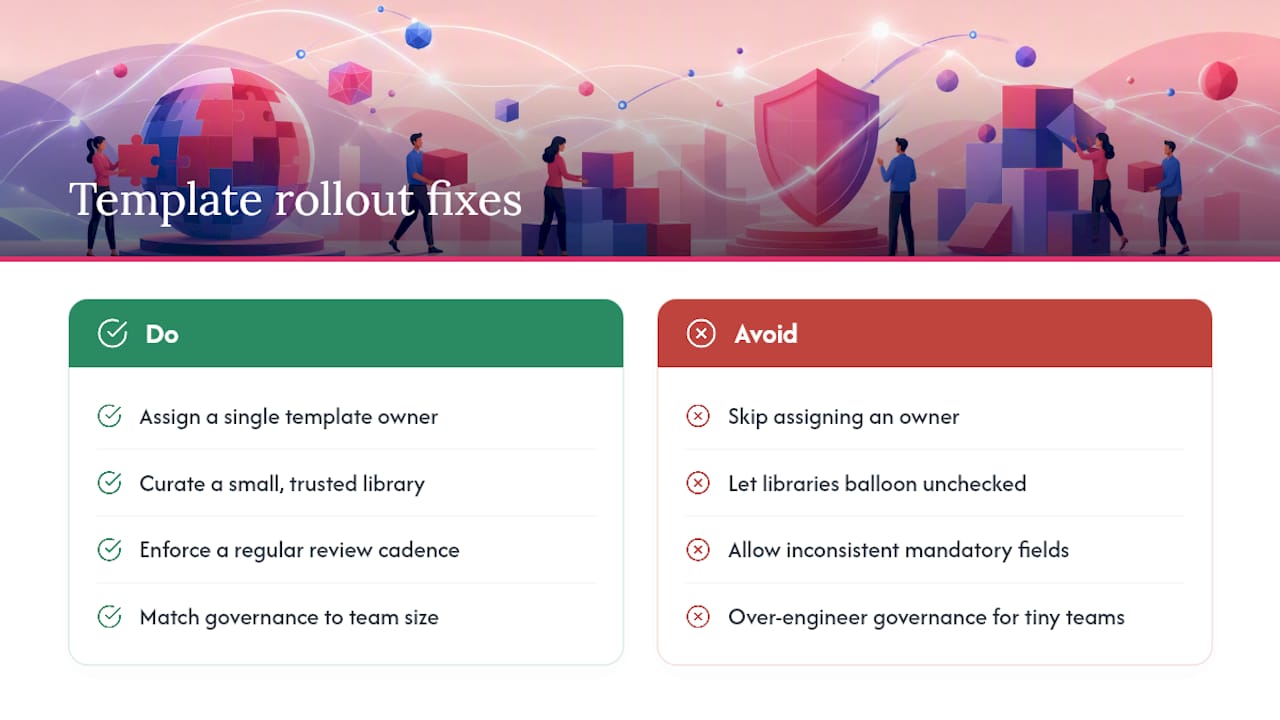
The fix that consistently works isn’t more tooling. It’s fewer templates, tighter ownership, and a review cadence that actually gets followed instead of scheduled and skipped. Teams that treat their template library like a small, curated set of trusted assets, rather than an ever-growing folder, spend far less time firefighting version confusion and far more time shipping content.
The organizations that get this right also resist the urge to over-engineer governance for a five-person marketing team. Match the process to your scale, and revisit it as you grow.
— Jon
Bring Governed Templates to Your Marketing Workflow
Photofy is built around the exact governance model this guide describes: a shared template library your team can’t quietly fork into a dozen off-brand variants. Every asset lives in one place, approvals sit between draft and publish, and white-labeling keeps enterprise or franchise networks on-brand without a compliance headache for every local post.

Whether you’re running a small marketing team or managing brand consistency across dozens of franchise locations, Photofy maps directly to the playbook above: template libraries with locked brand elements, an approval layer before content goes live, scheduling, and analytics to track what’s actually working. Small teams can start with the Small Business plan at an affordable monthly price or an affordable yearly price, while larger organizations can get enterprise pricing details built around white-labeling and multi-user approvals. If your team is evaluating options, request enterprise information or check current plan tiers to see which fits your rollout timeline.
Sources
The governance model here draws on documented practices for template ownership and version control, managed template propagation, cross-portal template deployment, and GitOps-based versioning for teams managing code or infrastructure templates. Reviewing these directly helps if you need configuration-level detail beyond what a general playbook can cover.
- Contract Template Governance: Ownership, Versions and Approved Use | ClearContract
- Managed templates on monday.com
- Template Manager by NetSpinnr
- Using GitOps-enabled version control | Digital.ai Release
FAQ
What Is Template Management for Teams?
Template management for teams is the practice of assigning ownership, version control, and approval workflows to shared templates so multiple people can use them without creating conflicting or off-brand versions. It typically includes a central registry, field validation, and a publish/approve process.
How Often Should Templates Be Reviewed?
Most governance frameworks recommend a quarterly review cycle, checking usage volume, approval rates, and section deletion rates against set thresholds. Templates that consistently underperform on the same metric across two quarters should be redesigned or retired.
When Does a Team Need a Template Governance Committee?
A dedicated committee typically makes sense once a template library exceeds roughly 20 templates or when a single template affects multiple departments at once. A small group of three to five people with clear decision authority is usually enough at that scale.
Does Photofy Support Template Approvals and Version Control?
Yes. Photofy includes template libraries, approval steps before content publishes, and white-labeling for enterprise and franchise brand control. Pricing details for Small Business and enterprise plans are listed on the Photofy site.
What’s the Fastest Way to Fix an Unmanaged Template Library?
Start by inventorying every template in use, removing duplicates, and assigning one accountable owner to each remaining template. That single step, done in week one, resolves most of the immediate confusion before any formal workflow is even in place.