
Content Tagging Strategy: 90 Days to Govern AI Tagging
The fastest route to findable, reusable content is a small, governed controlled vocabulary paired with required metadata fields and AI-assisted tagging under editorial review. This combination gives you better search results, faster analytics, and content your team can actually reuse instead of recreating. Below, we walk through the audit, design, naming rules, governance, automation, and a 90-day checklist you can put to work right away.
TL;DR:
- For larger libraries, begin with 50 to 150 terms; smaller teams should use a tighter list, then pilot one hub for four to eight weeks.
- Require topic, format, and audience at upload, cap social posts at two to four tags, and decide whether videos need clip level labels.
- Assign a taxonomy owner and area stewards, approve new terms through a lightweight request process, review usage quarterly, audit performance twice yearly, and reassess annually.
- Use AI to suggest tags during uploads, archive triage, and term remapping, but route low confidence matches to review and spot check samples for drift.
- Track tagged asset coverage, search failures, coverage by hub, and reuse rates; use the results to adjust terms before expanding beyond the pilot.
Table of Contents
- What content tagging is and why it matters
- Designing a controlled vocabulary and taxonomy for tags
- Audit and pilot: inventorying content before you scale
- Naming rules, governance, and maintenance cycles
- When and how to use AI and automation for tagging
- Practical 90-day checklist and tag usage rules
- Applied example: supporting tagging, governance, and reuse
- Pragmatic priorities for content engineers
- Why use a platform to manage tagged content and enforce governance
- FAQ
- Sources
What content tagging is and why it matters
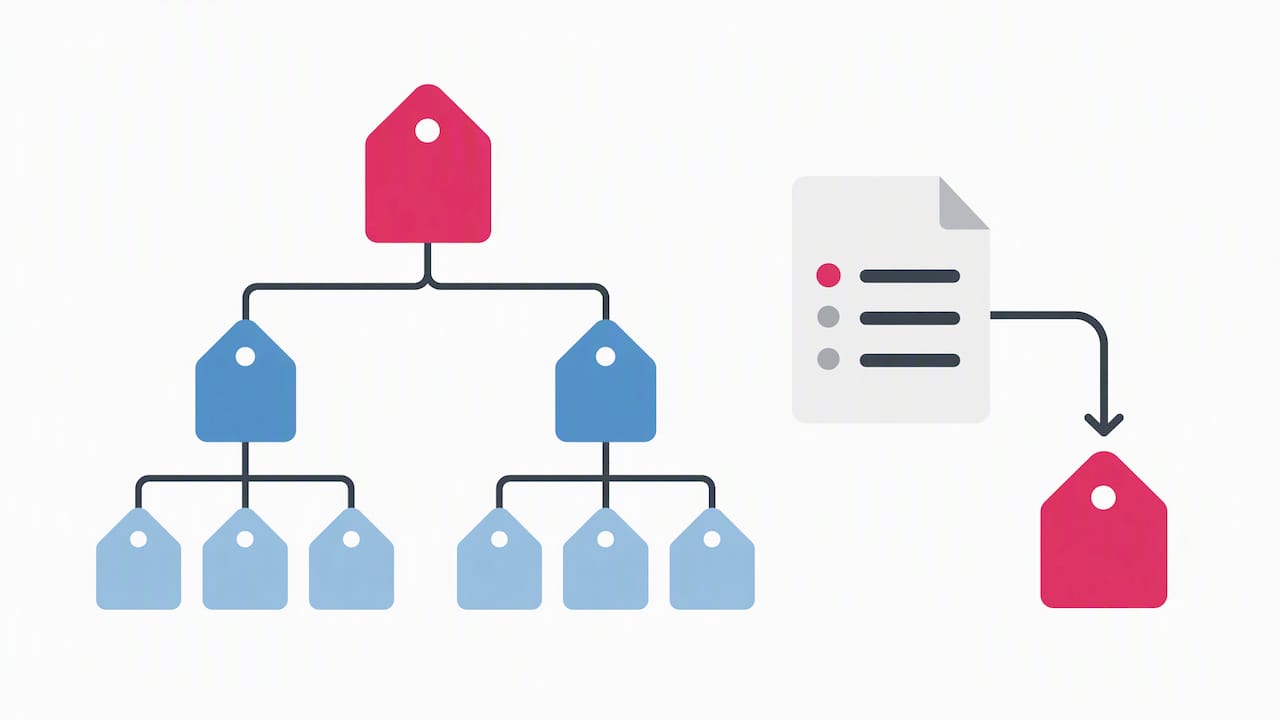
Content tagging means attaching descriptive labels to an asset so it can be found, filtered, and reused later. Tags differ from categories, which group content into a few broad buckets, and from a taxonomy, which is the structured system that organizes tags, categories, and their relationships together.
Most teams tag along a handful of dimensions:
- Topic: the subject matter the content covers.
- Format: video, image, blog post, carousel, and similar.
- Audience: who the content is meant to reach.
- Funnel stage: awareness, consideration, or decision.
- Campaign: the initiative or launch the asset belongs to.
- Status: draft, approved, archived, or retired.
A controlled vocabulary eliminates duplicate or conflicting labels and gives your whole team a shared language for tagging, which shortens time-to-find and increases how often existing assets get reused instead of rebuilt from scratch.
In 2026, AI-powered tagging has become a practical requirement for maintaining taxonomy integrity as content libraries scale, according to guidance on AI content automation workflows. That shift matters because manual tagging alone rarely keeps pace with the volume most teams publish today.
Designing a controlled vocabulary and taxonomy for tags
Before you build anything new, you need to see what you already have. Taxonomy best practices from the Nielsen Norman Group recommend starting with a full inventory of existing content and sourcing candidate terms from that content and from how users actually search.
- Export every tag currently in use and flag duplicates, near-variants, and one-off terms nobody else uses.
- For each surviving term, decide on a preferred label, list its synonyms, write a one-line definition, and note any exclusions.
- Organize tags by type, such as topical, entity, format, audience, and lifecycle, so contributors know which bucket a new term belongs to.
- Set naming rules covering case, singular versus plural, and hyphen use, then record two or three examples for each rule.
For larger libraries, taxonomy guidance from Contesimal suggests an operable starting set, often in the 50 to 150 term range, with smaller teams working from a tighter list to keep adoption simple.
Pro Tip: Write your naming rules on one page and pin it where contributors tag content, since a rule nobody can find gets ignored within a week.
Audit and pilot: inventorying content before you scale
A clean audit spreadsheet with three buckets, keep, merge, or delete, turns a messy tag list into a workable plan. Export your content library, map every tag to one of those buckets, and you’ll usually find that a surprising share of tags exist for a single asset.
- Decide which metadata fields are required (topic, format, audience) versus optional (campaign, sub-topic).
- Choose whether you need asset-level tagging alone or whether clips, sections, or pages within an asset also need their own tags.
- Pick one high-value content hub or vertical and run a pilot for four to eight weeks before rolling the system out everywhere.
- Assign who runs the export, who approves new tags during the pilot, and who trains contributors on the naming rules.
Splitting tagging into asset-level metadata for discovery and clip-level tags for precise reuse unlocks retrieval for video, podcast, and research teams working from the same tagging taxonomy framework. Our metadata-first asset library checklist walks through a similar setup process for teams building their first governed library.
Naming rules, governance, and maintenance cycles
Tagging only stays useful when someone owns it. A taxonomy owner sets direction, stewards manage specific areas like product lines or regions, and taggers apply the system day to day.
- Require a minimum evidence threshold for new terms, such as a planned content count, before anyone adds a tag to the approved list.
- Route new-term requests through a lightweight approval step rather than letting contributors add tags freely.
- Review usage quarterly, audit performance biannually, and reassess the full taxonomy once a year.
- Retire unused tags gently: mark them inactive, redirect existing content to the replacement term, and document the change.
Periodic audits on this kind of cadence keep a vocabulary aligned with how your content and audience actually change over time, rather than letting it drift silently.
Pro Tip: Name a taxonomy steward for each major content area from day one, since an unowned vocabulary grows messier every quarter it goes unmanaged.
Our guide to 90-day content governance covers how to formalize these roles alongside brand controls for distributed teams.
When and how to use AI and automation for tagging
Automation earns its place in a few specific spots: triaging an old archive, suggesting tags during upload, and batch remapping when you retire or merge terms. In each case, the AI suggests and a person confirms, which keeps the vocabulary from drifting away from your approved list.
- Set a confidence threshold below which suggestions route to a review queue instead of auto-applying.
- Spot-check a sample of AI-tagged assets regularly and feed corrections back to improve future suggestions.
- Watch for domain-specific terms, false synonyms, and gradual vocabulary drift as your library grows.
- Enforce required fields through your CMS templates and validate them at upload, using automation only for suggestions.
Automation has become a governance requirement for large content libraries, since modern CMS platforms increasingly offer tag suggestion or auto-apply features that need editorial guardrails to stay accurate. Our automation workflow examples show how this pairing works in practice for marketing teams.
Practical 90-day checklist and tag usage rules
A sequence like this takes most teams from a messy tag list to a working system within one quarter.
- Export all current tags and content metadata.
- Clean the list into keep, merge, and delete buckets.
- Draft preferred terms, synonyms, and naming rules.
- Get stakeholder approval on the starter vocabulary.
- Pick a pilot hub and tag it manually for four to eight weeks.
- Train contributors on the naming rules and required fields.
- Turn on AI-assisted suggestions with a review queue.
- Measure results and adjust the vocabulary.
- Roll out to remaining content hubs.
- Schedule the first quarterly usage review.
For usage rules, keep social posts to two to four tags, decide upfront whether video needs clip-level tags in addition to asset-level ones, and mark topic, format, and audience as required fields everywhere.
| KPI | What it tells you |
|---|---|
| Percent of assets tagged | How complete your coverage is |
| Search-with-no-result rate | Whether tags match how people search |
| Tag coverage by hub | Where gaps remain |
| Content reuse rate | Whether tagging is driving reuse |
Connecting these metrics to analytics is what separates a tagging project that improves reuse and search from one that just adds busywork. A common pitfall is skipping the pilot and rolling out to every hub at once, which multiplies cleanup later instead of avoiding it.
Applied example: supporting tagging, governance, and reuse
A shared asset library with enforced metadata fields at upload gives your whole team one consistent place to tag, search, and reuse content instead of rebuilding it hub by hub.
- Required fields at the point of upload keep topic, format, and audience consistent across every contributor.
- White-labeling lets enterprise and franchise teams apply their own branding while central admins keep the underlying tagging and governance structure intact.
- Admin controls support approval workflows and help track where AI-assisted suggestions were used versus manually tagged content.
- Pre-built templates speed up tagging for new campaigns since format and audience fields come pre-populated.
Teams gain centralized control over the vocabulary while local reps or franchise partners still customize content for their own audience, which is the balance most distributed organizations are trying to strike.
Pragmatic priorities for content engineers
Governance and a tight pilot beat a textbook-complete taxonomy nobody can maintain. Start small, measure findability and reuse directly, and name a steward for every area before the vocabulary starts to drift on its own.
— Jon
Why use a platform to manage tagged content and enforce governance
Once your vocabulary and naming rules are set, you need a place to enforce them. An asset library applies required metadata fields at upload, admin controls support the approval workflows your governance model depends on, and white-labeling keeps enterprise and franchise brands consistent while local teams still customize their own content.

When you evaluate any platform for this job, check four things: whether it enforces required metadata, whether it gives you real admin roles, whether it supports exports and API access, and whether its AI suggestions route through a review step rather than auto-applying. See how our pricing and plans fit your team, or visit our enterprise page if you’re managing tagging and brand governance across a distributed organization.
FAQ
What’s the difference between a tag and a hashtag?
A tag is internal metadata used to organize and retrieve content within your own system, while a hashtag is a public, platform-specific label used on social media to group posts for discovery by other users. Tags live in your content management system; hashtags live in the post itself.
What are examples of content strategies?
Common content strategies include pillar-and-cluster content organized around core topics, campaign-based content tied to specific launches, and evergreen reference content maintained over time. A tagging strategy, built on a controlled vocabulary and required metadata fields, supports all three by making related content easy to find and reuse.
What does tagging mean in slang?
Outside of content management, “tagging” is sometimes used casually to mean mentioning or labeling someone on social media, such as tagging a friend in a photo. In content strategy, the term refers specifically to attaching descriptive metadata labels to organize and retrieve digital assets.
What does content tag mean?
A content tag is a descriptive label attached to a piece of content, such as a topic, format, or audience type, that makes the asset easier to find, filter, and reuse later. Tags work best when drawn from an approved, controlled vocabulary rather than created freely by each contributor.
Sources
- A guide to controlled vocabularies — Abby Covert
- Taxonomy 101 — Nielsen Norman Group
- Content tagging taxonomy guide — Contesimal
- 7 AI content automation workflows every CMS should support in 2026 — LLMCMS