The Best Canva Alternatives for Marketers in 2026
If you need Canva-level speed for social posts, Photofy and Adobe Express are the fastest alternatives to reach for first. For advanced photo editing, Photopea or GIMP give you far more control. For presentations and data visualization, Visme is the clear choice. The single recommended pick for marketers and distributed teams is Photofy, because it combines design templates, scheduling, and analytics in one workflow rather than forcing you to stitch together separate tools.
Here is the shortlist at a glance:
- Photofy — Best for marketers and teams that need design plus scheduling and analytics together. Visual content drives significantly higher engagement, and Photofy is built around the entire publishing cycle.
- Adobe Express — Best for users already inside the Adobe Creative Cloud ecosystem.
- Visme — Best for teams producing infographics, reports, and interactive presentations.
- Photopea — Best for Photoshop-style layer editing in a free browser tool.
- GIMP — Best for offline, open-source pixel-level editing with full scripting control.
- Polotno — Best for organizations that need an embeddable or self-hosted editor.
When to stay on Canva: If your team is already productive with Canva Pro, your templates are built, and you have no unmet need around scheduling, brand controls, or analytics, switching costs will likely outweigh any gain. As independent expert reviews note, Canva remains a strong general-purpose tool. Switch only when a specific gap is costing you time or consistency.
Key Takeaways
Photofy is the strongest choice for marketers who need design, scheduling, and analytics in one workflow rather than three separate tools.
| Point | Details |
|---|---|
| Workflow fit beats editing power | The best alternative is the one that integrates with your publishing stack, not necessarily the most feature-rich editor. |
| Photofy for integrated publishing | Photofy combines templates, scheduling, analytics, and white-label brand controls in a single platform for marketers and teams. |
| Photopea or GIMP for deep editing | Both tools offer advanced layer and pixel-level control; GIMP works fully offline and is completely free. |
| Open-source for offline control | GIMP and Krita are the right picks when you need offline editing, scripting, or a zero-cost permanent solution. |
| Polotno for embedded editors | Organizations building their own apps should evaluate the Polotno SDK for a self-hosted, embeddable design editor. |
Table of Contents
- How do these Canva alternatives compare at a glance?
- How do you choose the right Canva alternative for your needs?
- Short reviews: which tool is right for you?
- How we evaluated these alternatives
- Why Photofy is a recommended alternative for marketers and teams
- What actually separates a good design tool from the right one
- Photofy gives you design, scheduling, and analytics in one place
- Useful sources and official links
How do these Canva alternatives compare at a glance?
The table below covers all 12 tools across the dimensions that matter most for a real publishing workflow. Pricing tiers reflect each vendor’s published structure; exact amounts change frequently, so always confirm on the official pricing page before committing.
| Tool | Best For | Free Tier | Paid Tier Shape | Platform | Templates & Assets | Collaboration | Brand Kit | AI Features | Photo Editing Depth | Ease of Use |
|---|---|---|---|---|---|---|---|---|---|---|
| Photofy | Marketers & distributed teams needing design + scheduling + analytics | Yes | Monthly/annual; enterprise via inquiry | Web, iOS, Android, Desktop | Extensive pre-designed templates + stock library | Team brand controls; franchise/enterprise white-label | Yes, with white-label for enterprise | Yes | Moderate | Beginner-friendly |
| Adobe Express | Adobe CC users wanting polished, asset-rich output | Yes (limited) | Monthly/annual subscription | Web, iOS, Android | Large; Adobe Stock + Fonts integration | Basic team features | Yes | Firefly generative AI | Moderate | Beginner-friendly |
| Visme | Teams creating data-driven presentations & infographics | Yes (limited) | Per-seat subscription | Web | Strong for presentations; data viz charts | Team workspaces | Yes | AI design assistant | Light | Moderate |
| Photopea | Photoshop-style editing, free in browser | Yes (ad-supported) | Low-cost premium (ad-free) | Web only | Minimal templates | None | None | None | Advanced (layers, masks) | Steep |
| Pixlr | Affordable photo editing for social images | Yes | Low-cost subscription | Web, iOS, Android | Moderate | Limited | Basic | AI background removal | Moderate-advanced | Moderate |
| VistaCreate | Quick social and print output from templates | Yes | Annual subscription | Web, iOS, Android | Very large template library | Basic | Basic | Limited | Light | Beginner-friendly |
| Snappa | Quick one-off social graphics with minimal setup | Yes (3 downloads/mo) | Monthly/annual subscription | Web only | Moderate | Basic team seats | Basic | Limited | Light | Very easy |
| BeFunky | Collage layouts and artistic photo effects | Yes | Monthly/annual subscription | Web, iOS, Android | Moderate; collage-focused | None | None | AI photo enhancer | Moderate | Beginner-friendly |
| GIMP | Free, offline, scriptable image editing | Free (open-source) | None | Windows, macOS, Linux | Minimal | None | None | Limited plugins | Very advanced | Steep |
| Krita | Digital painting and illustration | Free (open-source) | None | Windows, macOS, Linux | Minimal | None | None | None | Painting-focused | Moderate-steep |
| Polotno | Embeddable/self-hosted editor for custom apps | Free (Studio) | SDK licensing | Web (Studio); embeddable SDK | Moderate | SDK-dependent | SDK-dependent | Limited | Moderate | Moderate |
| Desygner | Small teams needing brand control and template reuse | Yes | Monthly/annual subscription | Web, iOS, Android | Large; brand-focused | Team brand controls | Yes | AI design suggestions | Light | Beginner-friendly |
A few pricing caveats worth knowing:
- “Free tier” often means limited exports, watermarked outputs, or a monthly download cap. Snappa’s free plan limits the number of downloads, suitable for occasional use but not for a regular content calendar.
- Stock asset licensing varies. Adobe Express’s free tier gives access to a subset of Adobe Stock; full access requires a paid plan. Always check whether the assets you use are licensed for commercial use before publishing.
- “Team seats” are defined differently across tools. Some charge per seat from the first user; others include a small number of seats in the base plan. Confirm seat definitions before scaling.
As Zapier’s research on design tool workflows concludes, the best alternative is rarely the most powerful editor. It is the one that fits into your existing publishing stack.
How do you choose the right Canva alternative for your needs?
The right tool depends on your workflow, not just the feature list. Before you trial anything, answer these questions honestly.
1. What is your actual budget?
Free tiers are useful for testing, but most have meaningful limits on exports, assets, or team features. Decide whether you need a free tool permanently or whether a paid plan is realistic. Open-source tools like GIMP and Krita cost nothing but require time to learn.
2. Are you working alone or with a team?
Solo creators can use almost any tool effectively. Teams need shared brand kits, role-based permissions, and ideally a way to prevent off-brand posts. If brand consistency across multiple contributors is a priority, tools with dedicated brand controls (Photofy, Desygner, Adobe Express) are worth the extra cost.
3. How important are templates to your workflow?
If you publish frequently and rely on templates to maintain speed, the quality of the template library matters more than raw editing power. Large libraries sound appealing, but expert reviewers consistently flag template search and filter quality as a friction point in tools with thousands of options. Test the search before you commit.
4. Do you need to publish directly from the design tool?
This is where many Canva alternatives fall short. Most tools stop at export. If you want to go from design to scheduled post without switching apps, your shortlist shrinks quickly. Photofy’s built-in social media scheduling closes that gap for marketers.
5. What export formats do you need?
Print work requires high-resolution PDF or CMYK export. Social-only workflows are fine with PNG and MP4. If you need both, confirm the tool supports them before investing time in setup.
6. How much do AI features matter?
AI background removal, generative fill, and auto-resize are genuinely useful for speed. Adobe Express’s Firefly integration is the strongest AI feature set among the template-based tools. If AI is a priority, weight that dimension heavily.
7. What integrations does your stack require?
A tool that does not connect to your CRM, social scheduler, or content calendar will create manual steps that compound over time. Marketing teams that need interactive, data-driven content often find that workflow integration matters more than any individual design feature.
Red flags to watch for:
- Unclear asset licensing (especially for stock photos used in commercial content)
- No team permission controls if you have more than one contributor
- Missing export formats for your primary use case (no PDF for print, no MP4 for video)
- Freemium limits that make the free tier effectively unusable for real work
Short reviews: which tool is right for you?
Photofy
Best for: Marketers, small businesses, franchises, and enterprise teams that need design, scheduling, and analytics in one place.
Photofy is the only tool on this list that treats publishing as part of the design workflow rather than a separate step. You build from pre-designed templates, customize with your brand assets, schedule the post, and review performance without leaving the platform. The white-label feature makes it particularly strong for franchise networks and enterprise brands managing content across distributed teams.
Pros:
- Integrated scheduling and analytics alongside design
- White-label and brand control features for enterprise and franchise use
- Available on web, iOS, Android, and desktop
Cons:
- Enterprise and franchise plans require direct inquiry rather than self-serve signup
- Photo editing depth is moderate, not suited for complex retouching
Who should pick this: Any marketer or team that currently uses Canva for design and a separate tool for scheduling. Combining those workflows in one platform saves real time on every campaign.
Adobe Express
Best for: Users already working inside Adobe Creative Cloud who want polished output with strong asset control.
Adobe Express sits in an interesting position: it is beginner-friendly on the surface but backed by Adobe Fonts, Adobe Stock, and Firefly generative AI effects that give experienced users meaningful depth. User reviews on G2 highlight the quality of the asset library and the Firefly integration as standout strengths, though some note that the free tier’s asset access is more limited than it first appears.
Pros:
- Adobe Fonts and Adobe Stock integration for polished, on-brand output
- Firefly generative AI for background effects and image generation
- Strong brand kit controls on paid plans
Cons:
- Full asset access requires a paid plan or existing Creative Cloud subscription
- Collaboration features are more limited than dedicated team platforms
Who should pick this: Designers and marketers already paying for Creative Cloud who want a faster template-based workflow without leaving the Adobe ecosystem.
Visme
Best for: Teams producing infographics, data-driven reports, and interactive presentations.
Visme goes further than most template editors on data visualization. You can connect live data sources, build interactive charts, and publish presentations that viewers can click through rather than just watch. For marketing teams that produce regular reports or thought-leadership content, that interactivity is a genuine differentiator. Marketing-focused roundups consistently position Visme as the go-to when static graphics are not enough.
Pros:
- Strong data visualization and interactive content features
- Team workspaces and brand kit on paid plans
- AI design assistant for layout suggestions
Cons:
- Free tier is quite limited for regular use
- Less suited to quick social graphics than template-first tools
Who should pick this: Content marketers and demand-generation teams who publish reports, whitepapers, or interactive landing pages alongside social content.
Photopea
Best for: Users who need Photoshop-level layer and mask control without paying for Photoshop.
Photopea runs entirely in the browser and opens PSD, XCF, and Sketch files natively. The interface mirrors Photoshop closely enough that anyone with Photoshop experience can work in it immediately. The free version is ad-supported; a low-cost premium tier removes ads. There are no templates, no scheduling, and no collaboration features. It is purely an image editor, and a very capable one.
Pros:
- Advanced layer, mask, and blending mode support in the browser
- Opens PSD and other proprietary formats for free
- No installation required
Cons:
- No templates, brand kit, or publishing features
- Ad-supported free tier can interrupt focus
Who should pick this: Designers who need to edit complex layered files occasionally and do not want to pay for a full Photoshop subscription.
Pixlr
Best for: Cost-conscious users who need capable photo editing for social images without desktop installs.
Pixlr offers two modes: a quick, simplified editor for fast crops and filters, and a more advanced editor for layer-based work. The AI background removal tool is genuinely fast and accurate. Pricing is affordable relative to Adobe alternatives, making it a practical choice for freelancers and small teams on tight budgets.
Pros:
- Two editing modes covering quick edits and more advanced work
- Fast AI background removal
- Available on web, iOS, and Android
Cons:
- Template library is moderate, not as extensive as Canva or VistaCreate
- Collaboration and brand kit features are minimal
Who should pick this: Freelancers and small business owners who primarily need photo editing for social content and want a low monthly cost.
VistaCreate
Best for: Users who want a large, high-quality template library and fast social or print output.
VistaCreate (formerly Crello) has one of the largest template libraries among the tools on this list, covering social formats, print materials, and video. The editing experience is clean and accessible for non-designers. It lacks the deeper workflow integration of Photofy but is a strong pure-design tool for teams that handle publishing separately.
Pros:
- Very large template library covering social, print, and video formats
- Clean, accessible editing interface
- Annual subscription pricing is competitive
Cons:
- Brand kit and collaboration features are basic compared to enterprise-focused tools
- No built-in scheduling or analytics
Who should pick this: Small business owners and social media managers who need volume output from templates and already have a separate scheduling tool.
Snappa
Best for: Occasional creators who need quick social graphics with minimal setup time.
Snappa is deliberately simple. The free plan limits you to three downloads per month, which is honest about its intended audience: people who create graphics occasionally rather than daily. Setup takes minutes, and the interface has almost no learning curve. It is not built for teams with complex brand requirements.
Pros:
- Very fast to learn and use
- Clean interface with no unnecessary features
- Reasonable paid plan for regular individual use
Cons:
- Free tier is very limited (three downloads per month)
- Web-only; no mobile app
- Limited brand kit and collaboration features
Who should pick this: Bloggers, solopreneurs, and occasional social media posters who want a no-fuss tool for one-off graphics.
BeFunky
Best for: Creators who prioritize collage layouts and artistic photo effects over polished brand output.
BeFunky has a distinct identity: it leans into creative photo effects, artistic filters, and collage templates rather than corporate marketing design. The collage maker is genuinely strong and easy to use. For brand-consistent marketing content at scale, it is not the right fit. For creative personal projects or lifestyle brands, it works well.
Pros:
- Strong collage maker with many layout options
- Creative filters and artistic effects
- Available on web, iOS, and Android
Cons:
- Not suited to brand-consistent marketing workflows
- No collaboration, brand kit, or scheduling features
Who should pick this: Lifestyle bloggers, photographers, and creators who want artistic effects and collage layouts rather than corporate design templates.
GIMP
Best for: Users who need free, offline, scriptable image editing with full pixel-level control.
GIMP is the most powerful free image editor available, period. It runs on Windows, macOS, and Linux, works entirely offline, and supports scripting for batch processing. The learning curve is steep, and the interface feels dated compared to modern web tools. But for anyone who needs professional-grade editing without a subscription, GIMP delivers.
Pros:
- Completely free and open-source
- Advanced pixel-level editing, scripting, and batch processing
- Works offline on all major desktop platforms
Cons:
- Steep learning curve; interface is not beginner-friendly
- No templates, brand kit, scheduling, or collaboration features
Who should pick this: Developers, photographers, and power users who need full editing control and are comfortable investing time in learning the tool.
Krita
Best for: Illustrators and digital artists who need a free, powerful painting application.
Krita is not a marketing design tool. It is a professional-grade digital painting application with an exceptional brush engine, built for illustrators, concept artists, and animators. If you are creating original artwork or illustrations for your brand, Krita is outstanding. If you need templates and social post layouts, look elsewhere.
Pros:
- Exceptional brush engine and painting toolset
- Free and open-source
- Strong community and tutorial resources
Cons:
- Not designed for template-based marketing content
- No web version; desktop only
Who should pick this: Illustrators and artists who create original visual content and need a free alternative to Procreate or Clip Studio Paint on desktop.
Polotno
Best for: Organizations that need an embeddable or self-hosted design editor within their own application.
Polotno is unusual in this list because its primary use case is not end-user design. The Polotno Studio is a free browser-based editor, but the real value is the Polotno SDK, which lets developers embed a Canva-like editor directly into their own web application. For teams that need offline or embeddable editing, Polotno is the most practical option available. It is not a fit for marketers who just need to make social posts.
Pros:
- Free browser-based studio for basic use
- SDK for embedding a design editor in custom applications
- Actively maintained with a developer-focused community
Cons:
- Not designed for end-user marketing workflows
- SDK licensing adds cost for commercial embedding
Who should pick this: Product teams and developers building platforms that need an embedded design editor for their own users.
Desygner
Best for: Small teams that need brand control and easy template reuse at scale.
Desygner sits between a consumer template tool and a lightweight brand management platform. The brand kit features let you lock down fonts, colors, and logos so team members can customize templates without going off-brand. It is a practical choice for small marketing teams that need consistency without the complexity of enterprise tools.
Pros:
- Strong brand kit and template-locking features for teams
- Large template library covering social, print, and presentations
- Available on web, iOS, and Android
Cons:
- AI features are limited compared to Adobe Express or Photofy
- Less suited to complex publishing workflows
Who should pick this: Small marketing teams and agencies that need brand-controlled templates distributed across multiple contributors.
How we evaluated these alternatives
Every tool on this list was assessed against eight dimensions: template and asset quality, editing capability, collaboration and team features, integration with publishing workflows, brand control options, learning curve, customer support quality, and security and privacy practices relevant to business use.
For practical testing, each tool was put through a real-world social post workflow: starting from a blank brief, selecting a template, customizing with brand assets, exporting in the required format, and (where available) scheduling the post directly. Collaboration scenarios were tested by setting up a shared workspace and assigning a template to a second user. Brand kit setup was timed from first login to a fully configured kit.
Pricing was assessed from each vendor’s published plans at the time of writing. No exhaustive price scraping was performed; vendor pricing changes frequently, and the tiers in the comparison table reflect the general shape of each plan rather than exact current figures. Always verify on the official pricing page before purchasing.
Support quality was assessed through available documentation, community forums, and published user sentiment. Security and privacy practices were reviewed at the policy level; enterprise buyers should conduct their own due diligence for compliance requirements.
Pro Tip: Before committing to any paid plan, run a real campaign workflow from start to finish on the free tier. Template quality, export speed, and publishing integration issues almost always surface within the first real project, not during a feature demo.
Why Photofy is a recommended alternative for marketers and teams
Most design tools stop at the export button. Photofy is built around what happens after: scheduling, publishing, and measuring the results. That distinction matters for marketers who currently use Canva for design and then manually move assets into a separate scheduler, track performance in a third tool, and manage brand consistency through shared folders.
Photofy’s core strengths map directly to marketer needs:
- Templates plus scheduling in one workflow. You design from a pre-built template, customize it, and schedule the post without switching platforms. The social media content calendar feature keeps your publishing pipeline organized alongside your design work.
- Brand kit and white-label controls. For small businesses, the brand kit keeps fonts, colors, and logos consistent. For franchise networks and enterprise brands, the white-label enterprise features let you deploy branded templates across hundreds of locations without losing control.
Three specific use cases where Photofy outperforms a standard template editor:
Disclosure: Photofy is the publisher of this article. It is included as a recommended option based on its genuine strengths for the marketer audience this article addresses.
What actually separates a good design tool from the right one
Most comparisons of apps like Canva focus on feature counts. More templates, more fonts, more AI tools. That framing misses the real question: where does the design workflow break down for your team?
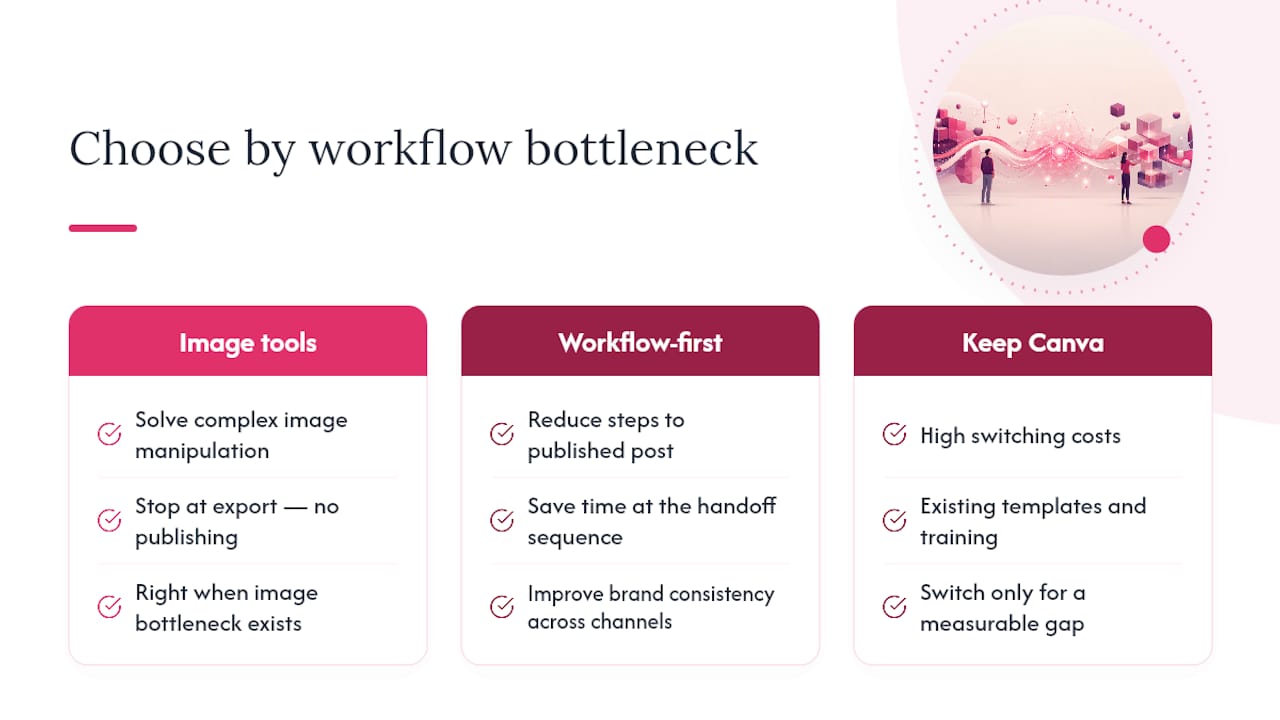
The honest answer, after working through these tools, is that the break usually happens at the handoff. You finish a design, export it, open your scheduler, upload the file, write the caption, set the time, and repeat for every platform. That sequence is where time disappears. It is also where brand consistency slips, because each step is a chance to use the wrong asset, the wrong format, or the wrong caption.
Tools like Photopea and GIMP are genuinely impressive for what they do. But they solve a different problem: complex image manipulation. If that is your bottleneck, they are the right answer. If your bottleneck is the volume and consistency of content going out across multiple channels, a tool that stops at export is not solving your actual problem.
The other thing worth saying plainly: switching costs are real. If your team has built a library of Canva templates, trained on Canva’s interface, and integrated it into your workflow, the bar for switching should be high. Switch when a specific, measurable gap exists, not because a new tool has a longer feature list.
The tools that tend to win in practice are the ones that reduce the number of steps between “idea” and “published post.” That is a workflow argument, not a design argument. And it is the lens worth applying before you trial anything on this list.
Photofy gives you design, scheduling, and analytics in one place
If you have been managing your design work in one tool and your publishing in another, Photofy closes that gap. You get pre-designed templates, a stock asset library, video stitching, graphic overlays, built-in scheduling, and post analytics, all in a single platform built for marketers. For franchise networks and enterprise brands, the white-label content management features let you maintain brand integrity across every location without the overhead of a custom build.

The free tier lets you test the core design and template features before committing. Paid plans scale from individual marketers to small business teams, with enterprise and franchise solutions available for larger organizations. You can also explore Photofy’s pricing page to find the plan that fits your team size and publishing volume.
Start with the Photofy platform and run one real campaign from template to scheduled post. That single workflow will tell you more than any feature comparison.
Photofy is the publisher of this article and a recommended option for marketers seeking an integrated design and publishing platform.
Useful sources and official links
The following official product pages and reference sources were used in preparing this article. Pricing, features, and plan structures change frequently; always verify directly with the vendor before purchasing.
Official product pages:
- The 7 best Canva alternatives
- The 7 best Canva alternatives for marketing teams
- Top Canva Alternatives for Design and Collaboration in 2026
- Best Canva Alternatives: Our Top 4 | EXPERTE.com
- Canva alternatives: free, offline, embeddable
- g2.com
Reference sources used in this article:
- The 7 best Canva alternatives — Zapier
- The 7 best Canva alternatives for marketing teams — Ceros
- Top Canva alternatives for design and collaboration — Miro
- Best Canva alternatives: our top 4 — EXPERTE.com
- The 6 best Canva alternatives compared — Dreamgrow
- Adobe Express user reviews — G2