
90 Day Playbook for Team Based Content Creation in Franchises
Team-based content creation is a governed workflow: assets live in one digital asset management (DAM) system, teams build from locked templates, approvals move through defined roles, publishing spans channels from a shared calendar, and usage data shows what actually gets used. The single-line recommendation is straightforward. Stop stitching together separate tools for design, approval, and scheduling, and consolidate into one content marketing automation platform built for the job. A leading social marketing platform is built around exactly that model.
TL;DR:
- Using a centralized DAM reduces asset search time and prevents version confusion, increasing efficiency across multiple franchise locations.
- Locked templates with editable local fields maintain brand consistency while allowing regional customization to fit market needs.
- Integrating approval workflows, role-based permissions, and analytics into one platform minimizes approval delays and compliance errors.
- DAM implementations typically yield an 8:1 to 14:1 return on investment by cutting time spent searching and duplicating design work.
- A phased 90-day rollout, including asset inventory, pilot training, and staged expansion, optimizes adoption and ongoing system optimization.
Table of Contents
- What Does Team-Based Content Creation Actually Require?
- Why Does Consolidating Tools Actually Pay Off?
- How Should You Evaluate a Team Content Platform?
- What Does a 30/60/90-Day Rollout Look Like?
- How Photofy Maps to This Playbook
- What Actually Keeps Content Consistent Over Time?
- Get Started With a Governed Content System
- Sources
What Does Team-Based Content Creation Actually Require?
A DAM is the foundation. It stores approved photos, videos, and graphics with version control and licensing metadata, so nobody publishes an expired promo image or an outdated logo. Without it, brand assets scatter across email threads, shared drives, and someone’s laptop, and version confusion becomes routine.
Template governance solves a different problem: how do you let 50 franchise locations post on Instagram without 50 different logo treatments? You lock the non-negotiables (logo placement, brand colors, fonts) while leaving fields open for local text, store hours, or a manager’s name. This is the same logic behind dynamic templating in franchise marketing portals, which balances corporate control with local flexibility.

Approval workflows and role-based permissions determine who can create, who reviews, and who has final publish rights. Content calendars and scheduling tools push that approved content across channels without a marketer manually reposting the same graphic five times. Analytics closes the loop, showing which templates and assets actually get used in the field.
Pro Tip: Pull a usage report every quarter. Assets nobody touches in 90 days are candidates for retirement, not storage.
The must-have integrations tie it together:
- CMS connections for blog and website content
- Social API access for direct publishing to major platforms
- Print and fulfillment integration for physical collateral like yard signs or table tents
- Single sign-on and permission syncing with existing team directories
AI-assisted creation and inline editing increasingly shorten the gap between a template and a published post, cutting revision rounds between creators and approvers.
Why Does Consolidating Tools Actually Pay Off?
Tool sprawl is the quiet tax on every marketing team. When design lives in one app, approvals happen over email, and scheduling runs through a third tool, metadata gets lost at every handoff. Nobody remembers which version got approved. Hootsuite’s enterprise guidance points to exactly this pattern: fragmented tools break the chain of custody on brand assets, while a single governed system keeps libraries, approvals, templates, and analytics connected.
The financial case is not vague. DAM implementations have shown return on investment in the range of 8:1 to 14:1 for marketing and communications teams, largely from reduced time spent hunting for files and fewer duplicated design requests. For a franchise network with dozens of locations independently searching shared drives for the “current” flyer, that time adds up fast.
Franchise organizations get a second layer of benefit: guardrails paired with local customization. A single portal can lock brand fundamentals while giving individual locations room to adjust for their market, and it can track co-op fund usage automatically. Franchise marketing portals that combine these functions give franchisors audit trails for co-op reimbursement, which simplifies compliance reporting that used to mean chasing down receipts and screenshots.
What does this look like in practice?
- Search time for approved assets drops sharply once everything lives in one library instead of five
- Campaign launches move faster because approval loops shrink from days to hours
- Compliance errors, like an expired disclaimer or wrong pricing, drop when templates lock the fields that matter
Statistic Callout: DAM systems deliver an estimated 8:1 to 14:1 return on investment for marketing teams, according to Forrester-style research cited in franchise-focused DAM analysis.
How Should You Evaluate a Team Content Platform?
Price is the wrong first filter. Start with whether a platform can actually govern brand consistency at your scale, then let cost and features compete against each other.
A working checklist for evaluating any team-based content creation platform:
- Centralized DAM with searchable tagging and version history
- Locked templates with editable local fields for franchise or regional teams
- Role-based permissions distinguishing creators, reviewers, and publishers
- Multi-channel scheduling with repurposing across formats
- Usage analytics showing which assets get pulled and which sit untouched
- API or native integrations with your CMS, social accounts, and fulfillment vendor
- White-label capability if you manage a network of independently branded locations
When you get a vendor demo, ask specific questions instead of watching a generic walkthrough: How far back does version history go, and can a location roll back to a prior approved asset? Can permissions be set at the individual location level, not just company-wide? How does templating handle a franchisee who wants to swap a photo without touching the logo? Is there API access for connecting a CMS or print vendor? Is white-labeling available for enterprise or multi-brand portfolios?
Pro Tip: If a vendor can’t answer the permission-granularity question in one sentence, that’s a sign their system wasn’t built for distributed teams.
Red flags worth walking away from: approvals that happen outside the platform (in email or chat), search that relies on folder names instead of tags, no audit trail for who approved what, and integrations that require manual export/import instead of a direct connection. Weigh features against expected time savings and risk reduction, not sticker price alone. A slightly pricier platform that cuts your compliance errors to near zero usually wins over months, not years.
What Does a 30/60/90-Day Rollout Look Like?
Rolling out a new platform to a distributed team or franchise network works best in three phases, each with a clear deliverable.
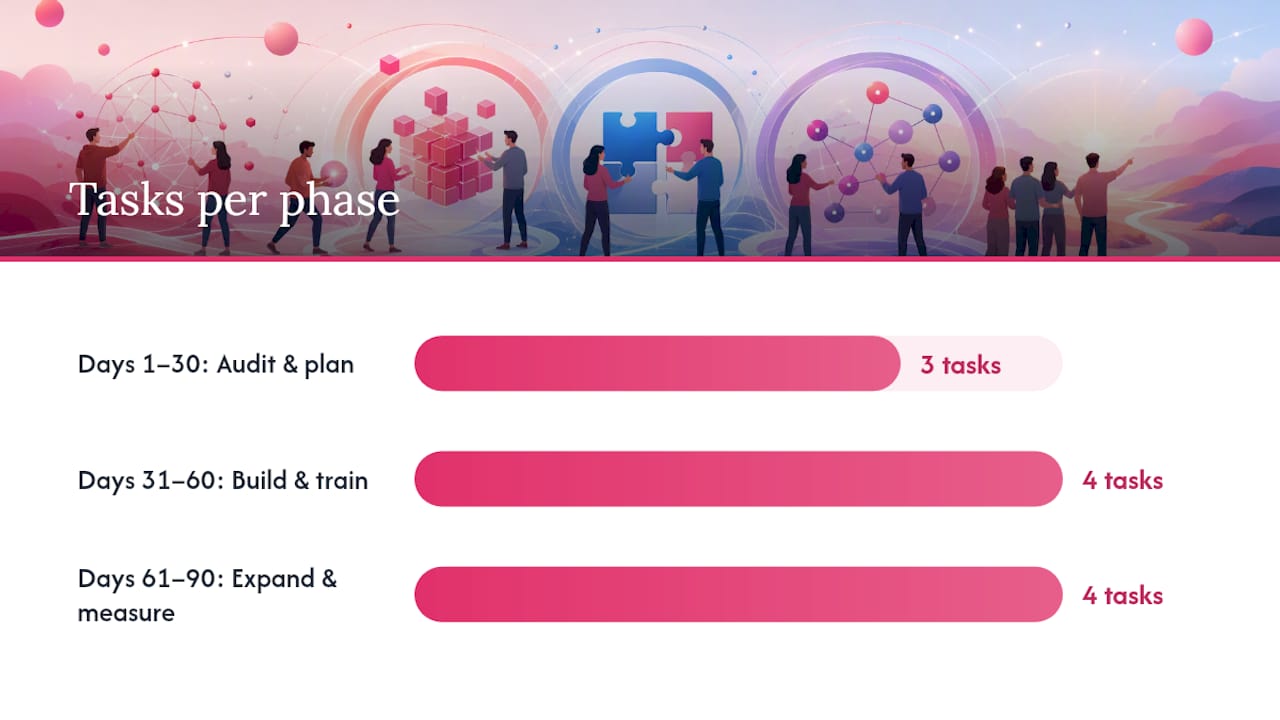
Days 1 to 30: Audit and plan
- Inventory existing assets, templates, and where they currently live
- Map every stakeholder who touches content: corporate marketing, regional managers, individual locations
- Choose two or three pilot locations that represent different sizes and markets
Days 31 to 60: Build and train
- Import approved assets into the new DAM with consistent tagging conventions
- Build locked templates with editable fields for local information
- Set up approval workflows and permission templates by role
- Train pilot users and gather feedback before wider rollout
Days 61 to 90: Expand and measure
- Roll out to the full network in stages, not all at once
- Track asset usage data to see what pilot locations actually adopted
- Retire templates or assets that saw little use
- Adjust workflows based on where approvals bottlenecked
Set your tagging conventions before you import a single asset. Categories like campaign, region, and expiration date save enormous time later. For franchise networks, mapping approval paths to compliance needs up front, including regulated pricing claims or local disclaimers, prevents a painful retrofit at month four.
Pro Tip: Build co-op fund tracking into your permission structure from day one. Retrofitting reimbursement tracking after launch means re-training everyone twice.
How Photofy Maps to This Playbook
Photofy’s structure lines up with the checklist above rather than requiring you to bolt pieces together. The asset library and template system function as the DAM and templating layer, giving teams a single source for approved photos, graphics, and branded layouts across iOS, Android, and desktop. White-labeling extends that governance to enterprise and franchise accounts, letting a parent brand control core assets while individual locations customize within set fields, a structure detailed in Photofy’s distributed marketing playbook.
Scheduling and analytics round out the picture, giving teams visibility into what gets published and what gets used.
A sample 90-day rollout for a customer with 40 locations might involve importing the corporate asset library and building core templates in month one; training regional managers and opening permissions to location users in month two; and reviewing usage data, retiring underperforming templates, and adding seasonal campaigns in month three.
What Actually Keeps Content Consistent Over Time?
Good governance empowers rather than restricts. The best rule sets lock the three or four things that actually damage a brand when they go wrong (logo, color, legal disclaimers) and leave everything else open. Teams that over-lock their templates end up with content nobody wants to post, and shadow workarounds creep back in.
Track usage relentlessly and let the data edit your template library for you. A quarterly review that retires the bottom-performing templates keeps the system lean instead of turning into a digital storage closet nobody wants to search through.
Training is not a launch-week event. New hires join constantly, and platforms add features. Treat onboarding as a standing calendar item, not a one-time video. Pair that with retirement reviews built into your regular quarterly marketing calendar, and the system stays healthy without anyone declaring a special cleanup project.
— Jon
Get Started With a Governed Content System
A governed platform is what turns “everyone posts something on-brand eventually” into “everyone publishes approved content on schedule.” Certain platforms offer franchise operators, brand teams, and small-business marketers a way to integrate DAM, templates, approvals, and scheduling into one system instead of five disconnected apps.

If you manage a single location, the personal solution covers template access and asset storage without a learning curve. If you’re rolling this out across a franchise network or multi-brand portfolio, the enterprise and white-label options add the permission granularity and brand controls this playbook calls for. Either way, the next step is the same: explore Photofy’s platform and see how your current asset library, approval chain, and posting schedule would look consolidated into one place.
Sources
- Scaling social media content in 2026: Enterprise guide
- DAM in franchising: brand management
- The Ultimate Guide to Franchise Marketing Portals: Scaling Brand Consistency in 2026