

Evergreen Social Content Ideas for Your Business
Evergreen social content is any post that stays accurate and useful months after you publish it, so you can create it once and reuse it many times. The best evergreen ideas for a business are how-to posts, FAQs, behind-the-scenes moments, customer stories, product spotlights and founder stories. They work best when they sit in a branded template library you can schedule from, so every reuse looks consistent. This guide gives you the ideas, shows how to adapt them to your type of business, and explains how to keep a library of them organized and on brand.
TL;DR
- Evergreen posts answer questions your customers ask every year, so they never go stale: how-tos, FAQs, behind-the-scenes, customer stories and product spotlights.
- Keep dates, prices and “this week” language out of the post itself, and put anything that changes in a caption or a dated asset you can swap.
- Build each idea as a reusable template with your logo, colors and fonts, so each repeat looks like your brand and takes minutes, not hours.
- Teams, franchises, direct sellers and dealers get the most from a shared library, where approved photo, video and PDF assets are ready for every rep to use.
- Photofy gives you templates, an asset library, scheduling and analytics on iOS, Android and desktop, so you can run this routine in one place.
Table of Contents
- What makes a social post evergreen?
- Evergreen social content ideas that work for almost any business
- Which ideas fit which kind of business?
- How do you balance evergreen and timely posts?
- How to build an evergreen library you can reuse
- Where can you find more post prompts?
- Put your evergreen library to work with Photofy
- FAQ
- Sources
What makes a social post evergreen?
An evergreen post answers a question or shows a process that will still be true next quarter and next year. A timely post depends on a moment: a holiday sale, a news story, a viral sound. Both have a place, but they do different jobs.
The easiest test is to ask three questions before you create a post:
- Will the facts in it still be correct in twelve months?
- Would a new follower who finds it later get value from it?
- Can I repost it without editing anything but the caption?
If you can say yes to all three, the post is evergreen. If the answer is “almost, except for the price,” move the price into the caption or a dated asset and keep the visual timeless. The same advice appears in guides to business evergreen content, which point out that a topic can be evergreen for one product and not another: a review of a long-lasting appliance holds up for years, while a review of a fast-fashion item does not.
Evergreen content also helps with a very practical problem: consistency. When you have a bank of posts that never expire, a busy week does not leave your feed empty. For a deeper look at the planning side, see our guide to developing an evergreen content strategy.
Evergreen social content ideas that work for almost any business
These formats fit nearly any industry. Each one has a quick way to adapt it to your own offer.
1. Behind-the-scenes moments
Show how your product is made, how a job gets done, or what a normal day looks like. Behind-the-scenes posts give followers insider access to real people at work, which builds trust. A photo of your workspace, a short clip of a process or a packing-an-order video all qualify. Skip anything that shows a date or a seasonal décor detail.
2. Team introductions and employee spotlights
A short post introducing a team member, with their role, what they love about the work and one fun fact, is one of the standard ideas on lists of evergreen social content for any industry. Rework it each time someone new joins, and repost the older ones when you want to remind people who is behind the business.
3. Customer stories and testimonials
A customer quote, a before-and-after or a short success snapshot works at any time of year. Adicator suggests turning customer micro-moments, such as a kind comment or message, into posts. If you share a customer’s photo or video, ask permission and credit them, as the Segal Communications guide recommends.
4. FAQ posts
Write down the five questions you answer most often, then turn each into one post: the question as a headline, the answer in two or three lines. These work because they address exactly what your audience is already wondering. A carousel with one question per slide makes a good series.
5. How-to and tip posts
Teach one small thing. Two formats from Adicator’s list are easy to adapt: “How to fix [common mistake] in [your niche]” and “3 time-saving hacks every [your audience] should know.” Replace the brackets with your own topic and you have a month of posts.
6. Product or service spotlights
Pick one product or service and explain what it does, who it is for and how to use it. Use clear photos and a consistent layout so a spotlight made today looks the same as one made next spring.
7. Founder and origin stories
Share why you started, what you got wrong at first and what you would tell someone just starting out. Lists of ideas for when you run out of things to post often start here because the story does not change. Rewrite the caption occasionally, and the post feels new.
8. Transformation content
Before-and-after posts that explain what was not working, what changed and the outcome. This suits trades, fitness, design, real estate and any business where results are visible.
9. Decision guides
“Option A or option B?” posts help people choose. DataCram’s small business topics include comparing two options and explaining the factors that drive price. Keep the factors in the post and put any actual numbers in a separate, dated graphic, so you only update one thing.
10. Seasonal checklists that repeat every year
A spring maintenance list or a back-to-school prep list is tied to a season, but not to a year. Leave the year off the graphic and it comes back every twelve months.
11. Plain-language glossary
Explain the terms of your trade in one sentence each. People searching for the meaning of a word you use daily will find these, and they make you look like the expert.
12. Pre-hire or pre-purchase checklists
Tell customers what to check before they hire or buy: licenses, insurance, written estimates. It positions you as helpful before they ever contact you.
13. Myth-busting posts
Name a common misunderstanding in your field and correct it in a few lines. Myth-busting is on Reddit for Business’s list of unique evergreen formats, and it invites comments.
14. Community questions
Ask something your audience can answer at any time of year: their favorite tool, their first job, the best advice they ever received. It is the easiest way to spark conversation, and it needs no design work at all.
Which ideas fit which kind of business?
The formats above stay the same. What changes is the subject and who is posting.
| Business type | Best-fit evergreen ideas | What to put in the template |
|---|---|---|
| Small business or freelancer | Behind-the-scenes, customer stories, FAQs, tips | Your logo, two brand colors, one photo slot |
| Direct selling company | Product spotlights, how-to-use posts, personal stories reps can adapt | Approved product images and compliant wording |
| Franchise | Seasonal checklists, local team spotlights, service explainers | Locked brand elements, editable local details |
| Car manufacturer or dealer | Vehicle feature explainers, service tips, delivery-day moments | Photo, video and PDF assets in a shared library |
| Enterprise brand | Glossary posts, decision guides, customer case studies | Governed templates for regional teams |
A service business can post how to prepare for an appointment, a food business can share a recipe, and a design business can share a DIY tip, as the Segal Communications list notes. If you work in a specific industry, we have ideas for restaurants, fitness brands, real estate and automotive dealers and OEMs.
If you manage a network of reps, dealers or franchisees
Evergreen content is a natural fit for networks because the same post is useful to many people. The central team creates a how-to, a product explainer or a service reminder once. Local reps then add their name, photo or location. The goal is to keep the core message and design consistent while leaving room for the local touch. If you are building that library, our checklist for a metadata-first social media asset library and our guide to dealer marketing assets show what to build, share and track.
How do you balance evergreen and timely posts?
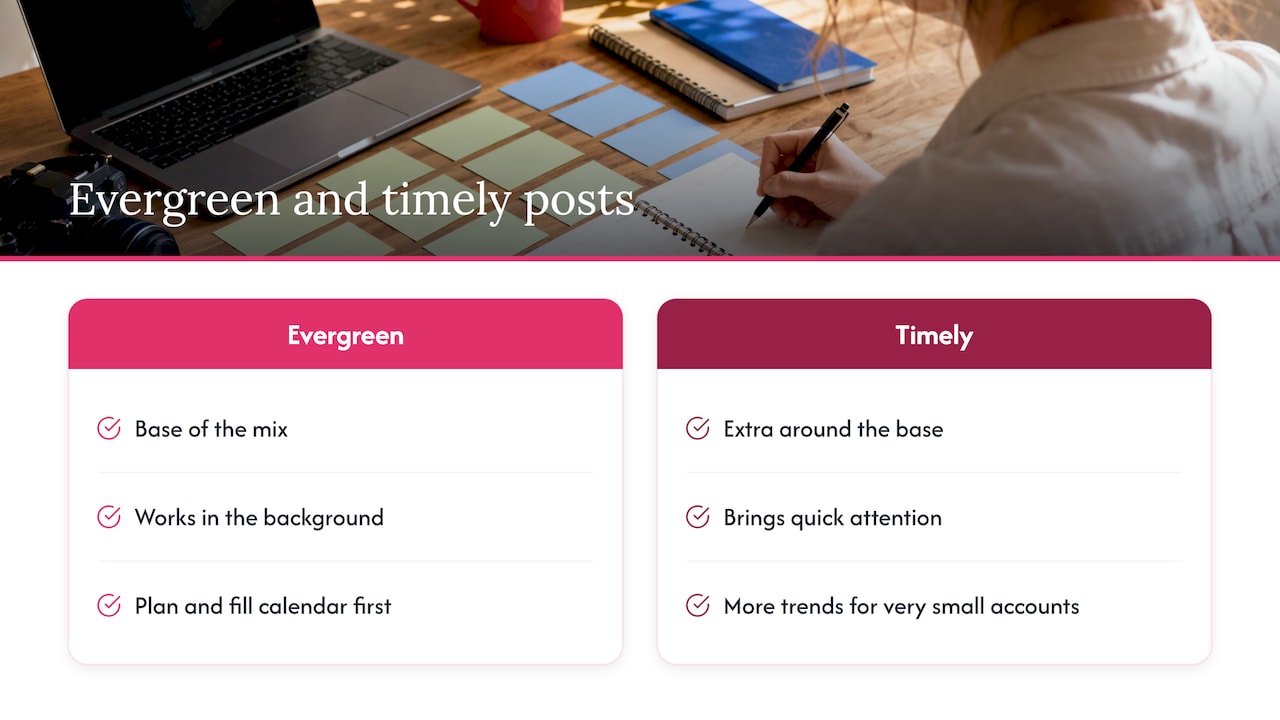
Evergreen posts are your base, and timely posts are the extra. Trend-based posts can bring quick attention, and evergreen posts keep working in the background. One company blog, Reelyze, recommends a mix weighted toward evergreen, with more trend content for very small accounts. You do not need a formula to start. A simple approach is to plan your evergreen posts first, fill the calendar with them, and then add timely posts around them as opportunities come up.
Your posting schedule matters too. Our data-backed guide to when to post on Instagram helps you choose slots, and a content calendar helps you see where evergreen posts fit and where gaps remain.
How to build an evergreen library you can reuse
Ideas only save time if you can find them and post them again. This is the routine we recommend.
Step 1: Pick five themes
Choose the five subjects your customers care about most: for example, how it works, pricing factors, common mistakes, results and your story. Every post you create should belong to one of them.
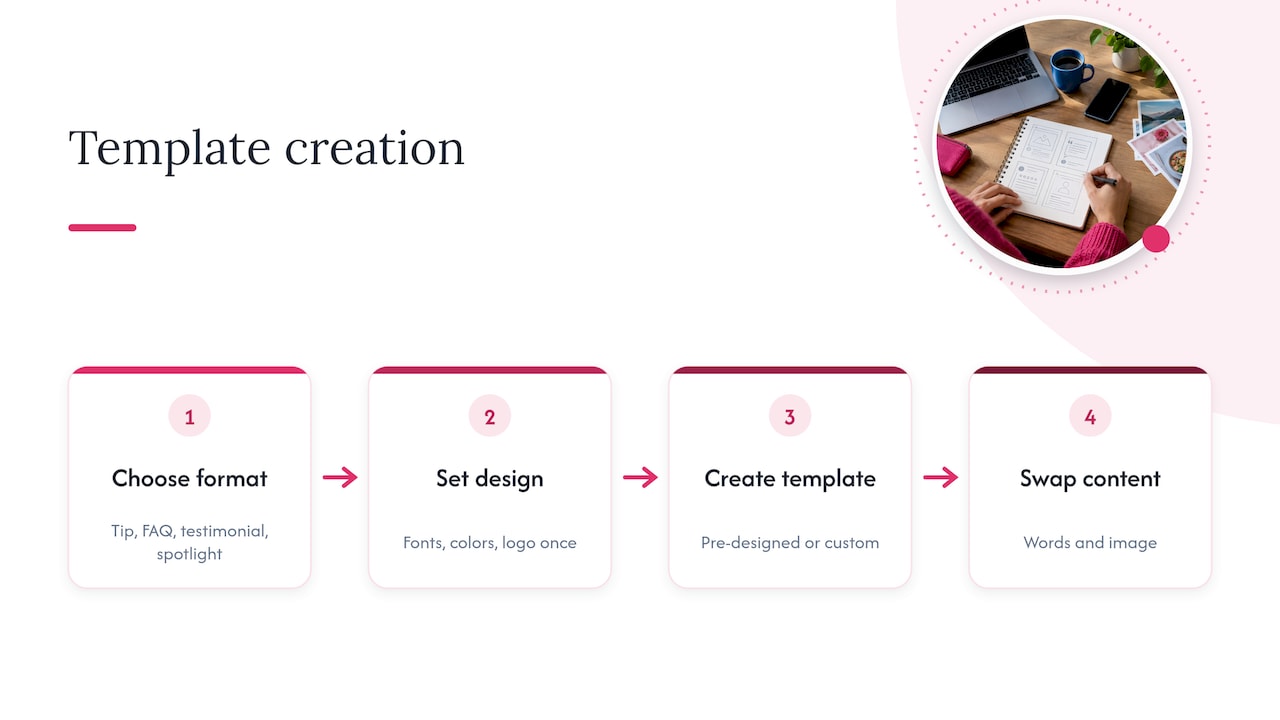
Step 2: Turn each idea into a template
Build one layout per format: a tip card, an FAQ card, a testimonial card, a spotlight. Set your fonts, colors and logo placement once. In Photofy, you can start from pre-designed templates or create custom ones, and add graphic and text overlays to your own photos and video. That means each new post is a matter of swapping the words and the image.
Step 3: Write captions that stay true
Avoid “this year,” “new,” “now” and “this week.” Use specific language that remains accurate. If a number changes, such as a price, keep it in a separate asset you can update.
Step 4: Organize by theme and format
Name each asset clearly and tag it by theme, format and audience. A library where you can find “FAQ, shipping, customer-facing” in seconds gets reused. A folder of unnamed files does not. Photofy includes a stock asset library for the images and clips you need.
Step 5: Schedule and rotate
Plan a rotation so each evergreen post returns every few months, with a fresh caption or a new first line. Photofy includes scheduling, so you can plan a stretch of posts in one sitting.
Step 6: Review the results
Look at which formats earn the most saves, comments and shares, and make more of them. Photofy includes analytics for this. Retire any post that is no longer accurate. For more ways to raise engagement on what you post, see our 20 high-engagement strategies.
Step 7: Keep the team on brand
If several people post for your company, agree who can edit what. Our guide to template management for marketing teams covers governance. For enterprise organizations, Photofy offers white-label content management so teams share the same approved materials.
Where can you find more post prompts?
If you want more prompts to adapt, this list of blog and content ideas for marketers gives repeatable formats that you can reshape into social captions and carousels. Pair it with your own customer questions, which are always the best source of evergreen topics.
Our perspective on evergreen content
We see evergreen content as the foundation of a social presence you can sustain. The hard part is rarely the idea. It is turning the idea into something that looks like your brand every time, in the hands of whoever is posting.
That is why we built Photofy around templates, a shared asset library, scheduling and analytics in one platform. A small business owner can keep a month of posts ready in one sitting. A franchise or direct selling company can give every location or rep approved content that still feels local. A dealer network can share photo, video and PDF assets in one place.
Our advice: choose a handful of formats, build them once, and let the library do the work. The time you save is time you can spend with customers.
Jon
Put your evergreen library to work with Photofy
Photofy is a social marketing platform for creating, sharing and managing branded content on iOS, Android and desktop. It includes pre-designed and custom templates, a stock asset library, video stitching, graphic and text overlays, scheduling and analytics. Casual personal use is free, so you can start building your first templates today.
For a business, the Small Business plan is $10.99 per month or $99 per year. Individual plans are $11.95 per month, $29.97 per quarter or $99.95 per year. Team plans are $13.00 per month per user for Pro Teams and $9.00 per month per user for Enterprise Teams. For franchise, direct selling and enterprise needs, including white-labeling, visit our pricing page to get in touch.
If you want to see the whole workflow first, start at the Photofy home page.
FAQ
What are examples of evergreen content on social media?
Good examples include how-to posts, FAQs, behind-the-scenes clips, team introductions, customer testimonials, product spotlights, founder stories and glossary posts. They stay useful because they do not depend on a date, a trend or a news event.
How often can I repost evergreen content?
There is no fixed rule, but a common approach is to bring a post back every few months with a new caption or first line. Watch your analytics: if a post still earns saves and comments, it is worth repeating. If its facts have changed, update or retire it.
Can I use customer photos and videos in evergreen posts?
Yes, with permission. Ask the customer first and credit them in the post. Keep a record of the permission with the asset so anyone on your team can reuse it with confidence.
How do I keep evergreen posts on brand when several people post?
Use shared templates with your logo, colors and fonts built in, and a single library for approved images, videos and PDFs. This way each person only changes the words or a local detail, and the look stays the same across every account.
Sources
- 10 Evergreen Social Content Ideas for Any Industry, Segal Communications
- Guide to Evergreen Content: How To Use It for Your Business, Shopify
- 10 Evergreen Content Ideas That Always Perform, Adicator
- Evergreen Content: Pick Topics That Earn for Years, DataCram
- Reel Trends vs Evergreen Content: What Wins?, Reelyze
- Best Blog Post Ideas for 2025