

Localizable Social Templates: How to Build and Share Them
A localizable social template is an approved post design with fixed brand elements and open fields for local details. Headquarters decides the logo, fonts, colors and core message. Each local rep, franchisee or dealer fills in the city, the offer, the photo and the call to action. Photofy is built for this: you can set up branded templates once and put them in the hands of every location, on iOS, Android and desktop.
This guide shows you what to lock, what to open up, how to share templates across a team and how to check each post before it goes live.
TL;DR
- Lock the logo treatment, typography, approved colors and core message. Open the local language, offer, imagery, event details and call to action.
- Start with your three best-performing posts, adapt them for each market, and only then build a full library.
- Share templates through one platform with roles and approvals so local reps create fast and headquarters keeps control.
- Check every export for alt text, captions, contrast and platform fit before publishing.
- Photofy plans start at $10.99 per month for small businesses, with team and enterprise plans for franchises and larger networks.
Table of Contents
- What makes a social template localizable
- What to lock and what to let local teams change
- Which post types and platforms localizable templates suit
- How to build your first localizable template set
- How to share templates and manage permissions across a network
- Check every post before it publishes
- A worked example: a franchise spring promotion
- How to tell if this workflow fits your team
- Perspective
- What Photofy plans cost
- Put localizable templates to work with Photofy
- FAQ
- Sources
What makes a social template localizable
An ordinary social template gives one person a faster way to make a branded post. A localizable template gives many people a shared starting point. The design is approved once, and the parts that should change from place to place are built in as editable zones.
Think of every template as two layers.
The fixed layer is what makes a post recognizably yours: logo placement and size, typefaces, the color palette, the layout grid and the message pillars your brand stands behind.
The flexible layer is what makes a post relevant to a neighborhood, a city or a language: the headline wording, the photo, the offer, the local event, the name and contact details of the person or store posting.
The point is not to make every region publish identical creative. It is to let each market sound like itself while the audience still sees one brand. A template that locks everything gets ignored, because local reps cannot use it. A template that unlocks everything produces off-brand posts, and you are back to policing them by hand.
What to lock and what to let local teams change
Write this down as a simple rule sheet before you design anything. A good split looks like this.
| Element | Lock it | Let it vary |
|---|---|---|
| Logo | Placement, clear space, color versions | Co-branded location name beneath it |
| Typography | Brand typefaces and size hierarchy | Line length for longer local headlines |
| Color | Approved palette | Seasonal accent from within the palette |
| Message | Core pillars and legal wording | Local examples, testimonials, regional promotions |
| Imagery | Photo style and overlay treatment | Local photos and regional scenes |
| Call to action | Button style and position | Wording, phone number, booking link |
The flexible items map to the uses where localization pays off most: regional promotions, event announcements, country or state holidays, local testimonials and language-specific calls to action. A national chain that posts the same “Grand Opening” graphic for every store loses the one thing a local post has going for it, which is that it is about a place the viewer knows.
If you are deciding where to begin, our guide on adapting your top three posts before you scale localization walks through the approach. Take the posts that already work, change only the local layer, and watch what holds up before you build dozens of variations.
If you also publish in more than one language, multilingual content for global markets covers how messaging and calls to action shift between audiences.
Which post types and platforms localizable templates suit
Almost any repeatable post can be localized. These are the formats that teams with many locations use most.
- Promotions and offers. Seasonal sales, limited-time deals and financing messages with a local price or address.
- Event announcements. Open houses, store events, webinars and community sponsorships.
- People posts. Team introductions, hiring posts, new-agent welcomes and customer spotlights.
- Holiday and seasonal posts. Messages timed to a state, city or regional moment.
- Listings and inventory. Property or vehicle posts built from a photo, a headline and a details strip.
- Video and carousel posts. Short clips with branded overlays and several images in a sequence.
For industries with a clear post vocabulary, starting from a ready-made set saves weeks. We have written detailed guides for real estate social media templates for agents, automotive social media templates for dealers and OEMs and salon social media templates, each with the formats that matter in that trade.
Photofy supports photo, video and PDF content, so a manufacturer can send a sales team a photo post, a stitched video and a PDF sheet from the same library. Our platform includes pre-designed and custom templates, a stock asset library, video stitching, graphic and text overlays, scheduling and analytics, so one place covers creation through publishing.
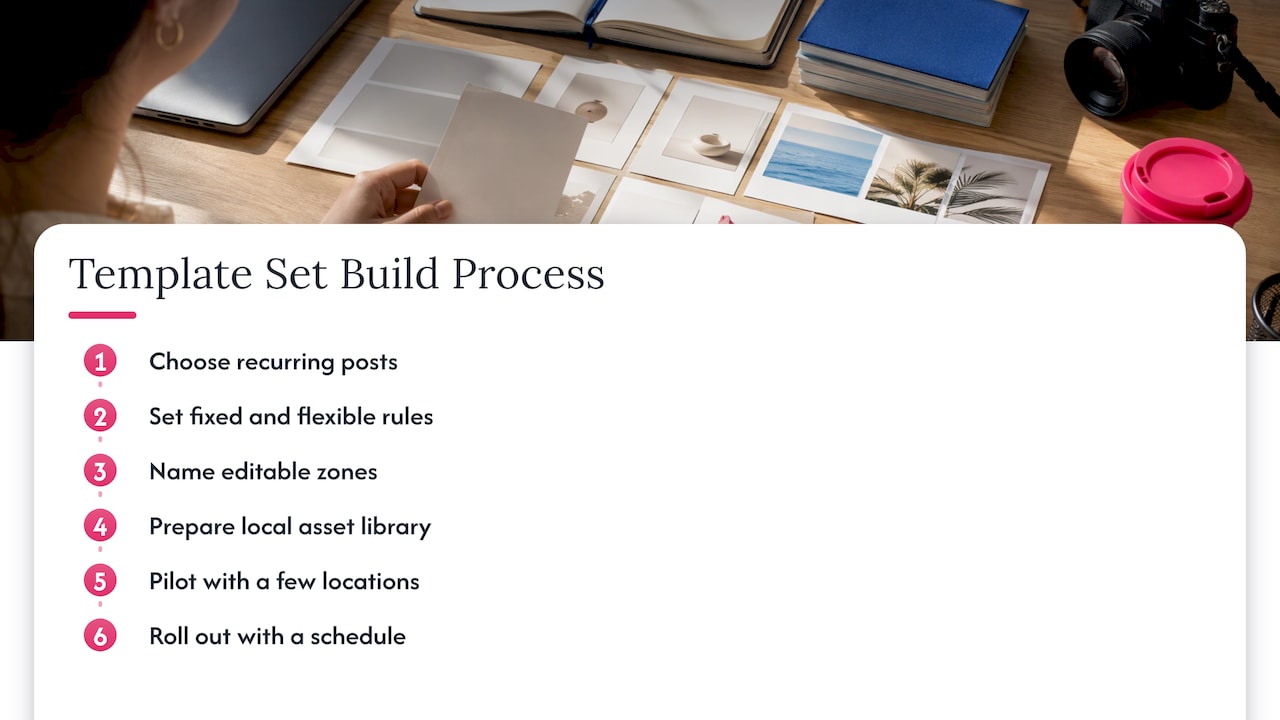
How to build your first localizable template set
Here is the process we recommend, with the point at each step where it usually goes wrong.
1. Pick the posts worth localizing
Look at the last few months and choose the three to five post types you publish most often across locations. Where it goes wrong: teams start with twenty designs, nobody uses most of them, and the library becomes clutter.
2. Write the brand rules as fixed and flexible
Use the table above as a starting point. Be specific: “logo top left, 12 percent of width” is a rule, while “keep the logo visible” is not. Where it goes wrong: rules live in a PDF brand book that local reps never open. Rules built into the template itself cannot be skipped.
3. Build the template with named editable zones
Mark which text blocks and image areas can change. Give each a sensible placeholder so a rep knows what belongs there, such as a store name, a date or a local offer. In Photofy, you can start from pre-designed templates or create custom ones, then add graphic and text overlays to match your brand. Where it goes wrong: leaving every text box open invites a fourth font and a neon headline.
4. Prepare a local asset library
Local reps need photos, logos and approved clips they can use without hunting through email threads. A well-labeled library is half the work of localization. Our checklist for a metadata-first social media asset library shows a five-step setup. Where it goes wrong: files named “final_v3_new” that nobody can find.
5. Pilot with a few locations
Give the set to two or three locations and ask what slowed them down. Fix the template, not the people. Where it goes wrong: rolling out to everyone at once and finding the flaw in 200 posts.
6. Roll out with a schedule
Pair the templates with a posting rhythm so reps know what goes out and when. Our social media content calendars give you a starting cadence.
How to share templates and manage permissions across a network
Sharing is where most localization programs stall. Emailing files or posting them in a shared drive leaves you with outdated versions in circulation and no sense of who changed what.
A workable permission model has a few roles.
- Brand owners at headquarters create and update templates and decide which elements are locked.
- Local creators (franchisees, agents, dealers, reps) personalize the flexible fields and produce posts.
- Approvers review posts that need a second set of eyes, such as regulated claims, financing terms or legal language.
- Publishers schedule or post the finished content.
We break this down further in five roles that keep multi-location posts local. The key idea is that one person rarely does all four jobs well, and small networks can combine roles while large ones separate them.
Photofy integrates branded content creation, team approvals, asset management and automated publishing in one platform. That is designed to give distributed organizations brand control while empowering local reps to create authentic, compliant content quickly. For enterprise clients, white-labeling lets a company present the platform under its own brand, which suits direct selling companies, franchisors and manufacturers that want their network to feel the tools belong to them. For more on that setup, see our guides to white label branding and white label social media platforms.
If you sell through dealers or partners, through-channel marketing explains how to connect co-op funds and CRM data to this kind of shared content.
Check every post before it publishes
Localization multiplies the number of posts, and so it multiplies the chances for an accessibility or formatting slip. Build a short check into the workflow rather than hoping local reps remember.
Accessibility
North Carolina’s Department of Public Instruction advises that meaningful social images need concise alternative text, videos need corrected captions, and graphic text must be readable with sufficient contrast. It also says essential information should not live only inside an image that people cannot access.
For contrast, the W3C’s guidance sets a ratio of at least 4.5:1 between text, including images of text, and its background at Level AA. This matters for templates because a headline placed over a local photo can pass in one image and fail in the next. Choose overlay treatments and text colors that hold up over a range of photos.
The same NC DPI guidance says to check accessibility after export or publication and to review headings, reading order, links, images, color, captions and keyboard access manually, not only with automated checkers. Our six-step social media accessibility workflow turns this into a routine for creators and teams.
Formats
Before a template goes into the shared library, confirm it exports correctly for every channel you use: square and vertical image sizes, short video, and PDF where your team shares sales sheets. Test with the longest local headline you can imagine, since city names and offers rarely fit the sample text.
Disclosures
Local testimonials and ambassador posts are popular localized formats. The Federal Trade Commission states that responsibility for clearly disclosing a material connection rests with the influencer and the brand, not the platform. If your local reps post paid or incentivized endorsements, put the disclosure wording in the template and route those posts through an approver.
A worked example: a franchise spring promotion
Imagine a 40-location fitness franchise running a spring campaign.
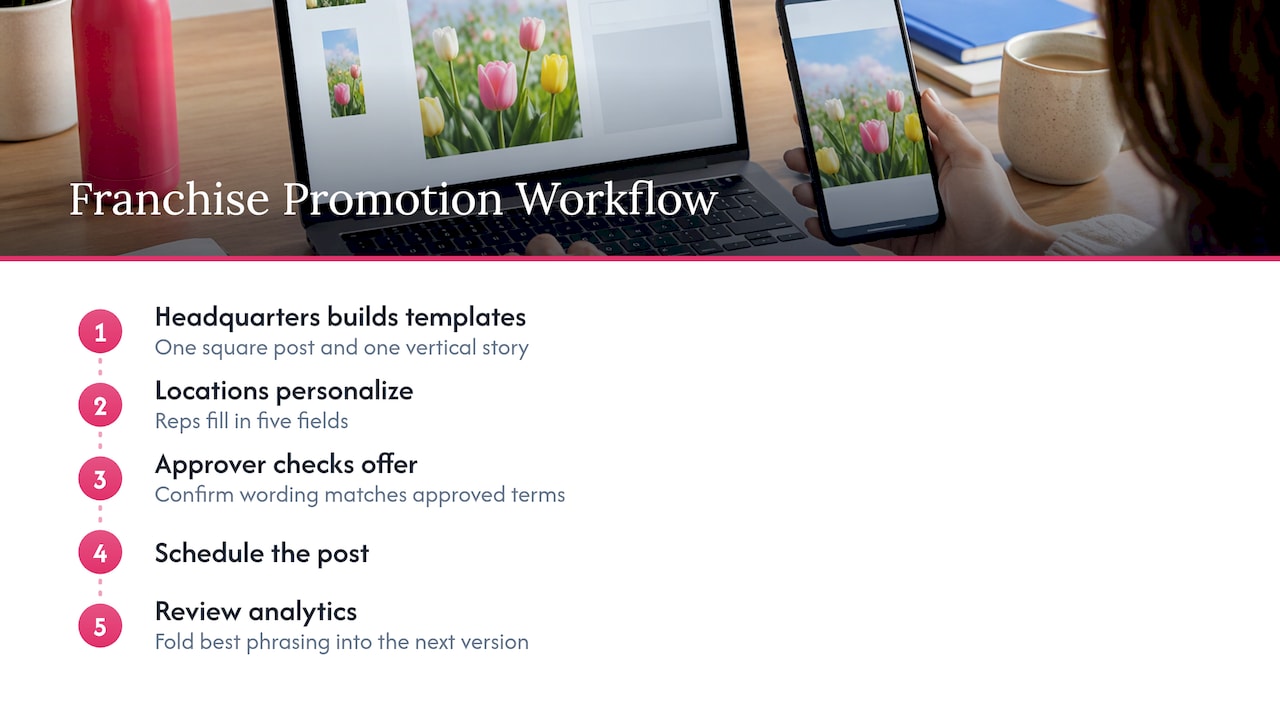
Headquarters builds one square post and one vertical story. The logo, typeface, palette and the message pillar, “start strong this spring,” are fixed. The editable zones are the headline’s second line, the location name, the offer, a local photo and the booking link.
A location in Phoenix writes about early morning classes before the heat. A location in Minneapolis features an indoor trial week. Both posts are instantly recognizable as the same brand. Both were made in minutes, because the rep filled in five fields instead of designing from scratch.
The approver checks that the offer wording matches the approved terms, and the post goes on the schedule. Afterward, analytics show which local variations drew the most engagement, and headquarters folds the best phrasing into the next template version. That feedback loop is where localization turns from a way to save time into a way to learn which messages work in which places. Our guide to fitness marketing best practices shows more campaign ideas in that vein.
How to tell if this workflow fits your team
A localizable-template workflow is a good fit when three things are true.
- More than one person posts for your brand. Two or more locations, reps or franchisees is enough.
- Brand consistency matters and varies in practice. You have seen off-brand posts or you spend time correcting them.
- Local relevance affects results. Your customers respond to a place, an event or a person nearby.
If you are a solo marketer posting for one brand, you still benefit from branded templates, and our piece on how photography templates strengthen brand consistency explains why. The localizable layer becomes valuable the moment a second person joins the process.
As a quick self-test, count how many days it takes a new location to publish its first on-brand post. If the answer is more than a day, a shared template set will probably help.
Perspective
We built Photofy around a simple observation: the people closest to the customer should be able to post quickly, and the people responsible for the brand should not have to review every pixel.
That is why we put templates, an asset library, approvals and publishing in one place. A template is not a restriction. It is an agreement about what stays the same, so local teams can spend their time on what should change: the offer, the neighborhood, the story.
For franchises, direct sellers, dealer networks and enterprise brands, we believe this is the most practical route to consistent, authentic content at scale. White-labeling lets your network use the tools under your own brand, which makes adoption feel natural rather than imposed.
Start small. Take your best three posts, make them localizable, and let your team show you what works.
Jon
What Photofy plans cost
Photofy offers a free tier for personal use, with paid plans for businesses and teams. Published prices, read from our site in September 2026:
| Plan | Price |
|---|---|
| Small Business | $10.99 per month or $99 per year |
| Individual Plans | $11.95 per month, $29.97 per quarter or $99.95 per year |
| Pro Teams | $13.00 per month per user |
| Enterprise Teams | $9.00 per month per user |
Franchise and enterprise arrangements, including white-labeling, are handled through direct inquiry. You can see the options on our Small Business plans page and our pricing page.
Put localizable templates to work with Photofy
If you manage a team, a franchise network or a set of dealers, Photofy gives you branded templates, a shared asset library, approvals and scheduling in one platform on iOS, Android and desktop. Small businesses can begin with the Small Business plan at $10.99 per month, and larger networks can talk to us about enterprise setups with white-labeling. Explore Photofy and build your first localizable template set this week.
If you work in a specific industry, look at our automotive dealer marketing assets guide or the campaign asset checklist to see what to build before launch.
FAQ
What is the difference between a branded template and a localizable template?
A branded template carries your logo, colors and fonts so every post looks like you. A localizable template does that and also defines which parts local teams may change, such as language, offer, photo and call to action. It is built for many contributors, not one.
Which elements should stay fixed across regions?
Keep logo treatment, typography, approved colors and core message pillars fixed. Let local language, seasonal references, regional imagery and local examples vary. This keeps the brand recognizable while each post still speaks to its own audience.
How many templates does a team need to start?
Begin with three to five of your most common post types, or even your top three performing posts. Pilot them with a few locations, fix what slows people down, and expand once the first set is in steady use.
How do we keep localized posts accessible?
Add concise alt text to meaningful images, caption every video, and keep text contrast at or above the 4.5:1 ratio. Review the exported post manually, since automated checkers miss things like reading order and link clarity.
Can franchisees and sales teams use the same templates?
Yes. Brand owners set the locked elements and approvals, and each franchisee, agent or rep fills in the local fields. Photofy supports franchises, direct selling brands and dealer networks, and enterprise plans can be white-labeled.
Sources
- Creating Accessible Digital Content, NC DPI
- Understanding Success Criterion 1.4.3: Contrast (Minimum), W3C
- FTC’s Endorsement Guides: What People Are Asking
- Multilingual SEO Content