

Branded Story Highlights: How to Build a Profile Menu That Sells
Branded Story Highlights are the saved Stories on your Instagram profile, designed so that every cover, title and slide looks like it came from the same business. Done well, they work as a menu for new visitors: who you are, what you offer, proof that it works and how to buy. The fastest way to get there is to build every Highlight from one set of brand templates, so covers and slides match from the first tap to the last. Photofy gives you pre-designed and custom templates, a stock asset library, text and graphic overlays and video stitching on iOS, Android and desktop, so one brand look carries across every slide.
This guide shows you what to put in your Highlights, how to design them, how to add them step by step and how to keep them current. It is written for small business owners, freelancers, marketers, franchise and direct selling teams and dealers who need a profile that looks consistent and converts.
TL;DR
- Highlights are your profile’s menu. Order them by what a new visitor needs first: who you are, what you offer, proof, then how to buy.
- Keep the set small. Five to eight Highlights are enough for most small businesses, and each one needs a consistent cover in your brand colors.
- Design Highlight slides to be read, not just glanced at: one message per slide, large text, solid brand-color backgrounds and a first slide that summarizes the whole Highlight.
- Review the set monthly. Outdated prices or services damage trust faster than a missing Highlight.
- Build covers and slides from templates so every team member, location or rep produces the same look.
Table of Contents
- What makes a Story Highlight “branded”?
- Which Highlights should a business include?
- How should you design branded Highlight covers?
- How do you design the slides inside a Highlight?
- How do you add a Highlight to a business Instagram account?
- How do you order and name the row?
- How do you keep Highlights fresh?
- Common mistakes with branded Highlights
- How Photofy helps you build a consistent Highlight set
- Our perspective on branded Highlights
- FAQ
- Sources
What makes a Story Highlight “branded”?
A regular Story disappears after 24 hours. A Highlight keeps selected Stories on your profile until you remove them, and people who can see your Stories can also see your Highlights. That permanence is why Highlights matter for a business: they are the one part of your Instagram profile that you curate for people who have never seen your daily posts.
A Highlight is branded when four things are consistent:
- The cover: the same style, colors and icon family across all Highlights.
- The title: short, plain labels that name what the viewer gets.
- The slides: the same fonts, colors, logo placement and layout from slide to slide.
- The job: each Highlight answers one question a buyer has.
Most accounts get the first and second right and stumble on the third. A tidy cover row that leads to slides in five different styles looks unfinished. This is where templates earn their keep: when slides start from a shared layout, the look holds even when several people make the content.
Which Highlights should a business include?
Start from the questions a new visitor asks before buying. One marketing guide describes Stories as the place where customers learn about the people and process behind a product, answering doubts such as whether the business is real, whether it fits them and how it works. Your Highlights should answer those questions in order.
A workable core set for most small businesses:
| Highlight | What it answers | What goes in it |
|---|---|---|
| Start Here / About | Who are you? | Your story, your face or team, what you stand for |
| Services / Offers | What do you sell? | One slide per service: what it is, who it is for, how to get it |
| Results | Does it work? | Before-and-after images, customer messages, numbers |
| Reviews | Do others trust you? | Named testimonials, screenshots with permission |
| How It Works | What happens after I pay? | Process steps, timelines, what to expect |
| Contact / Book | How do I buy? | Booking steps, links, hours, location |
This mirrors the structure that business Highlight guides recommend: services with one slide per offer, results, client words, behind the scenes, process and proof. The same guide suggests five to eight Highlights in total, since past eight or nine visitors tend to stop scanning in order.
Adjust the set to your business type
- Local service businesses (salons, studios, clinics): add location, hours, parking and how to book, so a first-time customer has no reason to hesitate. Our guide to salon social media templates covers formats that fit this.
- Shops and product brands: lead with How to Order, then Shipping, Returns and Sizing or Fit, followed by Reviews.
- Freelancers and consultants: Services, Results, Client Words and Process do most of the work.
- Franchises and direct selling teams: the corporate set (About, Offers, Results, How to Join or Buy) stays identical across every local account, with room for local hours, events or a rep’s own story.
- Dealers and OEM networks: Inventory highlights, Service Specials, Meet the Team and Financing, built from approved photo, video and PDF assets. See automotive social media templates for how that content is shared with a sales team.
Use the “homepage test”
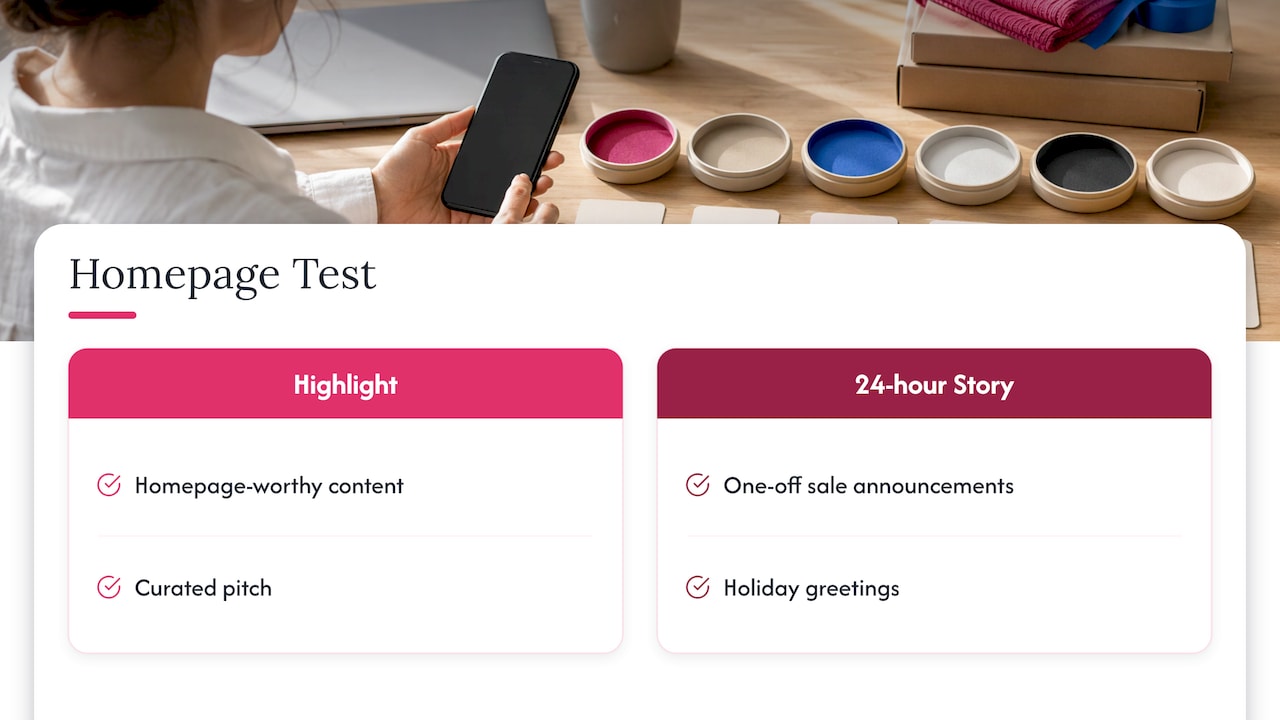
One useful rule: if you would not put something on your website homepage, do not put it in a Highlight. Highlights are not an archive of every Story you ever posted. They are a curated pitch. Save the one-off sale announcements and holiday greetings for the 24-hour Story.
How should you design branded Highlight covers?
Covers are small, so they need to be simple. Shopify’s guide to Highlight covers advises simple, bold graphics because small details will not be visible, using your brand colors and custom images to match your brand guidelines and keeping every cover visually consistent.
A practical cover system:
- One background color per brand palette, or two alternating colors at most.
- One icon style: all line icons or all filled icons, never a mix.
- Centered artwork. Highlights display as small circles, so keep the key graphic in the middle of the image with room around it.
- Short titles. Titles get cut off on the profile after only a handful of characters. Shopify’s Instagram Stories guide notes names are cut off after 10 characters, so choose words like Start, Offers, Results, Reviews, Book, FAQ.
- High-resolution export. Save the image at the highest-definition option available so it stays sharp.
Build the cover set once, in one session, and save it as a template. When you add a new Highlight next quarter, you copy the style instead of reinventing it. For teams, a shared template means a franchisee or sales rep can create a matching cover in minutes. Our post on photography templates and brand consistency explains why this approach holds a look together across many hands.
How do you design the slides inside a Highlight?
A daily Story is made to be seen for a moment. A Highlight slide is made to be read by someone deciding whether to trust you. That changes the design:
- One message per slide. If a slide needs two ideas, make two slides.
- Large text on a solid brand-color background when you are explaining a process, a price or a policy. Photos work best for results and behind-the-scenes moments.
- Safe margins. Keep text away from the top and bottom edges, where the profile interface and reply bar cover the image.
- A summary first slide. Many viewers only see the first slide, so make it state what the whole Highlight contains.
- A call to action on the last slide: book, message us, shop, visit. Missing calls to action are one of the most common weaknesses on business accounts. Our collection of pasteable social media CTAs gives you wording to start from.
- Short, readable video. If you include clips, add on-screen text so they make sense without sound. Our guide to adding readable text to social videos walks through it.
The same principle runs through all strong brand content: visual storytelling works when each image has one clear job. If you want the deeper model, read our practical guide to visual storytelling for brands.
Worked example: a Services Highlight
Say you run a small landscaping company. Your Services Highlight has five slides:
- Slide 1: “What we do” with your logo, three service names and a brand-color background.
- Slide 2: Lawn care. A photo of a finished yard, one line on who it is for, one line on how to book.
- Slide 3: Patios and walkways. Same layout.
- Slide 4: Seasonal cleanup. Same layout.
- Slide 5: “Ready to start?” with your phone number or booking instruction.
Every slide uses the same fonts, the same logo corner and the same text size. A visitor learns your whole offer in under a minute, and nothing looks improvised. If you list a price, keep it general (“starts at”) or leave it off, because exact prices in a permanent Highlight go stale quickly.
How do you add a Highlight to a business Instagram account?
The steps follow Instagram’s own help instructions and the walkthrough in Shopify’s Stories guide:
- Open your profile and tap the + button under your bio (the New circle in the Highlights row).
- Select the past Stories you want to include, then tap Next.
- Choose a cover. You can upload your branded cover graphic from your camera roll.
- Name the Highlight with a short title.
- Tap Add (or Done, depending on your version of the app).
Since Highlights draw from Stories, a new slide must first exist as a Story or sit in your Stories archive. A camera-roll image can serve as a cover without being posted, but slide content comes from Stories. The usual workflow is to design your slides, post them as Stories, then add them to a Highlight. If you do not want followers to see the slides in their Stories tray, make sure the Story archive setting is on first, then build the Highlight from the archive.
To reach more of your audience, you also need to know who sees the content. According to Shopify’s guide, Creator or Business accounts can see Story viewer data for two years after posting, while personal accounts lose access when the 24 hours end. To judge which Highlights work, read our Instagram analytics guide for small businesses.
How do you order and name the row?
The row reads left to right, and most visitors do not scroll it far. Order Highlights by what a new visitor needs first: who you are, what you offer, proof, then how to buy.
Naming works the same way. Titles should say what is inside, not be clever:
- Good: Start, Offers, Results, Reviews, How It Works, Book
- Weaker: Vibes, Stuff, Our World, Misc
If you manage several accounts, use identical titles and order across all of them. Consistency lets customers recognize your brand wherever they find a location or rep.
How do you keep Highlights fresh?
Outdated Highlights hurt. One widely cited recommendation is a monthly check: add one new result or testimonial, remove anything outdated and confirm that pricing and process details still match reality. A Highlight maintenance routine like this takes about fifteen minutes and protects trust.
Your monthly checklist:
- Are all services, hours and contact details correct?
- Is there one new proof point (a review, a result, a project)?
- Do any slides mention a promotion that has ended?
- Do all covers and slides still follow the brand look?
- Is the first slide of each Highlight still a clear summary?
For distributed teams, add a quarterly brand review so that every location or rep is using the current logo, colors and offers. Our guide to a metadata-first social media asset library shows how to keep approved assets organized so the right version is always the one people grab.
Common mistakes with branded Highlights
- Too many Highlights. Past eight or nine, visitors stop scanning in order.
- Mismatched covers. Mixed styles make a business look less established.
- Long titles. Words get cut off on the profile.
- Text too small. Slides that read fine on a desktop preview are hard to read on a phone.
- No next step. Every Highlight should end with one clear action.
- Stale content. Old prices, expired offers and former staff erode trust.
- A dumping ground. Highlights are a curated pitch, not an archive.
How Photofy helps you build a consistent Highlight set
If you are making a handful of Highlights for one business, you can get a lot done with a single set of branded templates. If you are doing it for a team, a franchise or a dealer network, the challenge becomes consistency across many accounts.
Photofy is a social marketing platform with pre-designed and custom templates, a stock asset library, graphic and text overlays, video stitching, scheduling and analytics, available on iOS, Android and desktop. For small businesses, the Small Business plan is $10.99 per month or $99 per year. Franchise, direct selling and enterprise organizations can use white-label content management so their network creates on-brand content from approved assets.
See the Small Business plan or explore Photofy to set up your branded templates and start building your Highlight row.
Our perspective on branded Highlights
Most businesses treat Highlights as an afterthought, a folder where Stories go to live. We see them differently: they are the part of your profile that does the introducing for you.
The challenge is rarely ideas. It is keeping every cover, slide and message on brand when several people are creating, whether that is a franchise with dozens of locations, a direct selling team or a dealership. That is why we built Photofy around templates, a shared asset library and white-label content management. When the brand look lives in the template, local reps can create authentic content quickly without drifting away from the brand.
Start small. Build a cover set, a Start Here Highlight and a Services Highlight in one afternoon, and let the template do the work from then on.
Jon
FAQ
Can I add Instagram Highlights without posting a new Story?
Yes, if the content is already in your Stories archive. Turn on the setting that saves Stories to your archive, then tap New in the Highlights row and pick from the archived Stories. A new photo or video generally needs to be posted as a Story first, although a camera-roll image can be used as a cover without being posted.
How many Highlights should a business have?
Five to eight is enough for most small businesses. A core set of About, Services, Results, Reviews, How It Works and Contact covers the questions a new visitor has. Add more only if each one has a clear job.
How long can a Highlight title be?
Keep titles to about a word or two. The profile shows only the first characters of a title, and Shopify’s Stories guide notes that names are cut off after 10 characters. Short labels such as Start, Offers and Reviews display cleanly.
Can I see who viewed my Highlights after 48 hours?
With a Creator or Business account, you can see Story viewer data for two years after posting, according to Shopify’s Stories guide. Personal accounts lose access after the Story’s first 24 hours. Switching to a Business account is free and does not require verification.
Sources
- Add a story to your Story Highlights, Instagram Help Center
- How To Use Instagram Stories: Tips and Examples, Shopify
- How To Create Instagram Highlight Covers, Shopify
- Instagram Stories: The Complete Guide for Creators & Brands, Reelinta
- How to Use Instagram Story Highlights to Showcase Your Business Services, Lilach Bullock
- Visual storytelling tips: boost your brand’s impact