
Video Aspect Ratios for Social Media: 2026 Cheat Sheet
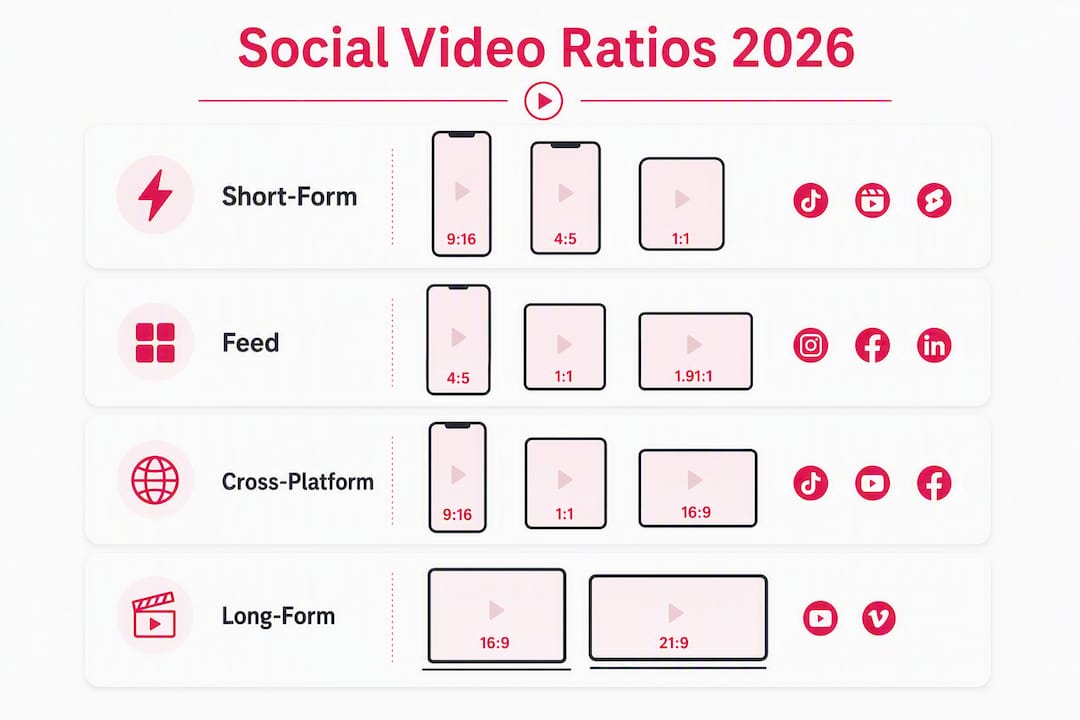
For social-first distribution, produce 9:16 for short-form, 4:5 for feed, and 16:9 for long-form; use 1:1 as a safe cross-post fallback when you can only export one file. Getting these right isn’t a minor detail — the wrong ratio costs you screen real estate, and on vertical-first platforms, it can reduce algorithmic distribution before a single viewer decides to scroll past.
Quick export TL;DR:
- 9:16 at 1080×1920 — TikTok, Instagram Reels, YouTube Shorts, Snapchat Spotlight, Pinterest Idea Pins
- 4:5 at 1080×1350 — Instagram feed, Facebook feed (portrait), LinkedIn feed
- 1:1 at 1080×1080 — universal fallback for feed cross-posting when you can’t produce a 4:5 export
- 16:9 at 1920×1080 — YouTube long-form, LinkedIn articles, Facebook Watch, X/Twitter
All four exports: MP4 (H.264), AAC audio, 1080p long edge.
Pro Tip: Save this page or screenshot the cheat-sheet table in Section 3 as your go-to export reference. Bookmark it alongside your editing software’s export presets.
Table of Contents
- Why aspect ratios directly affect your reach and engagement
- Your at-a-glance social video sizes cheat sheet
- Platform-by-platform specs for every major placement
- How do you choose the right aspect ratio for your content?
- Export and optimization settings that protect your video quality
- Why 4:5 often outperforms 1:1 in feed placements
- Key Takeaways
- The ratio workflow that actually saves time
- Photofy makes producing the right ratios faster and more consistent
- Useful sources and official platform documentation
Why aspect ratios directly affect your reach and engagement
Aspect ratio is a functional distribution requirement, not just a design preference. Vertical-native formats receive preferential treatment in short-form feeds because they fill the full mobile screen and hold attention longer than letterboxed content.
When you post landscape 16:9 on a vertical-first platform like TikTok or Instagram Reels, your video occupies less than roughly 40% of the phone screen. Platforms interpret that as a poor viewer experience and reduce distribution accordingly. Users are also more likely to scroll past content that doesn’t fill their screen.
The impact on feed placements is just as direct:
- Screen real estate: A 4:5 post occupies more vertical scroll space than a 1:1 square, making it harder to skip.
- Feed preview cropping: Instagram crops feed previews to 4:5 — anything taller gets cut unless opened as a Reel.
- Algorithmic signals: Native vertical formats generate stronger watch-time and completion signals, which feeds back into distribution.
- Ad performance: Paid placements on vertical-first platforms penalize non-native ratios with higher CPMs and lower delivery.
Stat to know: Vertical-first platforms deprioritize letterboxed landscape content because it occupies less than ~40% of the screen on phones — users are significantly more likely to scroll past non-native content.
The practical takeaway: matching your export ratio to the placement isn’t optional if reach matters to you.
Your at-a-glance social video sizes cheat sheet
Three master exports — 9:16, 4:5, and 1:1 — cover nearly every social surface for most campaigns. Add 16:9 when you’re producing long-form YouTube or Facebook Watch content.
The four core export shapes:
- 9:16 — Full-screen vertical; the dominant format for all short-form and Stories placements in 2026
- 4:5 — Portrait feed; more scroll real estate than square, preferred for Instagram and Facebook feeds
- 1:1 — Square; the universal fallback when one file must work across multiple feeds
- 16:9 — Widescreen; YouTube long-form, desktop-first placements, and embedded web video
| Placement | Aspect Ratio | Resolution (px) | File / Codec | Max Size / Length | Notes |
|---|---|---|---|---|---|
| TikTok / Reels / Shorts / Stories | 9:16 | 1080×1920 | MP4, AAC | 4 GB / varies by platform | Keep text inside centered 4:5 safe zone |
| Instagram / Facebook feed (portrait) | 4:5 | 1080×1350 | MP4, AAC | 4 GB / up to 60 min | Preferred over 1:1 for feed visibility |
| Feed square (cross-post fallback) | 1:1 | 1080×1080 | MP4, AAC | Varies | Use when one file must cover all feeds |
| YouTube / Facebook Watch / LinkedIn long-form | 16:9 | 1920×1080 | MP4, AAC | Varies by platform | Standard widescreen for long-form |
| Instagram / Facebook feed (landscape) | 16:9 | — | MP4, AAC | Varies | Avoid on vertical-first placements |
Pro Tip: Design your 9:16 export with a centered 1080×1350 safe zone — that way, the same file works as a Reel and previews cleanly as a feed post without a separate export.
Platform-by-platform specs for every major placement
Instagram’s primary ratio is 9:16 at 1080×1920 for Reels and Stories. Feed posts perform best at 4:5 (1080×1350). Instagram crops feed previews to 4:5, so anything taller gets cut in the grid view. Square (1:1) still works but gives you less scroll space.

| Placement | Ratio | Resolution | Format | Length / Size | Notes |
|---|---|---|---|---|---|
| Reels | 9:16 | 1080×1920 | MP4, MOV | Up to 15 min / 4 GB | Keep text in centered safe zone |
| Stories | 9:16 | 1080×1920 | MP4, MOV | Up to 60 sec / 4 GB | UI overlays at top and bottom |
| Feed (portrait) | 4:5 | 1080×1350 | MP4, MOV | Up to 60 min / 4 GB | Best feed visibility |
| Feed (square) | 1:1 | 1080×1080 | MP4, MOV | Up to 60 min / 4 GB | Cross-post fallback |
| Feed (landscape) | 16:9 | — | MP4, MOV | Up to 60 min / 4 GB | Avoid for feed-first content |
Ads vs. organic: Instagram ads support the same ratios but Stories ads have a tighter safe zone (roughly 14% top and bottom) to avoid the CTA button. For feed ads, 4:5 consistently outperforms 1:1 in vertical scroll environments.
Facebook mirrors Instagram’s feed behavior. Use 4:5 (1080×1350) for feed video, 9:16 (1080×1920) for Stories and Reels, and 16:9 (1920×1080) for Facebook Watch. In-stream video ads work best at 16:9 or 1:1 depending on placement.
TikTok
TikTok is built entirely around 9:16 at 1080×1920. Posting any other ratio leaves black bars or gets cropped. TikTok’s UI overlays (username, caption, like/share icons) sit at the bottom 25% of the screen, so keep critical text above that line. TikTok also supports 1:1 and 16:9 for specific ad formats, but organic content should always be 9:16.
YouTube
YouTube Shorts uses 9:16 at 1080×1920, matching TikTok and Reels. Standard YouTube long-form is 16:9 at 1920×1080. YouTube also supports 4:5 and 1:1 uploads, but the player adds black bars on non-16:9 content for long-form. For Shorts, native 9:16 is the only format worth producing.
X (formerly Twitter)
X supports landscape (16:9), square (1:1), and portrait (9:16) video. The platform historically enforces a 512 MB file-size cap, which limits how high you can push bitrate on longer clips. For organic posts, 16:9 and 1:1 are the most common formats. Vertical 9:16 works for short clips but X’s feed is not as vertically optimized as TikTok or Instagram.
LinkedIn’s feed favors 4:5 (1080×1350) for native video posts and 16:9 (1920×1080) for longer thought-leadership content. Square (1:1) is a reliable fallback. LinkedIn video ads support 1:1 and 16:9 — check LinkedIn’s Campaign Manager for current ad placement specs, as these update periodically.
Pinterest Idea Pins use 9:16 at 1080×1920, consistent with other short-form placements. Standard Pins work at 2:3 (1000×1500) for a tall portrait look that performs well in Pinterest’s grid. Video Pins also support 1:1 and 16:9, but tall portrait formats get more screen space in the feed.
Snapchat
Snapchat Spotlight and Stories are 9:16 at 1080×1920, full-screen vertical. Snapchat’s UI is dense — profile info, reply buttons, and swipe-up CTAs occupy the top and bottom 15% of the screen. Keep all critical content in the middle 70% of the frame.
Pro Tip: Check each platform’s official help center before launching a paid campaign — ad specs update more frequently than organic specs, and a mismatched ratio on a paid placement can result in automatic cropping or rejected creative.
How do you choose the right aspect ratio for your content?
Start with placement, not content. The platform and surface you’re publishing to determine the ratio — not the other way around. Once you know where the video lives, the ratio choice is usually straightforward.
Ask these four questions before you export:
- What is the primary placement? TikTok, Reels, or Shorts → 9:16. Instagram or Facebook feed → 4:5. YouTube long-form → 16:9. Cross-posting to multiple feeds → 1:1 as fallback.
- Is this short-form or long-form? Short-form (under 3 minutes, vertical feed) → 9:16. Long-form (5+ minutes, horizontal player) → 16:9.
- Do you need to cross-post one file? If yes, 1:1 is the safest single-file format. If you can produce two files, 9:16 and 4:5 together cover nearly every surface.
- Is this paid or organic? Paid placements sometimes require different ratios per ad unit — always check the platform’s ad specs separately from organic guidelines.
Single-file decision guide:
- Choose 9:16 when the primary surface is TikTok, Reels, Shorts, or Stories and you’re only posting to one platform.
- Choose 4:5 when you’re cross-posting to Instagram and Facebook feeds and want maximum scroll visibility.
- Choose 1:1 when you need one file to work across Instagram, Facebook, LinkedIn, and X without cropping.
- Choose 16:9 when the primary surface is YouTube long-form, a desktop embed, or a Facebook Watch video.
A placement-specific approach consistently outperforms a one-size-fits-all asset. The extra export time pays off in reach.
Export and optimization settings that protect your video quality
The default export for social video is MP4 (H.264), AAC audio, 1080p long edge. That combination delivers the best balance of quality and file size across every major platform, and it minimizes aggressive re-encoding on upload.
Core export checklist:
- Container: MP4
- Video codec: H.264 (AVC)
- Audio codec: AAC, 192 kbps or higher
- Resolution: 1080p long edge (1080×1920 for vertical, 1920×1080 for landscape, 1080×1350 for 4:5)
- Frame rate: 24–30 fps for most content; 60 fps for fast-motion or sports
- Color profile: Rec. 709 (standard for web/social delivery)
- Safe zone: Keep all critical text and logos inside a 10–20% margin from all edges
Safe-zone design is where most creators lose quality in practice. UI overlays — like/share buttons, captions, username bars, and device navigation — can obscure text near the edges of the frame. A 10–20% inner margin protects your content from being covered.
For 9:16 exports specifically, design key content around a centered 1080×1350 area inside the 1080×1920 canvas. That way, the same file previews cleanly as a feed post and plays correctly as a Reel without a separate crop.
| Editor | Recommended Export Preset |
|---|---|
| Adobe Premiere Pro | AAC 192k, Rec. 709 |
| DaVinci Resolve | AAC, 1080p, YouTube/Vimeo preset as base |
| CapCut | 1080p, 30 fps, MP4 — built-in platform presets available |
| Final Cut Pro | Apple Devices preset → H.264, 1080p, then export as MP4 |
On 4K uploads: Uploading at 1080p usually results in less aggressive re-encoding and a crisper final output than uploading 4K and letting the platform compress it heavily. Reserve 4K masters for CTV, archival files, or situations where you plan to crop in later.
Pro Tip: When converting a landscape 16:9 master to 9:16 for short-form, use AI subject-tracking reframe tools (available in Premiere Pro, CapCut, and DaVinci Resolve) rather than a static center crop. A static crop fails the moment your subject moves to the side of the frame.
Why 4:5 often outperforms 1:1 in feed placements
The answer is simple geometry. A 4:5 post occupies more vertical scroll real estate than a 1:1 square without triggering full-screen expansion. In a scrolling feed, more vertical space means more time in the viewer’s eye line before they scroll past.
4:5 (1080×1350) portrait is recommended over 1:1 for Instagram and Facebook feed placements precisely because it takes up more of the screen. A square post at 1:1 gives you 1080 pixels of height. A 4:5 post gives you 1350 pixels — 25% more vertical space in the feed — without the full-screen interruption of a Reel or Story.
Instagram’s feed behavior reinforces this: feed previews are capped at 4:5, so a 9:16 vertical video posted to the feed gets cropped to 4:5 in the grid anyway. That makes 4:5 the practical ceiling for feed visibility, and it’s why producing a dedicated 4:5 export beats relying on a cropped 9:16.
When to use 4:5 vs. 1:1 vs. 9:16 in feed:
- 4:5 — Your default for Instagram and Facebook feed video when you want maximum scroll visibility
- 1:1 — Use when you’re cross-posting one file to feeds across Instagram, Facebook, LinkedIn, and X and can’t produce a 4:5
- 9:16 — Post to Reels/TikTok/Shorts, not the feed grid; the feed will crop it to 4:5 anyway, so produce the 4:5 separately for feed placements
Key insight: Batching three master exports — 9:16, 4:5, and 1:1 — gives the best balance between reach and production cost for most social campaigns.
Key Takeaways
Three master exports cover nearly every social placement: produce 9:16 for short-form, 4:5 for feed, and 1:1 as a cross-post fallback, all in MP4 (H.264) at 1080p.
| Point | Details |
|---|---|
| 9:16 is the primary short-form ratio | Use 1080×1920 for TikTok, Reels, YouTube Shorts, Stories, and Snapchat Spotlight. |
| 4:5 beats 1:1 in feed placements | 4:5 (1080×1350) occupies 25% more vertical scroll space than a square post. |
| Safe-zone margin protects your content | Keep critical text and logos inside a 10–20% margin from all edges to avoid UI overlays. |
| Upload 1080p, not 4K, for social | 1080p uploads typically result in less aggressive platform re-encoding and a crisper final output. |
| Photofy speeds ratio-specific production | Photofy’s templates and safe-zone overlays let you produce correctly sized exports across all placements without manual resizing. |
The ratio workflow that actually saves time
Most guides tell you to match the ratio to the platform. That’s correct, but it misses the more useful question: how do you build a workflow that makes the right ratio the default, not an afterthought?
The conventional advice is to export everything in 9:16 and let the platform handle the rest. That works until you notice your feed posts are getting cropped in ways you didn’t intend, or your 9:16 Reel is showing a 4:5 preview in the grid with your logo cut off. The platforms don’t crop intelligently — they crop geometrically.
The smarter approach is to design for the 4:5 safe zone first, inside a 9:16 canvas. Place your logo, your CTA text, and any on-screen copy inside the centered 1080×1350 area. The extra space above and below can hold background visuals or motion that looks good in full-screen but isn’t critical. That one framing decision means your 9:16 export works as a Reel and your feed preview looks intentional, not accidental.
For team workflows, naming conventions matter more than most people realize. A file named “campaign_video_final.mp4” tells the next person nothing about which ratio it is. A file named “campaign_video_9x16_1080p.mp4” eliminates the guesswork entirely and prevents someone from accidentally posting the wrong version to the wrong placement. Build that convention into your project folder structure from the start.
Batching exports is the other underused habit. If you’re already in your editing software, exporting three versions — 9:16, 4:5, and 1:1 — takes minutes and covers every surface for the campaign. Doing it after the fact, when a post is already live and cropped wrong, takes longer and often produces a lower-quality result.
Photofy makes producing the right ratios faster and more consistent
Getting every ratio right across eight platforms is a production challenge, not just a knowledge one. Photofy gives you a faster path from concept to correctly sized export, with pre-built templates sized for every major placement and safe-zone guides built directly into the canvas.

Here’s how Photofy fits into a ratio-first workflow:
- Pre-sized templates for 9:16, 4:5, 1:1, and 16:9 placements mean you start with the right canvas, not a blank one you have to resize manually.
- Safe-zone overlays show you exactly where UI elements will appear on each platform, so your text and logos stay visible.
- Video stitching and graphic overlays let you add captions, CTAs, and branding directly inside the correct aspect ratio without a separate editing step.
- Brand consistency tools keep your colors, fonts, and logo placement uniform across every ratio and every platform — especially useful for franchise and enterprise teams producing content at scale.
Whether you’re a solo creator managing three platforms or an enterprise team producing content for a distributed network, Photofy’s platform removes the manual resizing step that slows most teams down. You can also explore Photofy’s free content calendars to plan which ratio to export for each campaign placement before production starts. For larger teams needing batch pipelines and white-label workflows, Photofy’s enterprise solutions are built for that scale. Start with a free plan at photofy.com/personal to see how the templates work.
Useful sources and official platform documentation
Specs change. Platform ad requirements update more frequently than organic guidelines, and a ratio that worked last year may have a new safe-zone requirement today. Check these official sources before launching any paid campaign.
- Instagram video sizes, dimensions, and formats — Hootsuite’s regularly updated guide covering Reels, Stories, and feed specs
- Social Media Video Specs for Every Platform — Sprout Social’s comprehensive platform-by-platform reference
- Social Media Video Sizes 2026: The Definitive Guide — Covers safe zones, file limits, and export advice for Instagram, TikTok, YouTube, LinkedIn, Facebook, and X
- Video Sizes & Specs 2026: Every Platform’s Dimensions — Adwave’s export-focused reference including codec and bitrate recommendations
- The Complete Guide to Video Aspect Ratios for Social Media (2026) — Covers distribution impact, safe zones, and the case for vertical-native formats
- Social Media Video Size Cheat Sheet 2026 — Practitioner-focused master-file recommendations
- Video SEO guide: boost visibility and organic reach — Practical guidance on how format and aspect ratio affect discoverability and watch-time signals
Last reviewed: 2026. Platform specs — especially for paid placements — can change with little notice. Check each platform’s official help center or ads manager for the most current requirements before a campaign launch.
“A Reel designed edge to edge in vertical format can lose key text once Instagram adds overlays. A file with a wider aspect ratio that looks polished on YouTube can feel tiny in a mobile feed. A heavy export can trigger stronger compression than you expected.” — Social Media Video Sizes 2026: The Definitive Guide
You can also find platform-specific templates and export guides in the Photofy blog, updated regularly with practical content creation guidance.