Salon Social Media Templates: Formats, Setup and Mistakes
Salon social media templates are pre-built layouts for posts, stories, promotions and flyers, where you swap in your own photos, logo, colors and offer details instead of designing each piece from scratch. Used well, they let a busy stylist or salon owner publish consistent, on-brand content in minutes. This guide covers the formats worth building, how to customize them for your services, what every template should contain, and the mistakes that make a salon feed look generic.
TL;DR
- Build a small set of reusable templates, one per job: a service spotlight, a before-and-after, a promotion, an appointment reminder, a team introduction and a story.
- Customize fonts, colors, logo placement and tone once, then lock them so every post looks like the same salon.
- Every promotional template needs a clear offer, an end condition, your booking method and a legible logo.
- Keep key text inside the safe area of each format, because platform buttons cover the top and bottom of stories.
- Plan a few hours of content at a time. Templates only save time when you batch with them.
Table of Contents
- What salon social media templates actually are
- Template formats every salon should have
- How to customize a template for your salon
- What every salon template should include
- Keeping graphics consistent across services and offers
- Plan posts in batches
- Common mistakes to avoid
- Our perspective: templates should protect the brand and free the stylist
- Where Photofy fits
- Frequently asked questions
- Sources
What salon social media templates actually are
A template is a design file with fixed structure and swappable parts. The structure holds your layout, type sizes, color palette and logo position. The swappable parts are the photo, the headline, the price or offer, and the date.
For salons, that matters because the work is visual and repetitive. You post color transformations, cuts, nails, lashes, skin treatments, product features, holiday hours and seasonal offers, again and again. Without a system, each post is a new design decision, and the feed drifts into a mix of fonts and styles.
Salon content generally serves a few clear purposes. Wella Professionals’ salon social media toolkit describes using social posts to promote hairdressing events, drive business toward in-salon promotions and deals, and share the salon’s work along with stylists’ interpretations of trends. That is a useful way to sort your templates: each one should serve a business purpose, not just look pretty.
Template formats every salon should have
You do not need fifty templates. You need about six to eight that cover your regular weeks, plus a few seasonal extras. Here is a practical starting set.
| Template | Best for | What goes in it | Typical format |
|---|---|---|---|
| Service spotlight | Cuts, color, facials, lash and nail services | One strong photo, service name, short benefit line, booking prompt | Feed post or carousel |
| Before and after | Transformations | Two photos side by side or a swipe pair, stylist name, service used | Carousel or short video |
| Promotion | Seasonal deals, new-client offers, package pricing | Offer headline, price or discount, end condition, how to book | Feed post and story |
| Appointment reminder or open slot | Filling last-minute gaps | Date, time window, service, booking link or phone | Story |
| Team introduction | Building trust in individual stylists | Portrait, name, specialty, a personal detail | Feed post |
| Product feature | Retail shelf items | Product photo, one-line use case, price | Feed post |
| Holiday hours | Closures and extended hours | Dates, hours, booking reminder | Feed post and story |
| Client love | Reviews and testimonials | Short review text, first name, star rating, service | Feed post or story |
Posts and carousels
Feed posts are your portfolio. Use portrait-oriented layouts where you can, since they take up more of the screen as people scroll. Carousels are ideal for before-and-afters, step-by-step looks and service menus, because each slide carries one idea.
Stories
Stories are for time-sensitive content: open appointments, flash offers, behind-the-chair moments. They use a tall 9:16 layout, and the platform interface sits on top of your design. A safe zone guide for Instagram Stories puts the visible-everywhere area at 1080 x 1610 pixels inside a 1080 x 1920 story, with roughly 155 pixels at the top and bottom covered by profile information, the reply bar and stickers. Build your story templates with text and logos inside that center area.
Flyers and in-salon print
Some of your best promotions also belong at the front desk, on mirrors and in bags. Build your promotion template so it can be exported both as a social graphic and as a printable flyer, with the same offer wording. That keeps online and in-salon messaging identical.
Video
Short clips of a blowout, a balayage reveal or a nail set work well when you add a branded intro or end card. A reusable end card with your logo, your booking method and a call to action turns every clip into a branded piece without extra design time.
How to customize a template for your salon
Templates fail when they are used as found. The goal is to set up your version once, then reuse it for months.
1. Set your brand basics
Choose two or three colors, one headline font and one body font. Add your logo in a fixed position, usually a corner, with enough contrast against any photo. If you have a color palette on your website or in your signage, match it so the feed feels like an extension of the salon itself.
Content strategist Elizabeth Smithson makes the point in a salon social media guide from Boulevard that brand identity in a salon reflects the identity, culture and self-image of the whole team, and that consistency affects business value and customer trust. In practice, that means your templates should look and sound like the experience a client gets in the chair.
2. Match the template to your services and clientele
A barbershop, a luxury color studio, a nail bar and a med spa should not share the same look. Think about who books you:
- Color-focused studios: let the photo dominate, keep text minimal, and put the service name and stylist handle in a small, consistent band.
- Family or neighborhood salons: friendlier fonts, warmer colors, and clear pricing on promotion templates.
- Upscale or spa-style businesses: generous white space, a restrained palette, and fewer words per graphic.
- Barbershops: bolder type, high contrast, and strong appointment and walk-in messaging.
3. Write reusable copy blocks
Beyond layout, write the words once. Keep a short list of headline patterns, such as “Now booking [service] with [stylist]” or “This week only: [offer]”, and a standard closing line with how to book. Reusable copy keeps your tone steady and cuts the time spent staring at a blank caption.
4. Lock what should not change
If several stylists or a front-desk team post for the salon, lock the logo, fonts and colors and leave only the photo, headline and offer editable. This is where a platform built for teams helps more than a general design file, because everyone gets the same approved starting point.
What every salon template should include
The best templates make the next step obvious. Check each one against this list.
- A strong, current photo. Natural light, a clean background, hair or nails in focus. Replace stock-looking images with your own work whenever you can.
- Your logo, clearly legible. Place it where it will not be covered by the platform interface or lost in a busy part of the photo.
- One main message. One service, one offer, one idea per graphic.
- Offer details that stand alone. If you post a promotion, include what it is, what it costs or saves, who qualifies, and when it ends. A reader should not need the caption to understand it.
- A booking method. Phone number, booking link, or “DM us to book”. Pick the one your clients use most and keep it in the same place on every template.
- Your handle or location. Especially useful when graphics are shared or screenshotted.
- Credit for the stylist. Tagging the stylist who did the work gives them a reason to share it and helps clients find the right person.
A worked example: a new-client promotion
Say you want to promote a first-visit offer. A solid layout puts a portrait photo of finished hair in the upper two-thirds, the offer headline in your headline font across the lower third, one line of fine print with the end condition, your logo in the corner and your booking method at the bottom. For stories, move all of that inside the safe area. For print, export the same layout as a flyer. One design, three uses, identical wording.
Keeping graphics consistent across services and offers
The challenge for salons is variety: a bridal package, a men’s cut special, a retail promotion and a holiday closure all need to look like they come from the same place. The answer is a shared frame, not identical posts.
- Use one grid and spacing system. Same margins, same logo position, same text alignment across templates.
- Assign colors to purposes. For instance, your main brand color for everyday content and an accent color reserved for promotions, so offers are easy to spot.
- Keep photo treatment consistent. Similar brightness and cropping make a feed look intentional.
- Retire templates that no longer fit. If a layout starts looking dated, update it for everyone at once.
Wella’s toolkit supports this approach: its guidance ties visual content to practical purposes, such as showcasing capability, promoting events and offers, and interpreting trends for clients. When each template has a job, the feed feels coherent even when the content changes.
Plan posts in batches
Templates remove the design work, but you still need to decide what to post and when. The professional association Pro Beauty advises in its guide for salon owners that owners set aside a few hours each week or fortnight to plan their social posts around their professional goals. That fits how salons actually work: you cannot design between clients, but you can batch on a slow Monday.
A simple batching routine:
- Check your appointment book for slow days next week and decide which offers or open-slot stories to run.
- List the transformations, team features and product spotlights you have photos for.
- Drop each into the matching template and write the caption using your copy blocks.
- Schedule everything you can and leave a few story slots for same-day moments.
If you want a method for building the calendar itself, this walkthrough on planning a content calendar is a good place to start. Pair it with a seasonal list of dates that matter to your clients: prom and homecoming, wedding season, back to school, holiday parties and gift card season.
Common mistakes to avoid
- Too much text. If a graphic needs a paragraph, it belongs in the caption. Keep graphics to a headline, an offer and a call to action.
- Low-contrast type. White text on a light photo disappears on a phone. Add a solid band or a subtle overlay behind text.
- Text in the unsafe zone. Stories with the booking info at the very bottom get covered by the reply bar. Stay inside the center area.
- Offers without an end date or condition. Vague promotions create awkward conversations at the front desk. State terms plainly.
- Stock photos of models that are not your work. Clients book people and results. Real photos of your clients’ hair, with permission, build more trust.
- Posting client photos without consent. Get permission, especially for faces, and tell clients how you plan to use the image.
- A new look every week. Changing fonts and colors constantly makes the salon look unsure of itself.
- Outdated details. Old holiday hours, expired offers and former stylists’ names on graphics hurt credibility. Review your templates each season.
- No call to action. A beautiful graphic that does not say how to book wastes the post.
Our perspective: templates should protect the brand and free the stylist
At Photofy, we see the same pattern across the teams that use our platform: the people closest to the customer are the best content creators, but they are rarely designers. A stylist knows which transformation will get attention and which service needs a push this week. What they need is a fast, approved way to turn that into a polished post.
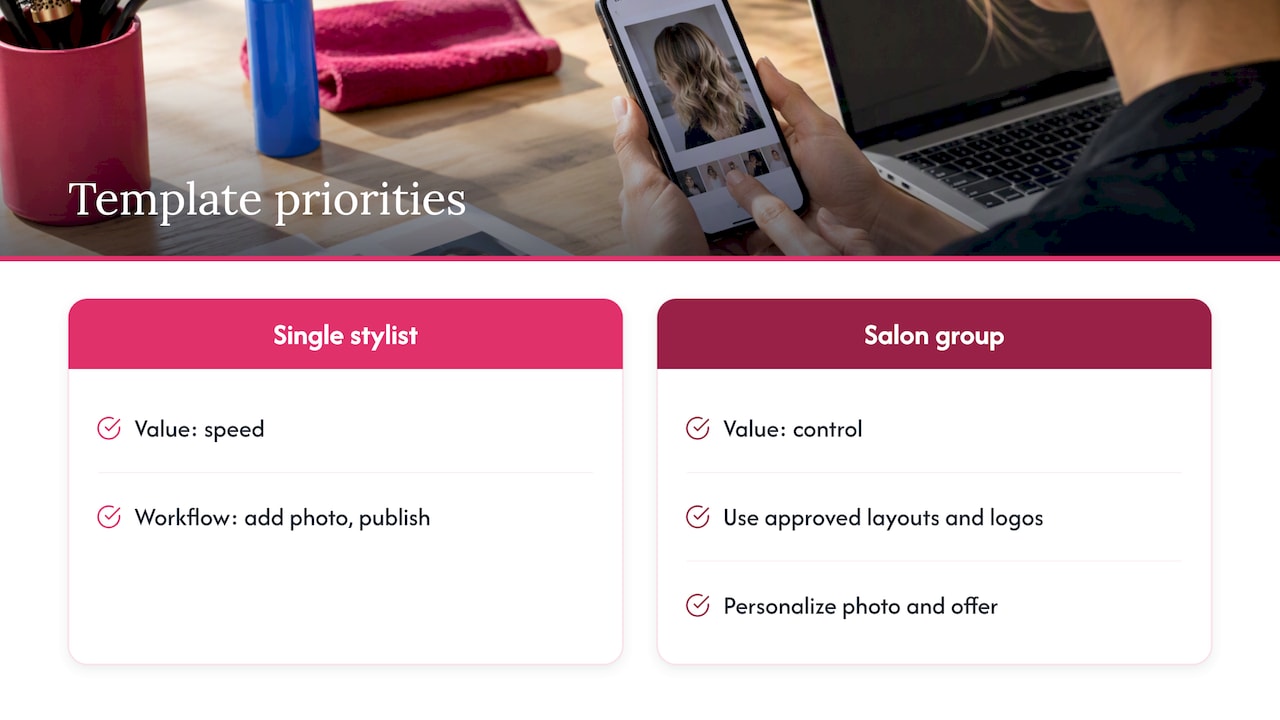
That is why we build around branded templates, a shared asset library, scheduling and, for larger organizations, white-label content management and approvals. For a single-chair stylist, the value is speed: open a template, add a photo, publish. For a multi-location salon group or a franchise, it is control: every location uses approved layouts and logos, while each team member still personalizes the photo and the offer.
Our advice for any salon is to resist the urge to make every post unique. Make the system consistent and let the photography and the offer be the variable. A client scrolling past should recognize your salon before they read the name.
— Jon
Where Photofy fits
If you want salon-ready layouts you can personalize from your phone or desktop, Photofy gives you pre-designed and custom templates, a stock asset library, video stitching, graphic and text overlays, scheduling and analytics in one place. The Small Business plan is $10.99 per month or $99 per year, and individual plans are listed on our individual plans page. Multi-location groups and franchises can contact us about enterprise options with white-label content management.

If you are comparing ways to keep a team on brand, our guide to brand consistency with tailored personal solutions explains how to set up the basics, and our overview of social media scheduling tools covers what to look for when you are ready to automate publishing.
Frequently asked questions
How many templates does a salon really need?
Six to eight cover most weeks: service spotlight, before and after, promotion, open slot, team introduction, product feature, holiday hours and client reviews. Add a few seasonal variations for holidays and busy seasons. More than that usually means you are redesigning instead of reusing.
Should I use free templates or build my own?
Free templates are a fine way to find layouts you like. The risk is that other salons use the same ones, so your feed looks familiar rather than distinctive. Start from a layout, then set your own fonts, colors, logo and photo style so the result is recognizably yours.
What size should my salon graphics be?
It depends on the format. For Instagram Stories, the standard is 1080 x 1920 pixels, with the safe area at 1080 x 1610, as described in the story safe zone guide. Check each platform’s current specs before building templates, since sizes and interface layouts change.
How often should a salon post?
There is no universal number. Pick a rhythm you can keep, such as a few feed posts and several stories a week, and plan it in a batch session. Consistency matters more than volume.
Sources
- Wella Professionals Global Salon Toolkit (PDF)
- The salon owner’s guide to social media, Pro Beauty
- Social Media Salon Blowout guide, Boulevard
- Instagram Story Safe Zone dimensions